VLeaF GO is a microdose flower vape pen with a replaceable ceramic heater designed by ViVANT.
Features:
On-demand vaping
Session mode & Instant mode
No need adaptor for water pipe
3 temperature levels
Replaceable ceramic heater
Convection heating
After learning about the brief introduction of Vivant VLeaF GO, let’s begin to know how to use it?
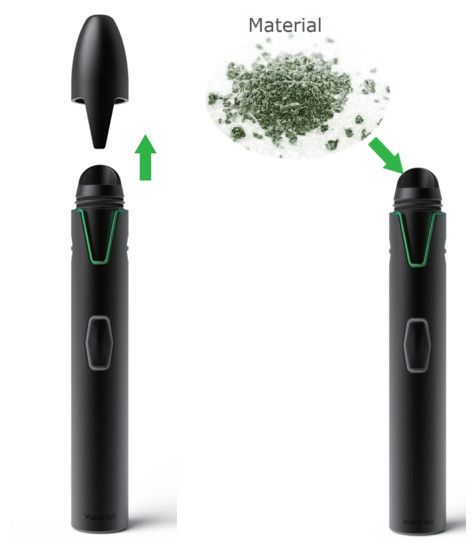
1. Pull out the top cap. 2. Grind your material. 3. Use the scoop to load your material. (Recommend less than 0.1g)
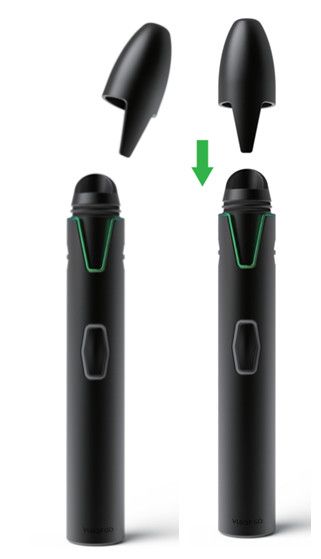
4. Use the cap to pack down your material. 5. Cap it.
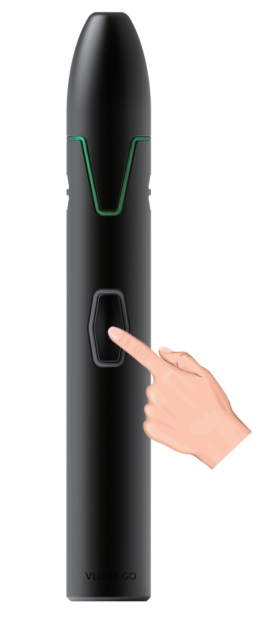
6. Press the fire button 5 times to power on/off.
7. Instant mode: Press and hold the fire button to vape. Doing several consecutive puffs leading to a longer inhalation when the device is cold may help extract vapor faster. Inhaling for 10-20 seconds (while holding the fire button) produces good extraction.
How to select temperature?
Press the fire button 2 times to select between low (green), medium (yellow), and high (red) temperatures.
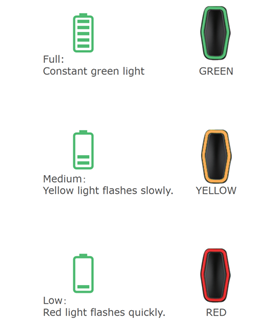
What’re the LED lights display?
LED light indicates both your temperature levels and battery levels.
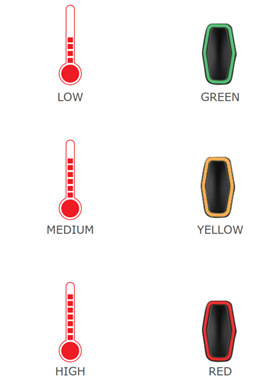
Quickly press the fire button 1 time to check the battery level.
How to switch to session mode?
Press the fire button 3 times to start session mode where the device stays on for 30 seconds without the need to hold down the button. (quickly press the fire button 1 tie to turn off session mode)
How to attach the water pipe?
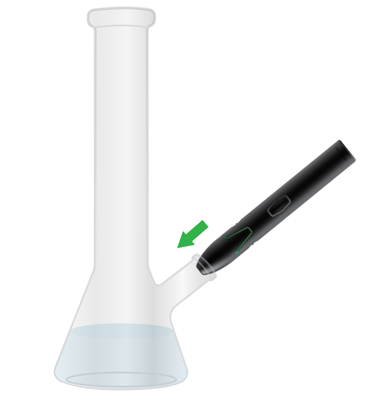
To vaporize through water simply remove the silicone mouthpiece cover and insert the cap into the down stem of your water pipe as shown above.
For more details on how to use Vivant VLeaF GO, you can visit the user manual on our website.