February 15, 2022 marked a significant milestone in Atlassian’s Server EOL (End Of Life) roadmap. This was not the final step. We still have two major milestones ahead of us: end of new app sales in Feb 2023, and end of support in Feb 2024. In simpler words, businesses still have enough time to migrate their Jira Server to one of the two available products – Atlassian Cloud or Atlassian DC. But the clock is ticking.
Jira Cloud VS Data Center: Which one to choose?
If we were to go by Atlassian numbers, 95% of their new customers choose cloud.
“About 80% of Fortune 500 companies have an Atlassian Cloud license. More than 90% of new customers choose cloud first.” Daniel Scott, Product Marketing Director, Tempo
So that’s settled, right? We are migrating from Server to Cloud? And what about the solution fewer people talk about yet many users rely on – Jira DC?
Both are viable options and your choice will depend greatly on the needs of your business, your available resources, and operational processes.
Let’s start by taking a look at the functionality offered by Atlassian Cloud and Atlassian DC.
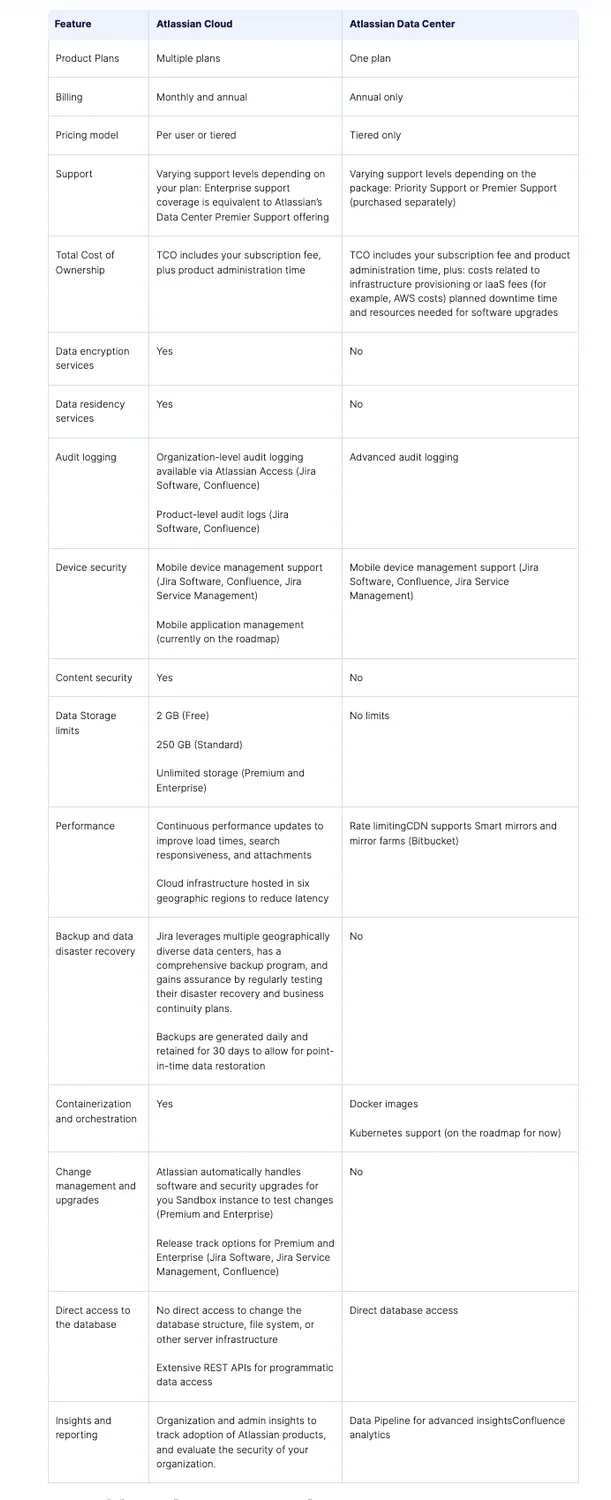
Jira Cloud: pros and cons
When talking about pros and cons, there’s always a chance that a competitive advantage for some is a dealbreaker for others. That’s why I decided to talk about pros and cons in matching pairs.
Pro: Scalability is one of the primary reasons businesses are choosing Jira Cloud. DC is technically also scalable, but you’ll need to scale on your own whereas the cloud version allows for the infrastructure to scale with your business.
Con: Despite the cloud’s ability to grow with your business, there is still a user limit of 35k users. In addition to that, the costs will grow alongside your needs. New users, licenses, storage, and computing power – all come at an additional cost. So, when your organization reaches a certain size, migrating to Jira DC becomes more cost-efficient.
Pro: Jira takes care of maintenance and support for you.
Con: Your business can suffer from unpredicted downtime. And there are certain security risks.
Pro: Extra bells and whistles:
- Sandbox: Sandbox is a safe environment system admins can use to test applications and integrations before rolling them out to the production environment.
- Release tracks: Admins can be more flexible with their product releases as they can access batch and control cloud releases. This means they’ll have much more time to test existing configurations and workflows against a new update.
- Insight Discovery: More data means more ways you can impact your business or product in a positive, meaningful way.
- Team Calendars: This is a handy feature for synchronization and synergy across teams.
Con: Most of these features are locked behind a paywall and are only available to either Premium and Enterprise or only Enterprise licenses (either fully or through addition of functionality. For example, Release tracks are only available to Enterprise customers.) In addition, the costs will grow as you scale the offering to fit your growing needs.
Jira Data Center: pros and cons
I’ll be taking the same approach to talking about the pros and cons as I did when writing about Atlassian Cloud. Pros and cons are paired.
Pro: Hosting your own system means you can scale horizontally and vertically through additional hardware. Extension of your systems is seamless, and there is no downtime (if you do everything correctly). Lastly, you don’t have to worry about the user limit – there is none.
Con: While having more control over your systems is great, it implies a dedicated staff of engineers, additional expenses on software licensing, hardware, and physical space. Moreover, seamless extension and 0% downtime are entirely on you.
Pro: Atlassian has updated the DC offering with native bundled applications such as Advanced Roadmaps, team calendars and analytics for confluence, insight asset management, and insight discovery in Jira Service Management DC.
Con: Atlassian has updated their pricing to reflect these changes. And you are still getting fewer “bells and whistles” than Jira Cloud users (as we can see from the feature comparison).
Pro: You are technically safer as the system is supported on your hardware by your specialists. Any and all Jira server issues, poor updates, and downtime are simply not your concern.
Con: Atlassian offers excellent security options: data encryption in transit and rest, to mobile app management, to audit offerings and API token controls. In their absence, your team company has to dedicate additional resources to security.
Pro: Additional benefits from Atlassian, such as the Priority Support bundle (all DC subscriptions have this option), and the Data center loyalty discount (more on that in the pricing section.)
Pricing
Talking about pricing of SaaS products is always a challenge as there are always multiple tiers and various pay-as-you go features. Barebones Jira Cloud, for instance, is completely free of charge, yet there are a series of serious limitations.
Standard Jira Cloud will cost you an average of $7.50 per user per month while premium cranks that price up to $14.50. The Enterprise plan is billed annually and the cost is determined on a case-by-case basis. You can see the full comparison of Jira Cloud plans here. And you can use this online calculator to learn the cost of ownership in your particular case.
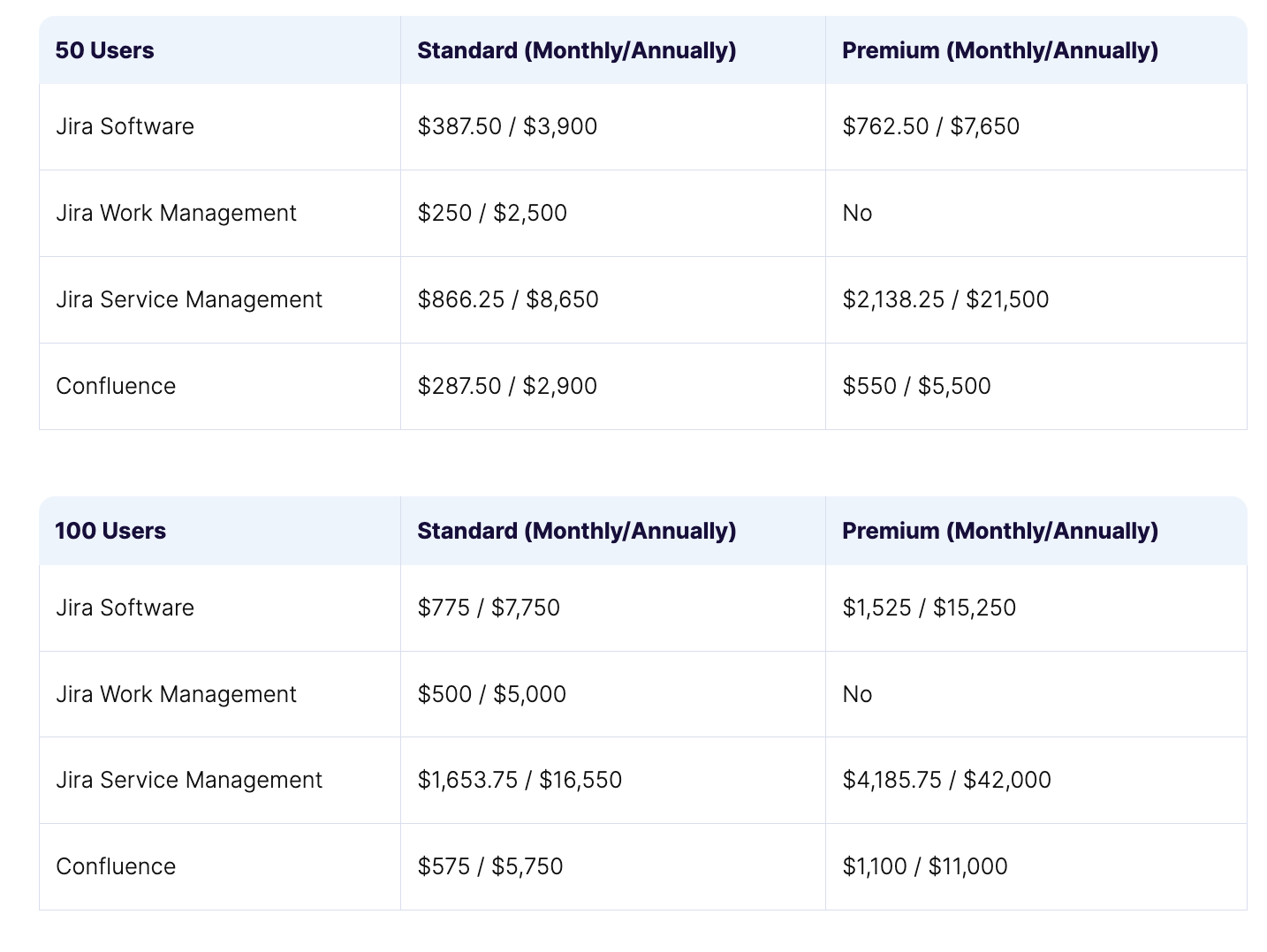
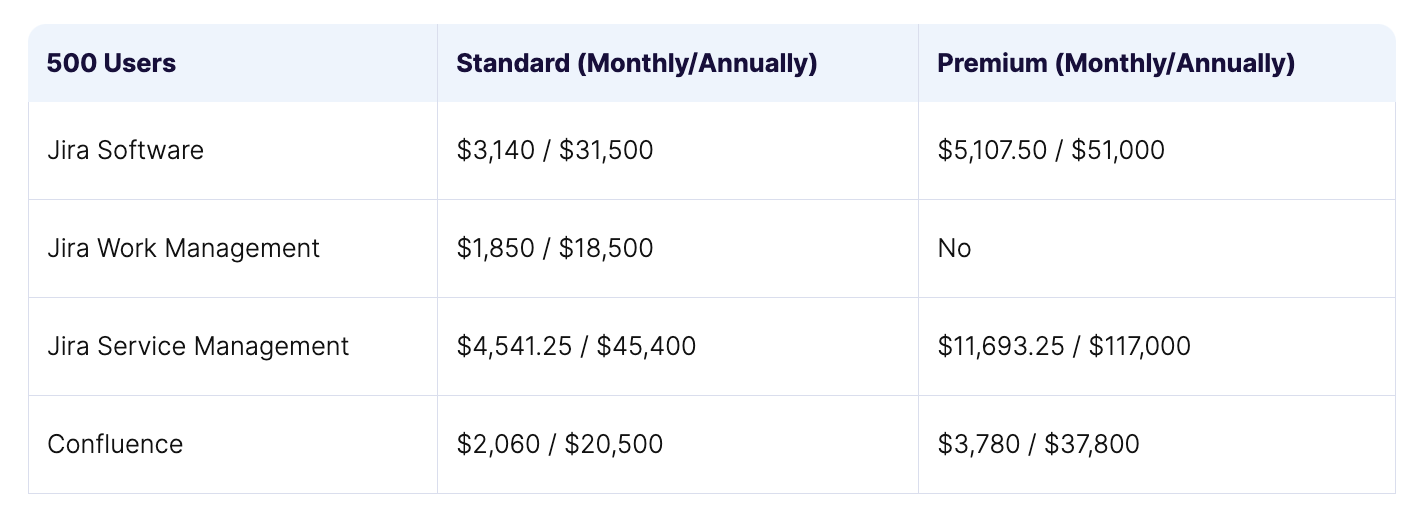
Please note that these prices were calculated without any apps included.
Jira Data Center starts at $42,000 per year and the plan includes up to 500 users. If you are a new client and are not eligible for any discounts*, here’s a chart that should give you an idea as to the cost of ownership of Jira DC. You can find more information regarding your specific case here.
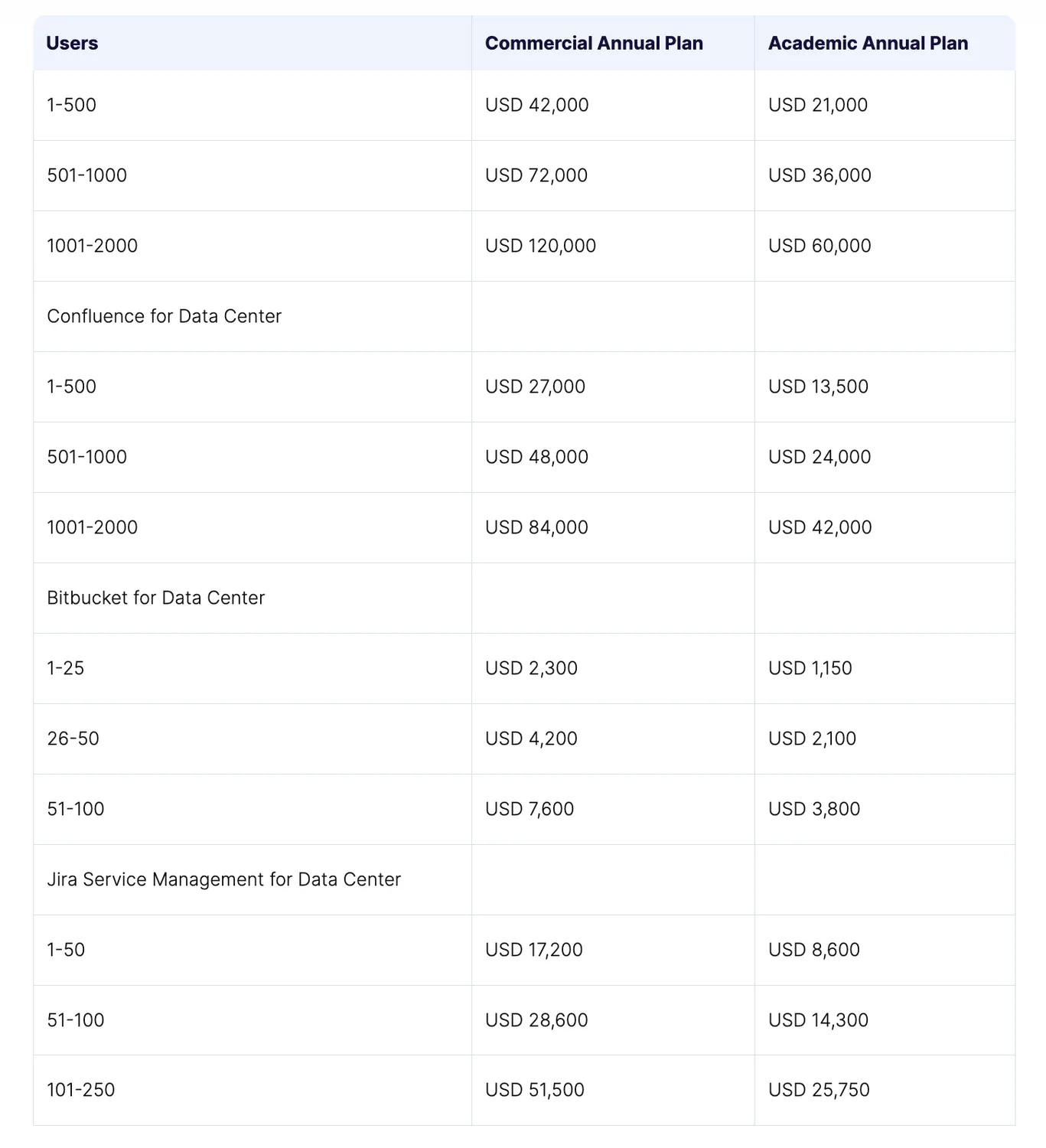
*Discounts:
- Centralized per-user licensing allows users access all enterprise instances with a single Enterprise license.
- There’s an option for dual licensing for users who purchase an annual cloud subscription with 1,001 or more users. In this case, Atlassian extends your existing server maintenance or Data Center subscription for up to one year at a 100% discount.
- There are certain discounts for apps depending on your partnership level.
- Depending on your situation, you may qualify for several Jira Data Center discount programs:Academic Data Center licensing offers a 50% discount.
Community Data Center licensing for Non-profit organizations is free of charge.
Lastly, there is a loyalty discount for Server customers who choose to migrate to the Data Center. Check this link to find out if you are eligible.
User Migration strategy
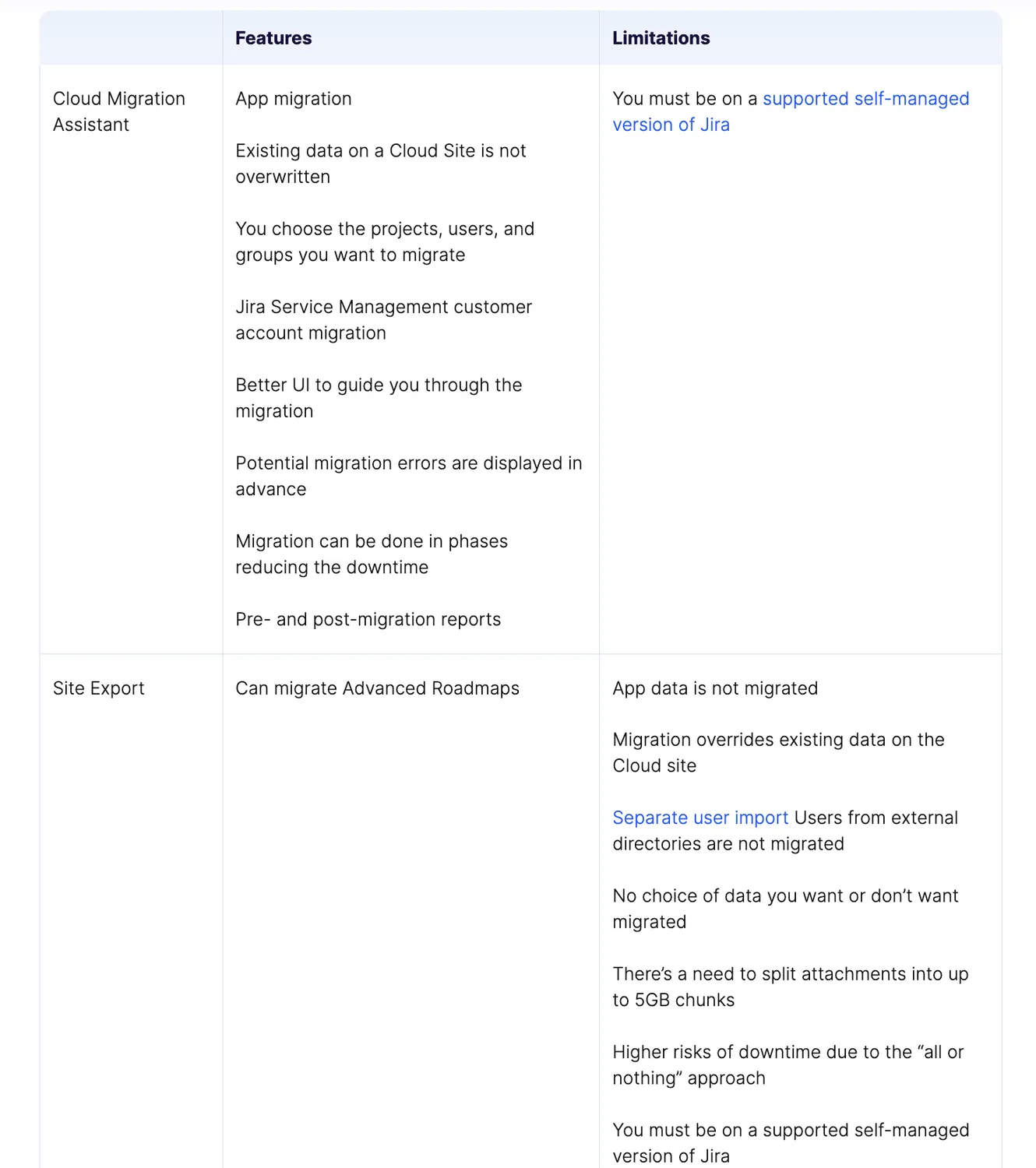
Originally, there were several migration methods: Jira Cloud Migration Assistant, Jira Cloud Site Import, and there was an option to migrate via CSV export (though Jira actively discourages you from using this method). However, Jira’s team has focused their efforts on improving the Migration Assistant and have chosen to discontinue Cloud Site Import support.
Thanks to the broadened functionality of the assistant, it is now the only go-to method for migration with just one exception. If you are migrating over 1000 users and you absolutely need to migrate advanced roadmaps – you’ll need to rely on Site Import. At least for now, as Jira is actively working on implementing this feature in their assistant.
Here’s a quick comparison of the options and their limitations.
On the TitanApps website you can find the entire article, which was written by Oleksandr Siryi.