Microsoft Office is used by millions of companies and users around the globe. All its features are some of the most used and easy-to-understand programs you can find on the web. In the USA only, 879,851 companies use the Office suite software.
Office has several versions. Each of them includes new features and improvements with each release. The latest launch is Microsoft 365, a brand name used by Microsoft for a group of software applications providing productivity-related services to its subscribers.
In this Microsoft 365 vs Office 2021 article, we are going to discuss the latest version of the popular suite. We’ll compare both versions, the one-time fees vs subscription Office, so you’ll understand what’s in both services.
Table of Contents:
- Microsoft 365 vs Office 2021 -
- What is Office 2021?
- What is Microsoft 365?
- Similarities between Microsoft 365 and Office 2021
- Differences Between Microsoft 365 and Office 2021
- Classic vs Premium Versions
- Additional Services and Apps
- Microsoft 365 benefits
What is Microsoft 365?
Microsoft 365, formerly Office 365, is the subscription-based service of the classic Microsoft program that includes the Microsoft Office product line. This subscription version of Microsoft Office offers the same Office apps as Microsoft 2021, in addition to some benefits that make the difference. We’ll mention them later.
Office 365 was released on July 17, 2017, but it was renamed on April 21, 2020, to emphasize the inclusion of several improvements and new features beyond the Microsoft Office core. For instance, artificial intelligence features and cloud-based productivity.

Microsoft 365 includes classic desktop apps, such as Outlook, OneDrive, Microsoft Word, Excel, PowerPoint, OneNote, SharePoint, Microsoft Teams, and other apps. You can link these apps to their online versions.
What is Office 2021?
Microsoft Office 2021 refers to the standalone version of the apps for its Operating System that you can own forever after the one-time purchase. It was released on October 5, 2021, the same day as Windows 11, the latest iteration of the 30-year-old Microsoft's productivity suite. It is also the successor to Office 2019.
This last version includes some changes in the interface, providing a translucent white color with rounded corners. This is a clear wink to Office 2010.
Unlike previous versions, Office 2021 is only supported on Windows 10, 11, and the three most recent versions of macOS.
Office 2021 Versions and Functions
When you install Office 2021 on your computer, you’ll have access, just like with the previous one-time purchases, to the basic functions, such as Outlook (only on the business version) Word, Excel, PowerPoint, and other productivity apps without the need for Internet access.
Office 2021 comes in four versions:
- Office LTSC (Long Term Service Channel). It is designed for commercial users. Long Term Servicing Channel includes enhanced accessibility features, performance improvements across apps, and visual improvements like dark mode support.
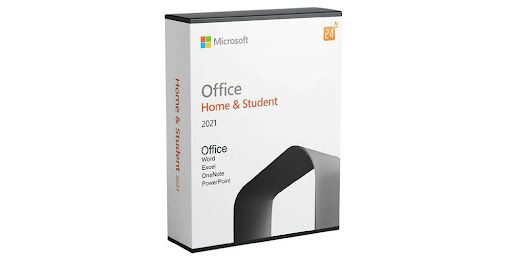
- Office Home & Student. Home and Student versions offer practical solutions for home users looking for simple apps. Having and attaching a Microsoft account on these two versions provides you with basic access to popular applications. Keep in mind that Home and Student versions do not include online storage, cloud features, and security updates.
- Office Home & Business. It includes all the classic 2021 versions of Word, Excel, PowerPoint, and Outlook. It’s compatible with Windows 10, Windows 11, and macOS. It also works with Microsoft Teams.
- Office Professional. In addition to the classic apps, Word, Excel, Powerpoint, and Outlook, it also includes Publisher and Access. It works with Microsoft Teams. It’s an option for growing small businesses that need these apps to manage their resources and plan the work. It includes Microsoft support for the first 60 days in case of technical issues.
You also have to remember that Office 2021 licenses are bound to the device, not to the user’s account. This means that if you purchase a new computer, you’ll have to buy another license to continue using this version.
Differences Between Microsoft 365 and Office 2021
In short, Microsoft 365 and Microsoft 2021 basically have similar offerings and provide essentially the same product. So, at this point, it is normal to wonder what the key differences between them are. Let’s have a look.
Subscription and One-Time Purchase
Microsoft 365 lets you pay a monthly or yearly subscription and install all the apps on multiple devices. This way, you can access Office from anywhere, regardless of your device. This subscription also includes Publisher and Microsoft Access when you download it.
Besides, your subscription can be shared with up to five people, like for example, your family members. This means that Microsoft 365 can be installed on more than one computer.
Office 2021 is a one-time purchase, which means you pay for a perpetual Office license. The software can be installed once on either a PC or Mac.
Connectivity
With Office 2021, you can continue to use the apps without an Internet connection, which is very useful if you’re just working at home on your own texts or documents.
Although Microsoft 365 allows you to use the apps without a connection, you will have to connect to the Internet every 31 days to reactivate. If you don’t do it, the apps will switch to the reduced functionality mode. This mode only gives you view and print access to the documents.
Price and Availability
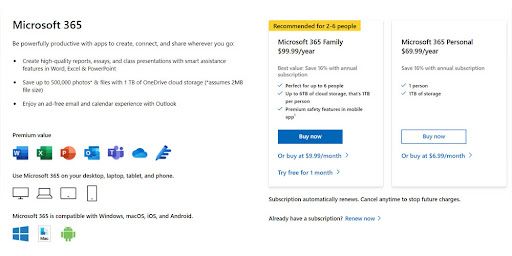
The subscription-based office suite of Microsoft 365 comes in several versions:
- The Family Plan has a price of $99,9 per year or $9,99 per month.
- The Personal Plan has a price of $69,9 per year or $6,99 per month.
- Microsoft 365 Apps for Business with a price of $82.5 per year or $8.25 per month.
- Microsoft 365 Business Standard has a price of $125,0 per year or $12,5 per month.
The Home & Business 2021 license also lets you use the apps for corporate use. If you consider the first investment, Office 2021 is much more expensive than Microsoft 365. But keep in mind that it’s a one-time purchase. Summarizing: if you buy Microsoft 365 Personal, in two years, you would have already spent more than if you bought Office Home & Student 2021.
On the other hand, if you buy the Microsoft 365 Family plan, but you have six users to share it, you’ll pay $16.67 per user. It would take at least nine years to equal the price of an equal number of Office 2021 licenses.
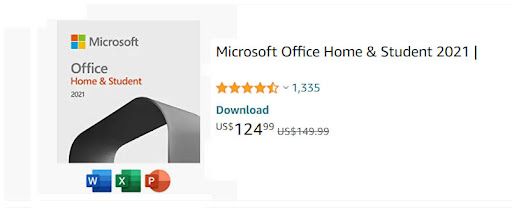
The Office 2021 Home & Student version costs $149.99 and includes the desktop versions of Word, Excel, PowerPoint, and PowerPoint.
Office 2021 Home & Business version, on the other hand, has a cost of $249.99 for the one-time purchase. In some stores, such as Amazon, you can find it for $124.99.
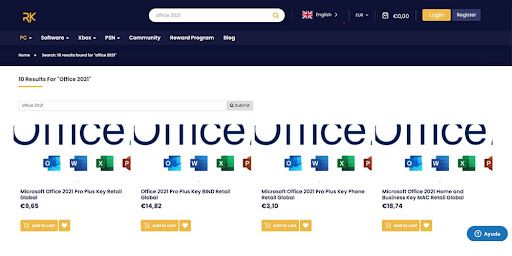
Luckily, at RoyalCDKeys, you can find the Microsoft Office 2021 Home and Business Key MAC Retail Global at €18,74 and the Microsoft Office 2021 professional plus at €3,50.
Classic vs Premium Versions
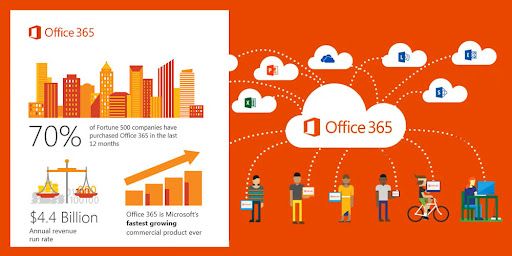
There are no major differences between both versions in terms of features. This is because Microsoft 2021 has been recently launched.
However, the Microsoft 365 Bussiness Premium version still has two features that can be useful for organizations. It integrates Advanced Threat Protection and PC and Mobile Device Management.
Regarding Microsoft 2021, you won't get any features in the future or further updates. The features you see right now are the ones you will get. With Microsoft 365, you can upgrade your apps. For example, you’ll get security updates and the latest features that Microsoft releases to the market.
Support
Office 2021 allows you to install the mobile apps for free and get basic editing features on your phone or tablet if they’re under 10.1 inches. However, it’s planned that Office 2021 only has support until 2026, and it won’t include extra features.
Once the support ends, a lack of security updates could place your personal info in danger. If you buy Office 2021, you’ll have to pay for each upgrade.
With Microsoft 365, you get extra and advanced features when you sign in to Office apps on your device. You can perform real-time collaboration if different people access your documents. Remember that you can access the services on up to five devices at the same time.
With a subscription, you'll always have the latest features, fixes, and security updates along with perennial tech support at no extra cost. In addition, with Microsoft 365, you can contact Microsoft and get technical support and/or subscription and billing support.
Additional Services and Extra Apps
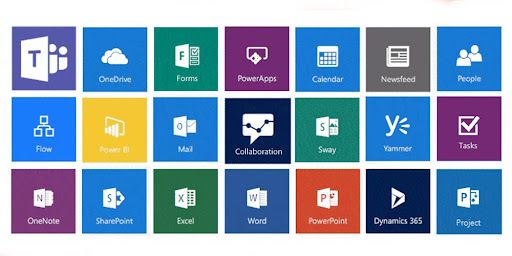
Microsoft 365 integrates all the basic apps of classic versions of Microsoft Office, i.e., Word, Excel, and PowerPoint, but it also gives you access to OneDrive Cloud Storage and Skype. This subscription service allows you to have up to 60 minutes of international calls. For OneDrive, you get 1TB of space for each user.
Microsoft 365 also integrates Publisher and Microsoft Editor, so if you use these office applications, you should consider getting Microsoft 365 instead. You can also install the office suite on a MacBook, an iPhone, and a desktop Windows PC without paying any extra fee.
It also allows you to acquire the latest features, new tools, bug fixes, and security updates just for the monthly subscription. What’s more, if you have a family plan with six users, you’ll be able to install the Microsoft 365 apps on up to 30 devices.
With the Microsoft 365 subscription, you'll also have access to the premium version of Outlook online, plus 1TB OF One Drive Cloud Storage, no advertisements, enhanced security, and message encryption.
Regarding Office 2021, in addition to the basic apps, you can get access to Microsoft Teams, and features previously exclusive to Microsoft 365, such as Presenter Coach in PowerPoint and advanced grammar suggestions.
Microsoft 365 Additional Benefits

Microsoft 365 allows you to insert royalty-free creative content directly, including icons, fonts, stock photos, templates, and more. You also get AI-powered tools, like the PowerPoint Presenter Coach, Resume Assistant, Designer, and Ideas.
For example, Word can detect what type of text you’re writing and proposes templates to improve it. On the other hand, Ideas suggests pictures and layouts when creating a presentation. Finally, Designer helps you pick formatting for your Word document and keep it consistent across all pages.
Why Should I Buy Microsoft 365?
In the first place, Microsoft 365 is a great choice since you can install it on any type of device (Windows 11, 10, 8.1, and macOS), including mobile devices. With this subscription, you’ll get continuous updates at a low cost.
Secondly, with Microsoft 365, you will have access to cloud-connected features all the time, of course, if you have an Internet connection to access cloud services.
Furthermore, if you need a Microsoft Office for several friends or members of your family, the Microsoft 365 Family is the plan for you. Speaking about organizations, the best is the Business version. You can find the Basic version, the Business Standard version, and the Business Premium, each of them with unique features.
Finally, you can upgrade your installed apps every time Microsoft releases a new version of features.
Why Should I Buy Office 2021?
Microsoft 2021 allows you to install the program on one computer running Windows 10 or 11 and pay for future upgrades. In a few words, you don’t have any free upgrade to the next version, and this is something you have to keep in mind.
Office 2021 integrates basic tools suite, but it does not have additional features and the same benefits as Microsoft 365. However, it’s just a one-time purchase, and you can get it at a more than affordable price from third-party sellers. That said, if you need Office software for personal daily use, Office 2021 will surely meet your expectations.
Office 2021 vs Microsoft 365: Which Should I Buy?
In short, you should buy the version of Office that fits your purposes. If you need the software just for personal use and basic features, the non-subscription version is for you. This way, you can save money and assure yourself of all the popular apps until you want to buy a new version.
On the other hand, if you need cloud-based software that you can use on all your devices, then the subscription-based Microsoft version is the right decision, and just for a monthly payment. Besides, this option will allow you to share the account with up to six people, and that is a great reason to choose this alternative.
At RoyalCDKeys, you can purchase several versions of Office 2021, from the Retail version to the Home and Business Key Mac version. You’ll get them not at a lower price than most sellers on the web offer.