Artificial Intelligence (AI) is changing the world of technology. It is no longer something just for science fiction movies—a powerful tool that has found its way into everyday devices.
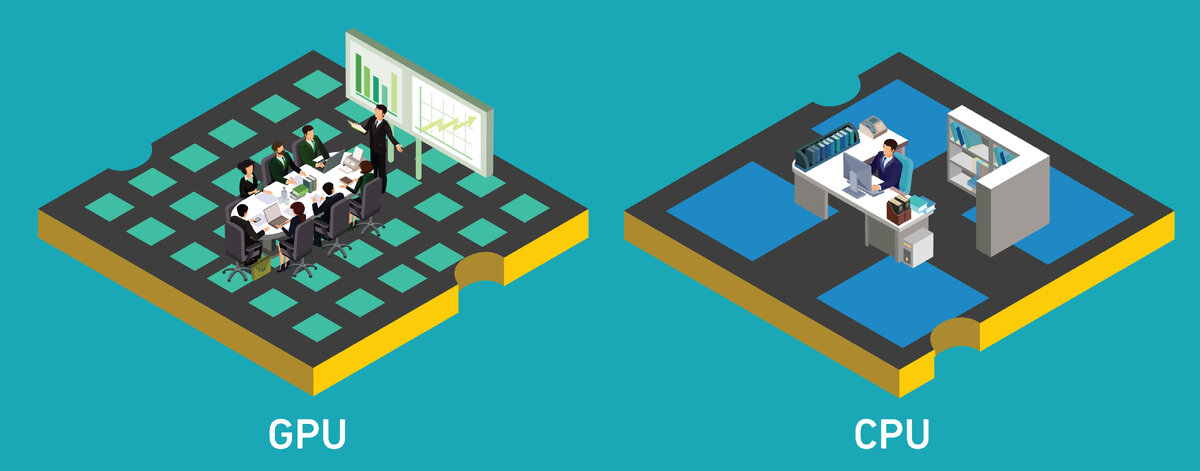
One area where AI is having a significant impact is improving laptop performance, especially when it comes to two essential components: the CPU (Central Processing Unit) and GPU (Graphics Processing Unit). These components are crucial for running everything from games to work applications.
Let’s explore how AI helps enhance their performance and make your laptop work better.
AI Improves CPU Speed
The CPU is your laptop's brain. It handles all of the tasks and processes, from opening programs to running websites. AI helps speed up the CPU's work by predicting what tasks you will perform next. Instead of waiting for a task, the AI anticipates it and prepares the CPU to handle it faster. This helps make your smart notebook PC more responsive and efficient.
In AI workloads, CPUs handle tasks involving complex algorithmic computation. They are engineered to execute a broad set of instructions,
When AI is used, it ensures that your laptop can handle many tasks simultaneously without getting slow. It does this by learning your patterns and optimising how the CPU divides the work. Whether switching between tabs, multitasking, or running several apps, AI ensures the CPU performs at its best. This leads to faster app launches, quicker file openings, and better overall performance.
AI Helps GPUs in Gaming and Graphics
The GPU is the part of your laptop that handles visuals, like images and videos. It is especially important for gaming, video editing, and other graphic-heavy applications. AI helps GPUs process images more efficiently, making them work faster and more accurately.
AI helps adjust the graphics to keep everything smooth when playing a game. For example, AI adjusts the GPU to render them without delay if the game scene becomes complex with many characters or effects.
Similarly, when working on creative projects like graphic design or video editing, AI adjusts the visual settings automatically to ensure the highest quality possible while also reducing the amount of energy the GPU uses. This way, the GPU runs faster without draining your battery.
AI adjusts CPU and GPU performance dynamically based on the applications being used. Intel’s Dynamic Tuning Technology, found in many laptops with Intel processors, uses AI to predict workloads and adjust performance levels to balance power consumption and performance.
AI Makes GPUs Smarter
AI doesn't just make the GPU work harder—it makes it work smarter. AI uses machine learning to understand your habits and predicts what actions you are likely to take next. This helps the GPU adjust its workload for more efficient performance.
- Smart Load Management: When you’re using a game or software that requires high graphics, AI ensures the GPU ramps up its power. Switching to a less demanding task reduces the power needed to save energy.
- Dynamic Resolution Adjustment: AI adjusts the resolution based on what’s happening in the game or application. If there are fewer visual details needed, AI lowers the resolution to save power and heat. But when needed, it boosts the resolution for a better visual experience.
This ability to adjust in real-time leads to better gaming experiences and smoother video rendering, while also maintaining battery efficiency.
Faster Performance with AI Boost
AI does not only work by improving the CPU and GPU individually; it can also optimise the performance of both simultaneously. When the CPU and GPU work together with AI support, tasks that usually take longer become faster and smoother.
Some ways AI improves performance include:
- Speeding up app launches: AI predicts which apps you use most frequently and loads them faster.
- Improving multitasking: AI allocates resources to make sure that running multiple apps does not slow down the laptop.
- Efficient task management: AI ensures that the CPU and GPU are used most efficiently, so they don’t overwork or waste energy.
AI Enhances Battery Life
Battery life is one of the most important factors when choosing a laptop. AI plays a key role in helping your laptop last longer on a single charge. The AI system constantly monitors the CPU and GPU's power usage and makes adjustments to save energy when needed.
For instance, if you are browsing the web or watching videos, AI reduces the power consumption of the GPU to save battery. On the other hand, when you’re playing a graphically demanding game, AI ensures that both the CPU and GPU get enough power to perform at their best.
Here’s how AI helps your laptop’s battery:
- Predicting battery usage: AI knows how much battery is left and predicts how long it will last based on your usage. It helps extend battery life by controlling power flow.
- Optimizing energy use: If you’re doing simple tasks, like checking emails or writing documents, AI ensures that only the minimum amount of power is used.
- Adjusting performance during high demand: When you need extra power for gaming or video editing, AI provides that extra juice without draining the battery too quickly.
AI Makes Laptops Cooler
AI helps keep your laptop from overheating, which is crucial for maintaining performance. When the CPU or GPU is under heavy use, it can generate a lot of heat, which can slow the laptop down or cause it to shut down. AI helps by monitoring the temperature and adjusting the workload of the CPU and GPU to prevent overheating.
For example, if the laptop starts to get too hot, AI lowers the intensity of the tasks the CPU and GPU are handling. This keeps the laptop cool while maintaining a good level of performance. This means that even during high-demand tasks like gaming or video editing, AI keeps the temperature in check, ensuring that the laptop doesn't overheat or become too loud.
AI Adjusts Graphics Based on Your Needs
For gamers, designers, and anyone who uses graphically demanding software, AI makes sure the GPU adjusts its graphics based on what you’re doing. Whether you’re playing a high-intensity game or simply browsing the web, AI tailors the graphics to ensure the best balance of quality and performance.
- High-Performance Gaming: During gaming, AI boosts the GPU to handle high-quality graphics and fast frame rates, ensuring smooth gameplay.
- Battery-Saving Mode: When not gaming, AI reduces the graphics settings to save battery power and energy.
AI ensures that the GPU is working at its best for whatever task you’re doing, giving you the highest quality experience without unnecessary power drain.
Conclusion
AI is a game-changer for laptop performance. It helps the CPU and GPU work faster, smarter, and more efficiently. Whether you are playing games, editing videos, or simply browsing the web, AI ensures that your laptop performs at its best. It boosts speed, improves multitasking, extends battery life, and helps keep your laptop cool. With AI, your laptop becomes more powerful and capable of handling any task you throw at it.