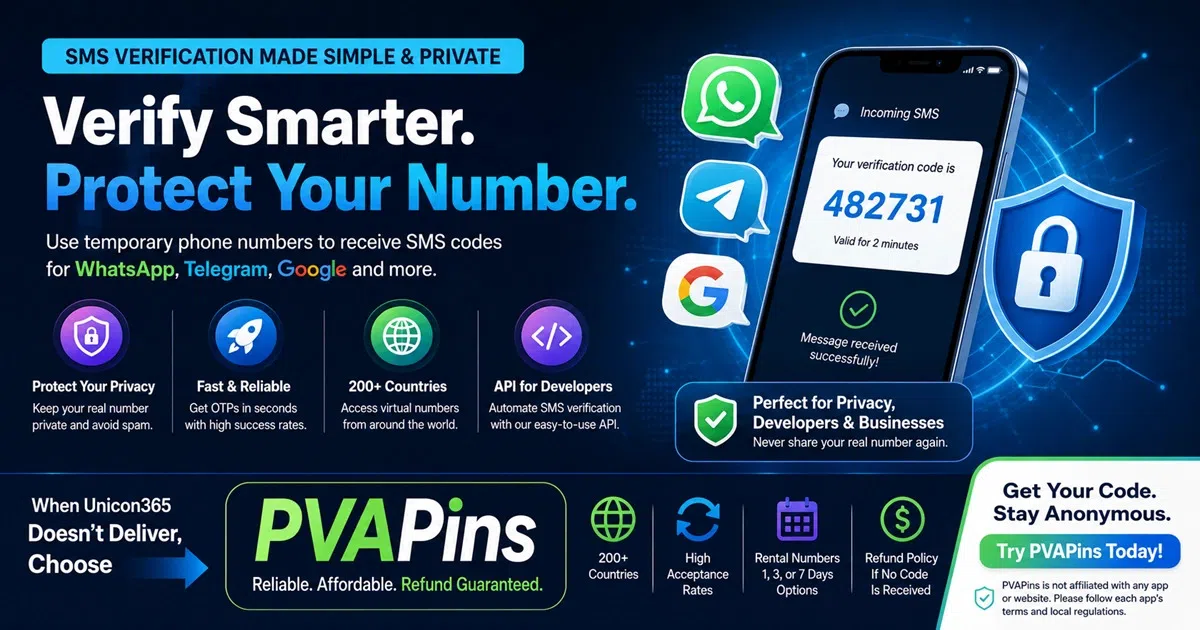
Let's be honest: sharing your personal phone number with every app isn't the smartest move. Using a temporary number for app verification is a clever privacy tactic, and platforms like Unicon365 are designed specifically for this purpose. They offer virtual numbers, enabling you to get those one-time passcodes (OTPs) without revealing your actual SIM card number. This guide will explain how Unicon365 operates, discuss common issues you might encounter with popular apps like WhatsApp, Telegram, and Google, and provide solutions when things go awry, including when it's time to consider a more reliable alternative. Temporary numbers are perfect for privacy-conscious individuals, developers testing application flows, or businesses managing multiple legitimate accounts. Just steer clear of using them for banking or financial services—that's just asking for trouble.
Quick Look:
Unicon365 provides temporary virtual numbers for SMS verification, which is ideal for signing up for apps without using your real phone number.
Facing common problems? Apps might block these numbers, you might select the wrong country, or mobile carriers could experience delays.
To fix these, try a new number, switch countries, or opt for a longer rental period.
Developers can use the Unicon365 API to automate SMS processes for testing and programmatic verification.
If Unicon365 consistently fails, PVAPins often works better, offering higher success rates, rental options, and a refund policy if a code doesn't arrive.
What's Unicon365 SMS Verification and Why Use It for App Sign-Ups?
Unicon365 is a service that provides temporary phone numbers to receive SMS verification codes. People use it to sign up for platforms like WhatsApp, Telegram, or Google without linking their personal mobile number. It's popular for enhancing privacy, conducting testing, and managing multiple accounts for legitimate business needs. Here's how it works: you get a virtual number, input it into the app, and the one-time passcode (OTP) then appears in your Unicon365 dashboard. Common reasons for using it include keeping your personal number off spam lists and testing how your app's onboarding functions from a fresh account. These numbers are usually temporary, for single-use, or available for short-term rental. Want to learn more about how it works? Check out how to receive SMS online without needing a physical SIM card. Services for temporary SMS verification, such as Unicon365, offer an important privacy layer, letting users interact with applications without directly exposing their personal phone numbers.
How to Verify WhatsApp, Telegram, and Google Accounts Using Unicon365
Using Unicon365 for app verification is straightforward: select the app (WhatsApp, Telegram, Google—you name it), choose a country, and get a temporary number. Enter this number on the app's sign-up screen, and the OTP will show up in your Unicon365 dashboard. The process is pretty much the same across most major platforms. For WhatsApp, ensure the number hasn't been previously banned; otherwise, verification will instantly fail. On Telegram, codes usually arrive in seconds, though delays can happen if the number is in high demand. If you're verifying for Google, skip the voice call option and stick with SMS. Try a free number first by heading to PVAPins to see if your app is supported before purchasing a number; no registration is needed for testing.
Unicon365 SMS Code Receiver: Getting Your OTP Quickly
The Unicon365 SMS code receiver is simply the dashboard where your incoming OTPs arrive. To get your code fast, make sure you've selected the correct app and country, and that the number is still active. Most codes appear within 30 seconds, but network congestion can cause delays. If the code doesn't automatically show up after 60 seconds, manually refresh your dashboard. Avoid using numbers that have been recently used for the same app, as the app might cache the old one. If you're using a mobile app version of Unicon365, double-check your spam or notification settings.
Unicon365 Verification Not Working? Common Reasons and Solutions
When Unicon365 verification fails, the usual culprits are that the number has already been flagged by the PVAPins Android app, you've selected the wrong country, or the number is temporarily out of service. The solution is usually to try a different number, perhaps from another country, or wait a few minutes. Common Issues:
App-side blocks: Apps like WhatsApp are aggressive about blocking VoIP numbers and might reject temporary ones.
Number recycling: If the previous user of this number got banned, the app might block it for you too.
Network glitches: The carrier supporting that virtual number might be experiencing a slow day.
A primary reason for temporary number verification failures is that privacy-focused applications aggressively blocklist certain number ranges to deter automated or fraudulent account creation.
Can't Get a Code from Unicon365? Here's Why and What to Do
If you're unable to receive a code from Unicon365, it's typically because the number doesn't match the app or the carrier is temporarily down. First, meticulously check that you've chosen the correct app in the Unicon365 portal. Then, try a free number from a different country; some carriers are significantly more reliable than others. Reasons for Missing Codes:
Carrier downtime: The virtual carrier Unicon365 uses for that specific country might be offline.
App timeout: The app timed out while you were waiting. Request a new OTP from the app.
Incorrect app selection: Make sure you didn't select "WhatsApp" when you're actually trying to verify "Telegram."
Understanding Unicon365 Verification Errors and Failed Codes
A "verification error" or "code failed" message from Unicon365 usually indicates that the OTP was either rejected by the app or never reached your dashboard. This can happen if the number is blocked, the app's SMS gateway is down, or the code expired before you entered it. Your best bet? Request a new number. What These Mean:
Code expired: Most OTPs are only valid for 60–120 seconds; enter it immediately.
Blocked number: The number might have been used for spam or fraud in the past.
App-side issue: The app itself could have a bug or a temporary outage with its SMS delivery system.
Understanding a 'verification error' means recognizing that the problem could stem from three areas: the temporary number provider, the target application, or even how quickly the user enters the code.
Unicon365 SMS Not Received: A Step-by-Step Troubleshooting Guide
If your Unicon365 SMS isn't coming through, first verify the app's country selection; it must match the number's country. Then, cancel the request and try again after 2 minutes. If it still doesn't work, consider a different number type (like renting a number for 1 day instead of a one-time use) for better stability. Troubleshooting Steps:
Confirm App Match: Double-check that the app you're verifying aligns with the one you selected in the Unicon365 dashboard.
Wait and Retry: After the initial request, wait 2 minutes, then trigger a new OTP from the app.
Think About Rentals: If a one-time number fails, rent a number for 1, 3, or 7 days for increased reliability. This often helps bypass app blocks that target single-use numbers.
Change Country: Switch to a different country known for reliable SMS routing (e.g., USA, UK, or Canada usually work well).
Still no code? If Unicon365 keeps failing you, switch to a service with a refund guarantee. Start with PVAPins; if your code doesn't arrive, you'll get your money back.
Unicon365 API for SMS Verification: How Developers Integrate It
Unicon365 provides a developer API that enables you to programmatically request phone numbers and check for incoming SMS. This is incredibly valuable for automating user verification flows, testing app onboarding, or developing tools that require multiple verifications. The API is RESTful and delivers JSON responses. Typically, the API includes endpoints for requesting a number, checking its status, and retrieving codes. You'll send API keys in the headers, then poll the getMessage endpoint until the OTP arrives. Common use cases include automated testing, bulk account creation for legitimate reselling, and user onboarding without exposing your personal number. Want to dive deeper? Explore a developer API for automated SMS verification. For developers, API integration for SMS verification is a game-changer, facilitating automated testing and scaling of account verification processes, thereby reducing manual effort.
Unicon365 Programmatic Verification: Automating Your SMS Flows
Programmatic verification with Unicon365 means using the API to automatically detect when a code arrives and then input it into the target app. This is crucial for developers testing SMS flows in staging or production environments. Automation frees you from constantly monitoring a dashboard and significantly accelerates your testing cycle. Most Unicon365 APIs require polling; webhooks are less common but much more efficient. Your script should be able to handle situations where the code never appears (e.g., retrying with a new number). Use this to simulate a user signing up for your app and verifying the entire SMS flow from beginning to end.
Where to Find Reliable SMS Verification When Unicon365 Falls Short
When Unicon365 doesn't deliver—due to app blocks, carrier issues, or blocked numbers—you need a reliable backup. Alternatives to Unicon365 for SMS verification exist for good reason. PVAPins offers virtual numbers across over 200 countries, focusing on reliability, real-time code delivery, and a refund policy if no code arrives. It's designed for users who need consistent, straightforward SMS verification. Why consider PVAPins:
Higher acceptance: PVAPins actively rotates its pool of numbers to avoid the blocklisting that affects many services.
Rental options: If a one-time number doesn't work, renting a 1-day or 7-day number often bypasses app blocks.
Clear pricing: No subscription required; you only pay for the number and SMS you use, with rates starting around $0.10. Check current pricing for SMS verification.
Compliance: PVAPins clearly states that it's not affiliated with any app and that users must adhere to each app's terms of service.
Reliability in SMS verification heavily relies on how well the provider manages its number pool; a service that regularly rotates numbers can significantly reduce blocklisting incidents. Need a number that lasts? Rent a virtual number for 1, 3, or 7 days to continue receiving OTPs without interruption. You only pay for what you use. PVAPins is not affiliated with any app or website. Please adhere to each app's terms and local regulations.
Key Takeaways:
SMS verification using temporary numbers can safeguard your privacy and streamline app testing.
Common problems with services like Unicon365 include app blocks and numbers being blacklisted.
Troubleshooting typically involves trying different numbers, countries, or rental periods.
APIs are available for automated and programmatic SMS verification workflows.
When a service consistently fails, switching to one with a better number pool and refund policy can save you time and frustration.
FAQs
Here are some common questions people ask about Unicon365 SMS verification.
Is using Unicon365 or PVAPins for SMS verification legal?
Yes, it's legal to use virtual numbers for SMS verification as long as you're not violating the target app's terms of service. It's widely used for privacy, testing, and managing legitimate business accounts. Always review the app's terms before using a temporary number.
Why do my Unicon365 codes frequently fail?
Codes often fail because the app has blocked the virtual number or detects it as a VoIP/non-mobile number. This is common with WhatsApp and Google. Switching to a service with a cleaner number pool, like PVAPins, can greatly improve success rates.
What's the difference between a one-time number and a rental number?
A one-time number is used for a single verification and then released. A rental number (e.g., 1-day or 7-day) is reserved exclusively for you, allowing you to receive multiple OTPs during that period. Rental numbers often have higher acceptance rates for apps that require ongoing verification.
What should I avoid using a temporary number for?
Do not use temporary numbers for banking, financial accounts, healthcare portals, or any service that requires a permanent contact number for security or legal reasons. They are best suited for social media, messaging apps, and testing environments.
How do I troubleshoot a "verification error" on Unicon365?
First, confirm that your app selection matches the app you're verifying. Then, try a different country. If the error persists, the number is likely blocked; request a new number from a different provider. Renting a number for 24 hours can also help bypass temporary blocks.
What happens if I never receive the SMS code?
Most reputable services, including PVAPins, offer a refund or replacement if a code isn't delivered within a reasonable timeframe. Always check the provider's refund policy before making a purchase. With PVAPins, you can request a new number or a refund if the code never arrives.
Can I use a temporary number for two-factor authentication (2FA) on an existing account?
Yes, you can, but the app might flag the number change and require additional verification (like email confirmation). It's most effective for creating a new account rather than enabling 2FA on an existing one.
Compliance note: PVAPins is not affiliated with any app or website. Please adhere to each app's terms and local regulations.