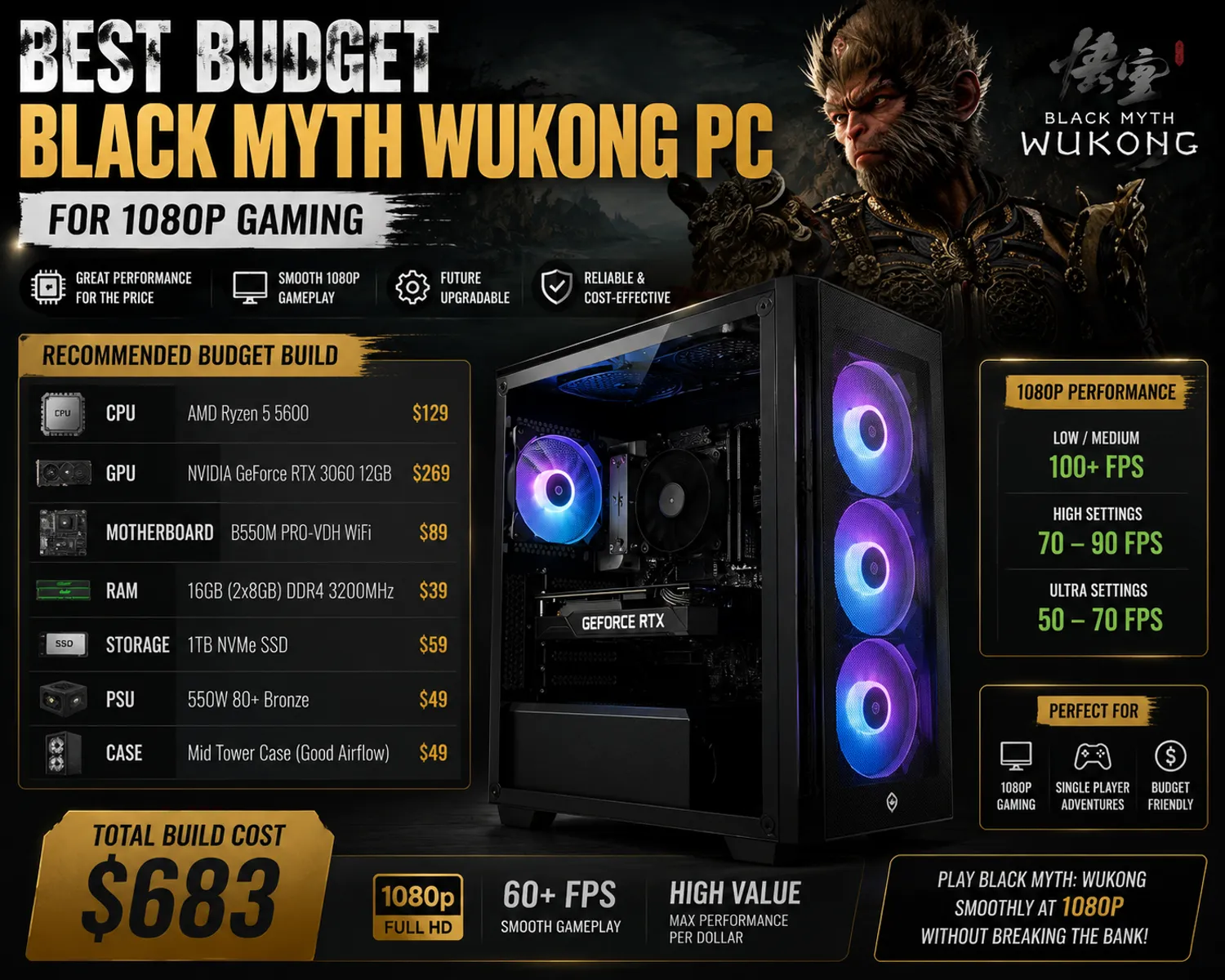
Black Myth: Wukong looks like it should demand a flagship rig, and for ray tracing at 4K, it genuinely does. But here's the part most shoppers miss: at 1080p with the right component choices, a properly specced budget tower handles this soulslike beautifully without anywhere close to a flagship price tag. This guide breaks down exactly what a Black Myth Wukong PC needs to run smoothly at 1080p, what you can safely skip, and where your money is best spent if you want strong frame rates without overpaying for headroom you won't use.
What Black Myth Wukong Actually Requires
Game Science's official specs are more forgiving than the screenshots suggest. At the minimum tier, the game asks for a GeForce GTX 1060 or Radeon RX 580, paired with a Core i5-8400 or Ryzen 5 1600-class CPU, 16GB of RAM, and roughly 130GB of storage. That's enough to launch and play at 1080p on medium settings without ray tracing, though "enough to launch" and "enjoyable to play" aren't always the same thing in a combat-heavy soulslike where frame drops during boss fights can get you killed.
The recommended tier is where most 1080p buyers should actually be aiming: a GeForce RTX 2060 or RX 5700 XT, an Intel Core i7-9700 or Ryzen 5 5500, and the same 16GB of RAM. This tier delivers good visuals at 1080p with stable performance, and modern equivalents like the RTX 3060 or RTX 4060 comfortably exceed it while staying firmly in budget territory. Ray tracing pushes requirements considerably higher, into RTX 3060/4060 minimum and RTX 4070-class recommended territory, so if ray tracing isn't a priority for you, skipping it is the single biggest money-saving decision you can make on this build.
The Sweet Spot GPU for a Budget Black Myth Wukong PC
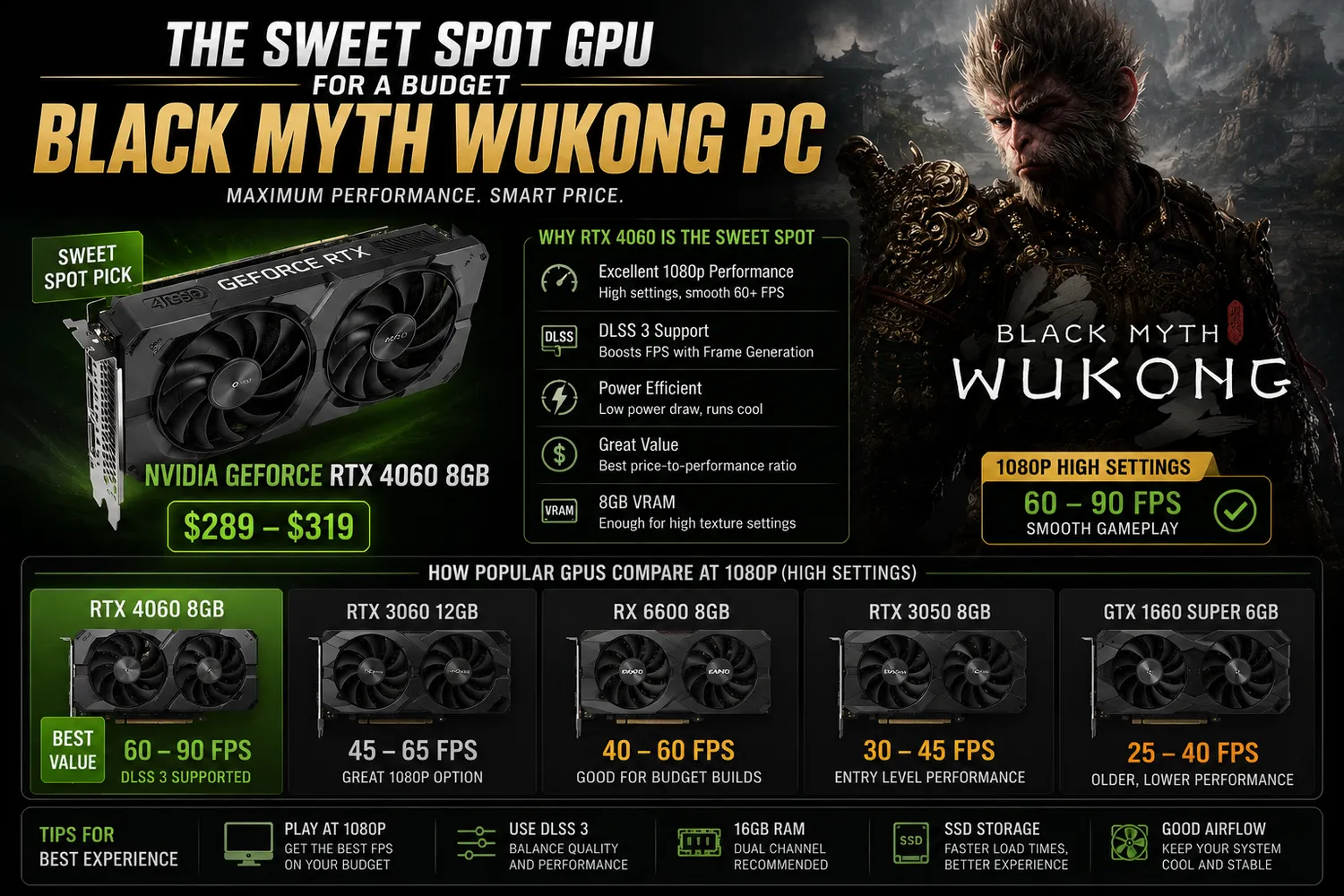
For 1080p gaming without ray tracing, an RTX 3060 or RTX 4060 is the practical sweet spot, and either one will run Black Myth: Wukong at medium-to-high settings with frame rates that stay comfortable through combat-heavy sequences. The RTX 3060 brings an unusually generous 12GB of VRAM for its price tier, which matters if you plan to keep this PC for several years and want texture headroom as games get more demanding. The RTX 4060 trades a bit of that VRAM advantage (8GB versus 12GB) for better efficiency, DLSS 3 with Frame Generation, and a more modern feature set, which can translate to a smoother frame rate in supported titles even without raw horsepower being dramatically higher. Either choice is a legitimate answer for a budget Black Myth Wukong PC, and the right pick mostly comes down to whether you find a better deal on one or the other at the moment you're buying.
What you don't need for 1080p is anything above this tier. An RTX 4070 or RTX 5070 will of course run the game beautifully, but you'd be paying a meaningful premium for performance headroom that a 1080p panel simply can't display. Save that money for RAM, storage, or just keep it in your pocket.
CPU: Don't Underspend Here Either
It's tempting to dump your entire budget into the GPU and treat the CPU as an afterthought, but Black Myth: Wukong's combat encounters, especially boss fights with multiple enemies and elaborate transformation mechanics, lean on CPU performance more than you'd expect from a visually-driven game. The recommended-tier Core i7-9700 and Ryzen 5 5500 are both several years old at this point, which is good news for budget shoppers: a current-generation Ryzen 5 5600, Ryzen 5 7500F, or Intel Core i5-12400F comfortably outperforms either reference chip while staying inexpensive thanks to being a step below the newest flagship silicon. Pairing a too-weak CPU with a capable GPU is a classic budget-build mistake, since it leaves performance on the table during exactly the demanding combat moments where you'd most want a stable frame rate.
RAM and Storage: Where Black Myth Wukong Gets Demanding
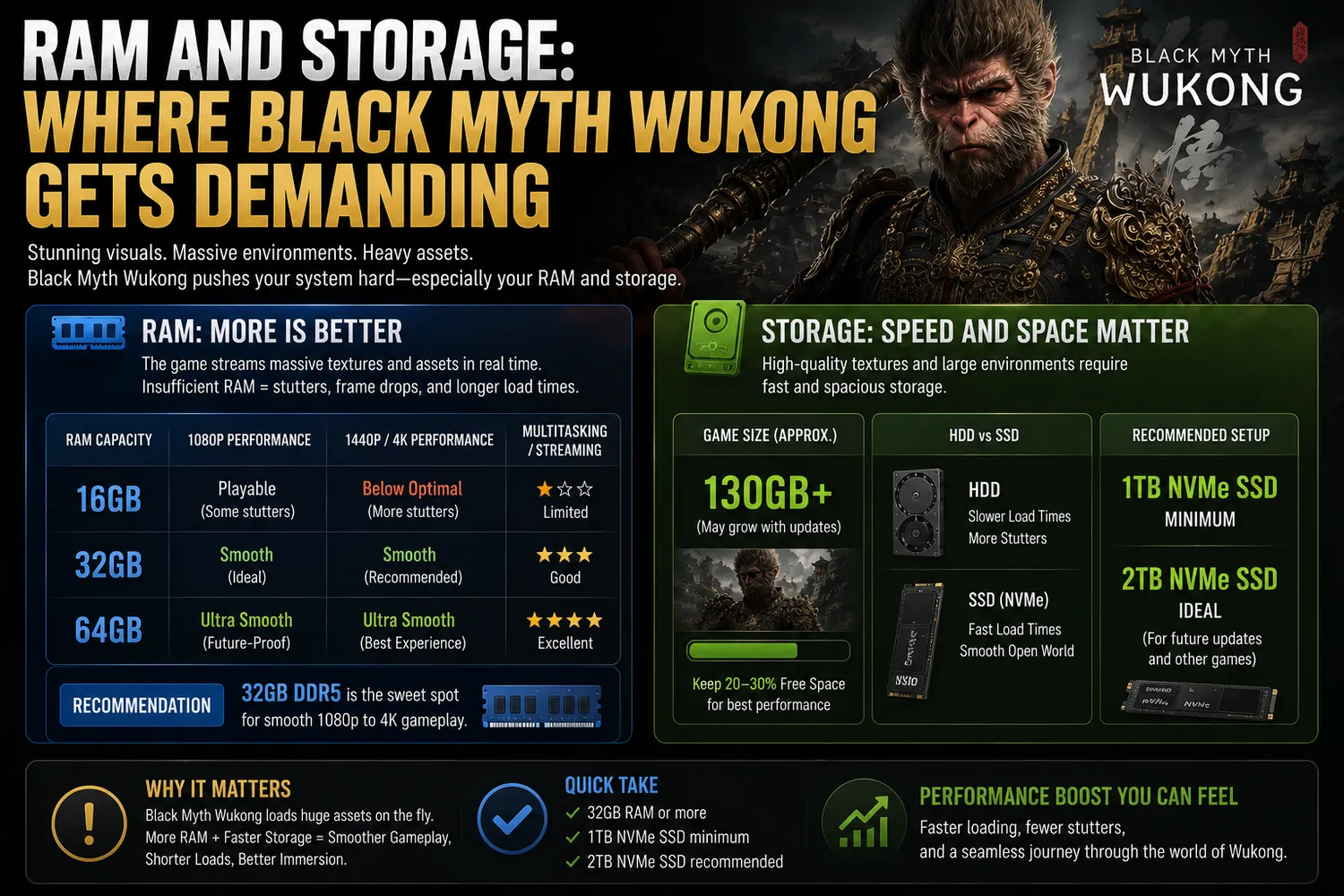
Sixteen gigabytes of RAM is the non-negotiable minimum across every tier of Game Science's official requirements, and that's worth taking seriously since the game has been known to stutter on older systems that try to scrape by with less. For a budget build, 16GB of DDR4 or DDR5 (depending on your platform) is the right target, and dual-channel configuration matters more than raw capacity at this tier, so two 8GB sticks will outperform a single 16GB stick in real-world frame pacing.
Storage is the quietly expensive part of this build. Black Myth: Wukong's install size sits around 130GB, and while the developer technically supports HDD installation, doing so will noticeably hurt load times and can introduce texture pop-in during fast camera movements, which matters in a game built around fluid combat. A 500GB to 1TB NVMe SSD is the realistic target for a budget build, since it needs to hold the game itself alongside Windows, drivers, and whatever else you're running, without leaving you constantly managing free space.
Sample Budget Build for 1080p
Putting these priorities together, a sensible budget Black Myth Wukong PC for 1080p gaming looks roughly like this: a Ryzen 5 5600 or Core i5-12400F CPU, an RTX 3060 12GB or RTX 4060 8GB GPU, 16GB of dual-channel RAM, and a 1TB NVMe SSD, all housed in a case with at least one front intake fan for basic airflow. Builds in this configuration typically land in the $700-$900 range depending on current GPU pricing and whether you're buying prebuilt or assembling the parts yourself, and that price band consistently shows up as the budget gaming sweet spot across most current hardware roundups. You won't be running ray tracing at high settings, and you won't be hitting triple-digit frame rates in every combat encounter, but you will get a smooth, stable 1080p experience that does justice to the game's combat and visual design without the premium price tag of a 1440p or 4K-focused rig.
What to Skip on a Tight Budget
A few corners are safe to cut without hurting your actual experience. RGB lighting, tempered glass side panels, and elaborate liquid cooling setups all look great in product photos but contribute nothing to frame rate, so they're the first things to drop if you need to trim cost. A high-wattage power supply beyond what your specific GPU and CPU combination requires is also unnecessary; a quality 550W-650W unit covers this entire build comfortably. Lastly, don't chase a 240Hz monitor to pair with this build. Black Myth: Wukong's combat-heavy pacing and the GPU tier recommended here will realistically deliver somewhere in the 60-100fps range at 1080p depending on settings, so a 144Hz monitor is a better match for your actual frame rate ceiling than paying extra for refresh rates this hardware won't consistently hit anyway.
Build the Right PC for Your Budget Today
Don't let flashy 4K screenshots talk you into overspending on hardware your 1080p monitor can't even display. Shop a configurator that lets you build a system around the exact GPU, CPU, and storage combination outlined here, whether that means an RTX 3060 build for maximum VRAM headroom or an RTX 4060 build for better efficiency and DLSS 3 support. Look for prebuilt towers that are hand-assembled and stress-tested before shipping, backed by a solid warranty and real technical support, so a budget price tag doesn't mean a budget ownership experience. Compare your options, lock in the specs that actually matter for 1080p combat performance, and get your Black Myth: Wukong rig ordered today. Buy a Black Myth Wukong PC with confidence by comparing the best prebuilt systems and custom-ready options for every budget.