A Comprehensive Guide to React JS Interview Questions & Answers
Are you gearing up for a job interview and facing questions about React JS? Don't fret! In this comprehensive article, we will delve deep into React JS interview questions and provide you with insightful answers that will help you navigate the challenging world of React JS interviews. We will break down the topics, tackle complex concepts, and prepare you for success in your React JS interview. So, grab a seat and let's dive in!
Table of Contents
- Introduction to React JSWhat is React JS?
Why is React JS So Popular?
- React JS BasicsHow Does React JS Work?
What is JSX in React?
- React ComponentsWhat Are React Components?
Class Components vs. Functional Components
- State and PropsUnderstanding State in React
What Are Props in React?
- Component LifecycleThe Component Lifecycle in React
Key Lifecycle Methods
- React HooksIntroduction to React Hooks
Most Commonly Used React Hooks
- Virtual DOMWhat is the Virtual DOM in React?
Why is the Virtual DOM Important?
- React RouterNavigating with React Router
Route Parameters and Nested Routes
- State ManagementState Management in React
Redux vs. Context API
- Performance OptimizationTips for Optimizing React Applications
Code Splitting and Lazy Loading
- Testing in ReactImportance of Testing in React
Tools for Testing React Applications
- Security in ReactCommon Security Concerns in React
Best Practices for Securing React Apps
- Server-Side RenderingWhat is Server-Side Rendering (SSR) in React?
Benefits and Limitations of SSR
- React NativeIntroduction to React Native
Building Mobile Apps with React Native
- ConclusionSumming Up Your React JS Knowledge
Preparing for Your Interview
Now, let's explore each of these topics in detail, so you can go into your React JS interview with confidence.

1. Introduction to React JS
What is React JS?
React JS, commonly referred to as React, is an open-source JavaScript library used for building user interfaces. Developed and maintained by Facebook, React has gained immense popularity in the web development community. It allows developers to create dynamic and interactive user interfaces with ease. React follows a component-based architecture, making it highly modular and reusable.
Why is React JS So Popular?
React's popularity can be attributed to several key factors. It offers a virtual DOM (Document Object Model), which enhances the performance of web applications. React also provides a unidirectional data flow and supports server-side rendering, making it SEO-friendly. Its vast community and a wealth of third-party libraries contribute to its popularity, making it a robust choice for web development.
2. React JS Basics
How Does React JS Work?
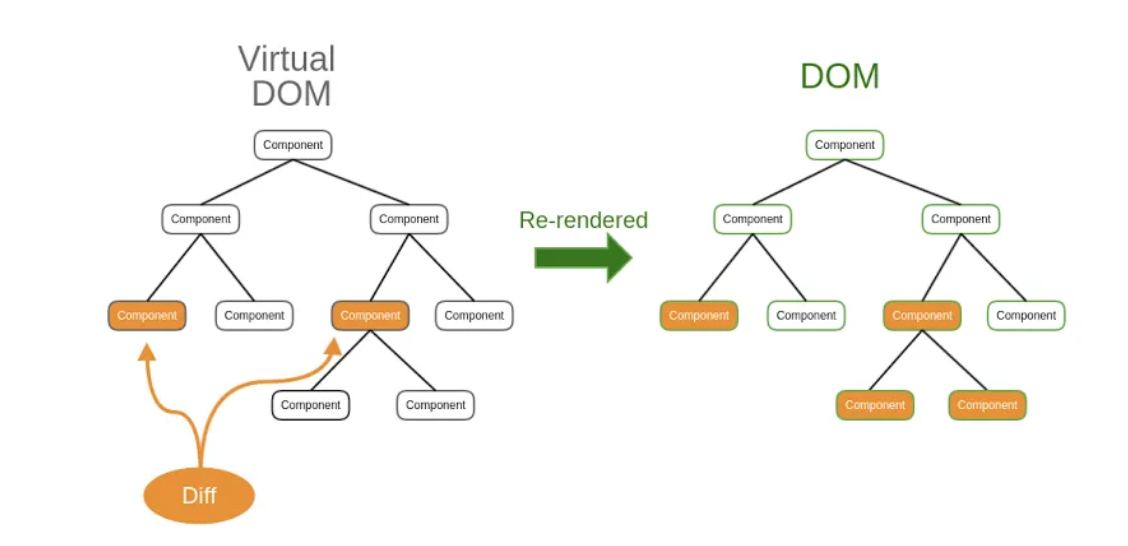
React works by creating a virtual representation of the user interface, which is referred to as the Virtual DOM. When changes occur in the application, React updates the Virtual DOM first. Then, it efficiently identifies the difference between the Virtual DOM and the actual DOM and applies only the necessary updates. This approach significantly improves application performance.
What is JSX in React?
JSX, which stands for JavaScript XML, is a syntax extension used in React for defining the structure of user interfaces. It allows developers to write HTML-like code within their JavaScript files. JSX is then transpiled into plain JavaScript by tools like Babel. This approach simplifies UI development and makes React components more readable.
3. React Components
What Are React Components?
React components are the building blocks of a React application. They can be thought of as independent and reusable pieces of a user interface. React components can be classified into two main types: class components and functional components. Class components are defined as JavaScript classes, while functional components are JavaScript functions.
Class Components vs. Functional Components
Class components were the traditional way of creating React components. They have their own state and lifecycle methods. Functional components, on the other hand, are simpler and have become increasingly popular. They don't have state or lifecycle methods of their own but can still manage state using React Hooks, which we'll explore later in this article.
4. State and Props
Understanding State in React
State is a crucial concept in React. It represents the data that can change within a component. State is used to manage dynamic content and to ensure that changes in data are reflected in the user interface. Class components use the setState method to update state, while functional components use React Hooks like useState for the same purpose.
What Are Props in React?
Props, short for properties, are a way to pass data from a parent component to a child component. Props are read-only and help make components reusable. They allow for the dynamic rendering of data in child components based on what is passed from their parent components. In React, props are immutable, which means they cannot be changed by the child component.
5. Component Lifecycle
The Component Lifecycle in React
Class components in React have a lifecycle that includes various methods for handling different stages of a component's existence. These methods allow developers to perform actions like setting initial state, fetching data, and cleaning up resources. The component lifecycle consists of three main phases: mounting, updating, and unmounting.
Key Lifecycle Methods
Some of the key lifecycle methods in React include:
componentDidMount: Invoked after a component is mounted to the DOM.shouldComponentUpdate: Allows developers to control if a component should update.componentDidUpdate: Called after a component updates.componentWillUnmount: Used for cleaning up resources before a component is removed.
6. React Hooks
Introduction to React Hooks
React Hooks were introduced in React 16.8 to allow functional components to manage state and side effects. They provide an elegant way to incorporate state and lifecycle features into functional components. Hooks like useState, useEffect, and useContext have become essential tools for building robust React applications.
Most Commonly Used React Hooks
- useState: Used to add state management to functional components.
- useEffect: Handles side effects in functional components, such as data fetching or DOM manipulation.
- useContext: Simplifies the sharing of data across components without prop drilling.
- useRef: Allows access to a DOM element or a mutable object within a component.
- useReducer: A more advanced hook for managing complex state logic.
7. Virtual DOM
What is the Virtual DOM in React?
The Virtual DOM is a vital concept in React's approach to improving performance. It is a lightweight copy of the actual DOM. When changes occur in a React application, they are first reflected in the Virtual DOM. React then calculates the difference between the Virtual DOM and the real DOM, ensuring that only the necessary updates are made. This process minimizes unnecessary re-rendering, making React applications highly efficient.
Why is the Virtual DOM Important?
The Virtual DOM's importance lies in its ability to optimize rendering. By updating the Virtual DOM first, React reduces the number of direct manipulations to the actual DOM, which can be a costly operation. This results in a smoother and faster user experience, especially in complex applications with dynamic content.
8. React Router
Navigating with React Router
React Router is a popular library for handling navigation in React applications. It allows you to define routes and associate them with specific components. With React Router, you can create a single-page application (SPA) with multiple views, making your web app feel more like a traditional website.
Route Parameters and Nested Routes
React Router supports dynamic route parameters, which enable you to create routes that can accept variables. This is particularly useful for building pages with dynamic content, such as user profiles. Additionally, React Router allows for nested routes, enabling you to create complex page layouts with multiple components.
9. State Management
State Management in React
As your React application grows in complexity, managing state effectively becomes crucial. Two common approaches to state management in React are Redux and the Context API. These solutions help you centralize and organize your application's state, making it easier to access and update.
Redux vs. Context API
- Redux: Redux is a state management library that provides a centralized store for your application's state. It offers a clear separation of concerns and a unidirectional data flow, making it well-suited for large applications. However, it comes with a steeper learning curve.
- Context API: The Context API is built into React and allows you to share state across components without the need for third-party libraries. It's simpler to set up, making it a great choice for smaller applications or when you want to avoid the additional complexity of Redux.
10. Performance Optimization
Tips for Optimizing React Applications
Optimizing the performance of your React applications is crucial for delivering a seamless user experience. Here are some tips to consider:
- Code Splitting: Split your code into smaller, more manageable chunks to reduce the initial load time of your application.
- Lazy Loading: Load components only when they are needed, improving the app's loading speed.
- Memoization: Use memoization techniques to cache the results of expensive calculations, reducing unnecessary re-renders.
- Avoiding Unnecessary Renders: Optimize your components to prevent re-rendering when it's not required.
11. Testing in React
Importance of Testing in React
Testing is an integral part of the development process, ensuring that your application functions as expected and remains free of bugs. React applications can be tested at various levels, including unit testing, integration testing, and end-to-end testing. Robust testing practices provide confidence in your codebase and help catch issues early in development.
Tools for Testing React Applications
Several tools are available for testing React applications:
- Jest: A popular JavaScript testing framework that works seamlessly with React.
- React Testing Library: A testing utility for testing React components by simulating user interactions.
- Cypress: An end-to-end testing framework that allows you to test your application's functionality from a user's perspective.
12. Security in React
Common Security Concerns in React
While React provides tools to build secure applications, developers must be vigilant about potential security issues. Common security concerns in React applications include Cross-Site Scripting (XSS), Cross-Site Request Forgery (CSRF), and improper data handling. It's essential to follow best practices to mitigate these risks.
Best Practices for Securing React Apps
To secure your React applications, follow these best practices:
- Sanitize User Input: Always validate and sanitize user input to prevent XSS attacks.
- Use HTTPS: Ensure your application is served over HTTPS to protect against data interception.
- Access Control: Implement proper access control to prevent unauthorized users from accessing sensitive resources.
- Avoid Storing Sensitive Data: Never store sensitive information in client-side code.
13. Server-Side Rendering
What is Server-Side Rendering (SSR) in React?
Server-Side Rendering is a technique that pre-renders a React application on the server, delivering a fully rendered page to the client. This approach enhances SEO, as search engines can index the content, and it provides faster initial page loads. However, SSR comes with its own challenges, such as increased server load.
Benefits and Limitations of SSR
- Benefits:Improved SEO: SSR helps search engines index your content.
Faster Initial Load: Pre-rendered content reduces the time it takes to display the page.
Accessibility: SSR can provide content to users with JavaScript-disabled browsers.
- Limitations:Increased Server Load: Server rendering can strain your server resources.
Complex Setup: Implementing SSR can be more challenging than client-side rendering.
14. React Native
Introduction to React Native
React Native is an extension of React that allows you to build mobile applications for iOS and Android using a single codebase. It provides a way to develop native mobile apps using React and JavaScript. React Native has gained popularity for its efficiency and the ability to create cross-platform mobile apps.
Building Mobile Apps with React Native
With React Native, you can leverage your knowledge of React to build native mobile apps. It offers components and APIs for building user interfaces, accessing device features, and interacting with the platform. This means you can develop mobile applications that have the look and feel of native apps, while reusing much of your web development knowledge.
15. Conclusion
Summing Up Your React JS Knowledge
Congratulations! You've made it through this comprehensive guide to React JS interview questions and answers. You've learned about the fundamentals of React, its components, state management, performance optimization, and even delved into server-side rendering and mobile app development with React Native. Armed with this knowledge, you're well-prepared to tackle React JS interviews with confidence.
Remember to continue practicing and building React applications to reinforce your skills. And, if you have any more questions or need clarification on any topic, don't hesitate to explore further. Happy coding!
Frequently Asked Questions
1. What are the key benefits of using React for web development?
React offers several key benefits, including improved performance through the Virtual DOM, a component-based architecture for modularity, and a vast community for support and resources.
2. How can I get started with React if I'm a beginner?
To get started with React, you can follow online tutorials, read the official documentation, and build small projects to apply your knowledge. Start with the basics and gradually work your way up.
3. What is the difference between React and React Native?
React is a JavaScript library for building user interfaces on the web, while React Native is an extension of React used for building native mobile applications for iOS and Android using a single codebase.
4. Is Redux necessary for state management in React, or can I use the Context API?
Redux is not necessary for state management in React. You can use the Context API for simpler applications or when you want to avoid the added complexity of Redux.
5. How can I secure my React application from common security threats?
To secure your React application, sanitize user input, use HTTPS, implement
Thanks for reading my blog hope you have got some basic overview about React Interview Questions & Answers. For further queries can join our demo session: https://reactmasters.in/ call us at: +91 84660 44555