The ability to copy files between directories is an essential skill in Linux server management. The process is often carried out in order to organize data, install applications, or manage applications. PuTTY, a powerful terminal emulator, acts as a secure gateway for executing commands on a remote Linux server. The cp command, which stands for copy is a useful tool in this procedure.
PuTTY: Secure Linux Server Access:
PuTTY is a trusted terminal emulator that allows for safe access to Linux servers via the SSH protocol. It provides users with a command-line interface that allows them to remotely execute various operations, making it an essential tool for system administrators and developers working in Linux environments.
Explore how to use SFTP to securley upload file on Oracle server on PuTTY.
Download PuTTY:
Download and install PuTTY in your computer.
Connect to Linux server:
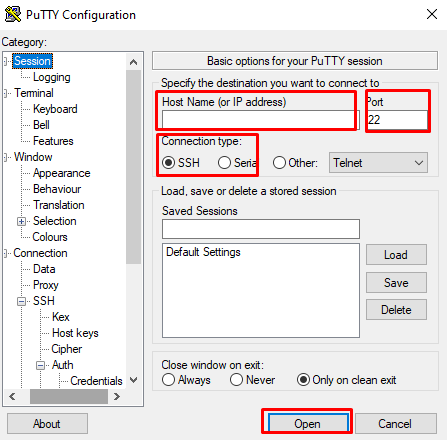
Open PuTTY, enter the IP address and username of the Linux server in the Hostname section.
Set the connection to SSH and port to 22.
Click on Opent o make the connection.
Navigate to the Source Directory:
Use the cd command to navigate to the directory where your files are located.
cd path to/source directory
Copy Files to the Destination Directory:
To copy files from the source directory to the target directory, use the cp command.
cp path to/source directory :/path to/destination/directory/
Replace /path to/destination/directory with the destination directory exact path.
Verify the Copy:
To ensure that the copy was successful, use the ls command to list the files in both the source and destination directories.
In conclusion, you can now copy the file from the one directory to another on Linux operating system. This process is essential for keeping an maintaining file structure, installing applications, and safeguarding data integrity. Mastering file manipulation commands like cp while users navigate the Linux command line via PuTTY improves their ability to efficiently maintain Linux servers.