In today’s fast-paced world, parents and schools must work together to ensure the safety and efficiency of student pick-ups. One tool that has become increasingly popular for managing school dismissals is School Dismissal Manager (SDM). This platform enables schools to manage how students are picked up, ensuring that each child follows a predetermined dismissal process while giving parents control over their child’s pick-up plans. In this blog, we will discuss practical tips for parents to use School Dismissal Manager effectively, and how the platform can streamline communication between families and schools.
What is School Dismissal Manager?
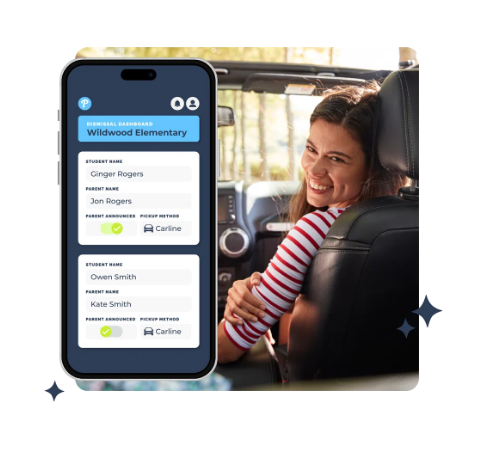
School Dismissal Manager is an online tool designed to help schools manage student dismissal efficiently. It allows parents to specify how their children will leave school at the end of the day, whether through car pick-up, bus, daycare, or other arrangements. By using this platform, parents can communicate their child’s dismissal plans clearly and securely, while schools can reduce errors and ensure every child gets to the correct destination safely.
Why Should Parents Use School Dismissal Manager?
Using School Dismissal Manager offers several advantages for both parents and schools:
- Safety: Ensures that children are picked up by the right person and in the right manner.
- Efficiency: Streamlines the dismissal process, reducing delays and confusion at the end of the school day.
- Real-time updates: Parents are notified of any changes to their child’s dismissal plan, providing peace of mind.
- Emergency alerts: In case of emergencies, the system can send immediate alerts to parents regarding any changes to pick-up plans.
Now that we understand the importance of School Dismissal Manager, let’s explore some tips for parents to use it effectively.
1. Familiarize Yourself with the Platform
Before the school year starts or when you're introduced to the platform, take the time to explore School Dismissal Manager thoroughly. Understanding how to log in, update pick-up preferences, and manage emergency contacts is essential. Schools often provide tutorials or user guides to help you navigate the system. Don’t hesitate to contact the school’s support team if you have any questions about how to use it.
2. Update Dismissal Plans Regularly
Your child’s dismissal arrangements may change throughout the school year due to various reasons: a change in your work schedule, a shift in after-school activities, or simply needing someone else to pick up your child. Make sure to update the platform with the correct information whenever there is a change in how your child will leave school. This will prevent confusion and ensure that your child is dismissed as per your updated instructions.
Most platforms allow you to update dismissal plans well in advance or even the day of, so be proactive in managing your preferences. If possible, set reminders for yourself to make these updates regularly, particularly if your child’s schedule changes weekly.
3. Set Up Emergency Alerts
One of the most beneficial features of School Dismissal Manager is its emergency alert system. Should there be any disruptions in the school’s schedule (e.g., weather-related closures, early dismissals, or safety concerns), the system can notify parents instantly. Make sure you enable emergency notifications so you can stay informed of any urgent updates. This feature is especially important when dealing with unexpected situations like school closures or changes to the dismissal procedure due to emergencies.
4. Designate a Primary Pick-Up Person
For many families, the pick-up routine might not always involve the same person every day. You might alternate between picking up your child, having a grandparent or sibling pick them up, or using a carpool system. To avoid confusion, assign a primary pick-up person in the School Dismissal Manager for each day of the week. This ensures that in case of an emergency or last-minute change, the system has a clear record of who will pick up your child.
Additionally, make sure that anyone authorized to pick up your child is also added to the platform. This will help prevent mix-ups or delays if someone else comes to pick up your child.
5. Use the "Same Plan Every Day" Option
If your child has a consistent dismissal plan each day (for example, they always take the bus home), you can use the "Same Plan Every Day" option to save time. This feature allows you to set a recurring pick-up arrangement for the entire week or month, so you don’t need to enter the same information daily. It's an easy way to ensure that the dismissal process is automated and hassle-free.
6. Check for Changes and Notifications
Always check your email or text messages for updates from the school, especially if there is a schedule change or emergency. In many cases, schools may need to modify the dismissal plans due to special events, weather disruptions, or other factors. By keeping an eye on the notifications sent through School Dismissal Manager, you can be sure you’re informed in real-time and can adjust accordingly.
7. Be Punctual for Pick-Ups
While School Dismissal Manager helps ensure that your child is safely dismissed, the platform cannot control how quickly you pick them up. Being punctual is critical. Arriving late can cause stress for your child and complicate the school’s dismissal process, particularly if they need to wait in a designated area. Set reminders to leave your house in time to meet the dismissal window and reduce the chance of delays.
8. Ensure That All Emergency Contacts are Current
In the event of an emergency, having up-to-date emergency contacts in the system is vital. Make sure that all contact information for you, your spouse, relatives, or anyone else who may need to pick up your child is current and correct. This ensures that if something unexpected happens and you can’t pick up your child yourself, the school will know exactly who is authorized to do so.
9. Keep Communication Open with the School
While School Dismissal Manager is an excellent tool, it’s still important to maintain open lines of communication with the school. If your child has a special requirement (e.g., they need to be picked up at a specific time for an appointment), notify the school as soon as possible. Ensure that the school has the correct information and is aware of any nuances in your child’s dismissal plan.
Frequently Asked Questions (FAQ)
1. What is School Dismissal Manager?
School Dismissal Manager is an online platform that helps schools manage student dismissals. It allows parents to specify how their child will be picked up from school, whether it’s by bus, carpool, daycare, or another arrangement. It aims to improve safety and streamline the dismissal process.
2. How do I use School Dismissal Manager?
To use SDM, log in to the system provided by your child’s school, and select your child’s dismissal preferences. You can update these preferences as needed, ensuring your child follows the correct pick-up procedure each day. The platform can send alerts for emergencies or changes to the dismissal schedule.
3. Can I change my child’s dismissal plan during the day?
Yes, most schools allow you to make changes to your child’s dismissal plan throughout the day, although it’s best to make changes as early as possible to avoid confusion. Check the system’s policies for specific deadlines or procedures.
4. Is my child’s safety ensured using School Dismissal Manager?
Yes, School Dismissal Manager adds a layer of safety by ensuring that children are dismissed according to authorized plans. The system sends alerts and notifications to keep parents informed of any changes or emergencies. It also helps schools track who picks up each child, minimizing errors.
5. How does the emergency alert system work?
The emergency alert system notifies parents immediately in case of unexpected situations like school closures, safety threats, or last-minute schedule changes. Make sure to enable alerts so that you receive these notifications promptly.
Conclusion
By using School Dismissal Manager and emergency alert system for schools effectively, parents can ensure a smoother, safer, and more organized pick-up process. By staying updated on changes, keeping information accurate, and utilizing key features like emergency alerts, you can make sure that your child’s dismissal process is as seamless as possible. This platform not only improves the efficiency of school dismissals but also enhances communication between parents and schools, ensuring that every child arrives safely in the hands of the right guardian.