It’s no secret that quality assurance automation is rising in the software development lifecycle. This article offers an overview of the best automated QA testing tools, explores their pros and cons, and offers a glimpse of which tool might be the one that could help you achieve better results in testing. It’s worth noting that it’s still essential to have a robust manual testing process since automation complements, rather than replaces, manual testing. Furthermore, data-driven testing can optimize the process by utilizing varied data sets, making it adaptable and dynamic.
Automation testing is using software to test another software. If applied correctly, the automation strategy helps reduce costs and improve the overall engineering and testing culture. Playback tools can also streamline the process, although it’s essential to understand the underlying mechanisms.
However, when choosing the right automation solution, it is easy to get lost in the ocean of modern QA automation software on the market. Here, we have selected some of the top automation testing tools that could help take over the time- and labor-consuming tasks and boost the general performance and functionality of the product.
The 4 Questions To Ask Yourself When Choosing a QA Automation Tool
It is always a good idea to start with the four WHs (What, Who, When, Why) when it comes to selecting the proper automation tool that would best fit the needs of the project. So let’s briefly dwell on each of them:
WHAT is being tested?
The “what” question comes down to whether you are testing web-based, mobile-based, or desktop applications and what layer of the product you are testing: UI, service/integration, units, end-to-end, etc. API testing is crucial to ensure that different software components communicate seamlessly in today’s interconnected world. It doesn’t mean that only one tool can be used to test those, but the question of “what” always comes among the first ones when choosing.
WHO is testing?
Who is going to work with the automation testing tools? Are we talking about qualified testers only? Or is it a junior in the early stages of their career? Are there non-technical members of the team who should be involved in the testing process and eventually have access to interpreting the results?
The “who” is also about the language of testing. And the fact that there should be people who know a certain scripting language on the team is a definite priority. Starting with or employing the tool or framework that supports the tester’s abilities is always easier.
The most popular languages used for automation testing include Java, JavaScript, Ruby, C#, Python, and PHP. Within the PHP ecosystem, tools like Codeception not only support web application testing but also provide capabilities for writing unit, functional, and acceptance tests. Additionally, familiarity with platforms and frameworks like .NET can be valuable. Moreover, tools today cater to a broad audience, with some allowing non-coders or even offering codeless solutions to deal with test creation.
This question is about two important things: how well the tool you work with inscribes itself into the processes of continuous development and integration, and how well it functions together with programmers’ tests. Thus, for example, it is really helpful to know if the tool offers version control and data history if necessary.
WHY is the testing needed?
This question concerns two important things: how well the tool you work with inscribes itself into continuous development and integration processes and how well it functions with programmers’ tests. Thus, knowing if the tool offers version control and data history, if necessary, is helpful. In general, continuous testing, a part of the DevOps culture, ensures that software is always in a deliverable state.
Open-Source vs. Commercial QA Automation Software
Another criterion to consider is the software’s value. Free automation tools like Selenium or Protractor are quite popular in the community of testers.
There are a lot of benefits to using open-source software, such as better pricing for licensing and the ability to create tailored solutions or extended collaboration.
However, the drawbacks of using open-source automation tools could be quite significant.
Security is the most important one. Thus, open-source QA automation tools might not be the right fit for projects that pay close attention to security parameters, scalability, robust features, and dedicated support. In this case, an enterprise-grade tool would be a better fit. Other disadvantages of open-source tools include time-consuming setup, limited feature availability, and non-specific or incomprehensible reporting.
A free automation testing solution can benefit individual testers and small or middle-sized businesses. Still, it’s a good idea to remember that commercial software is big business-oriented, secure, and if wisely chosen, has a full stack of features necessary for the target testing in question.
Comparative Descriptions of Best QA Automation Tools
1. Selenium

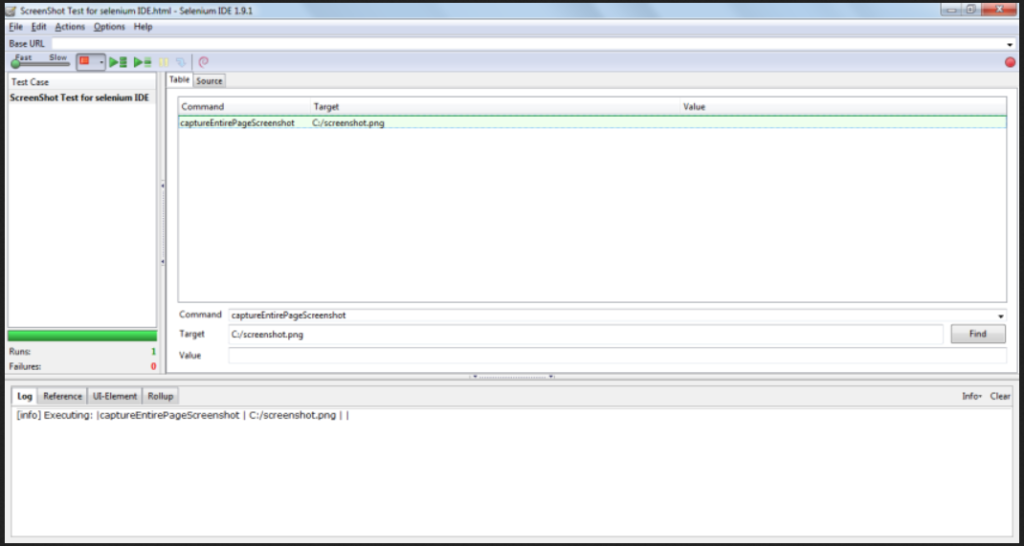
Selenium is still a number one choice among automation testing tools for web applications.
It’s a powerful drive for cross-browser testing and can be used for many test types, including compatibility, integration, smoke, sanity, end-to-end, and regression testing. It is compatible with all major browsers (Chrome, Firefox, etc.) and platforms, offering cross-platform capabilities, which is crucial in diverse device environments. One could say that Selenium, consisting of WebDriver, IDE, and Grid, is not a single tool but a toolbox for web browser automation.
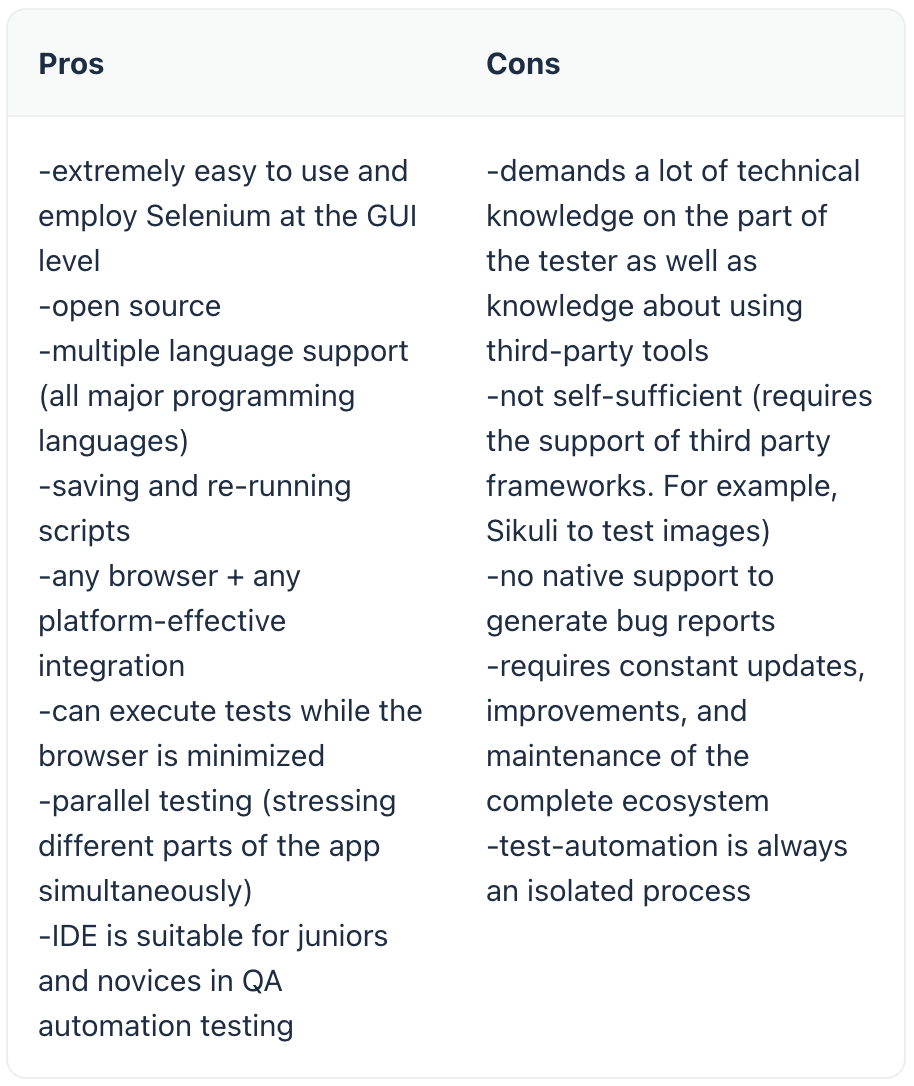
Selenium supports the creation of detailed test scripts, enhancing the workflow for a more organized testing process. It is license-free. However, the question of value is a bit tricky with Selenium as, being initially an open-source tool, it might require a workforce to set and maintain it. Here is a comparative chart representing Selenium’s pros and cons:
2. LambdaTest
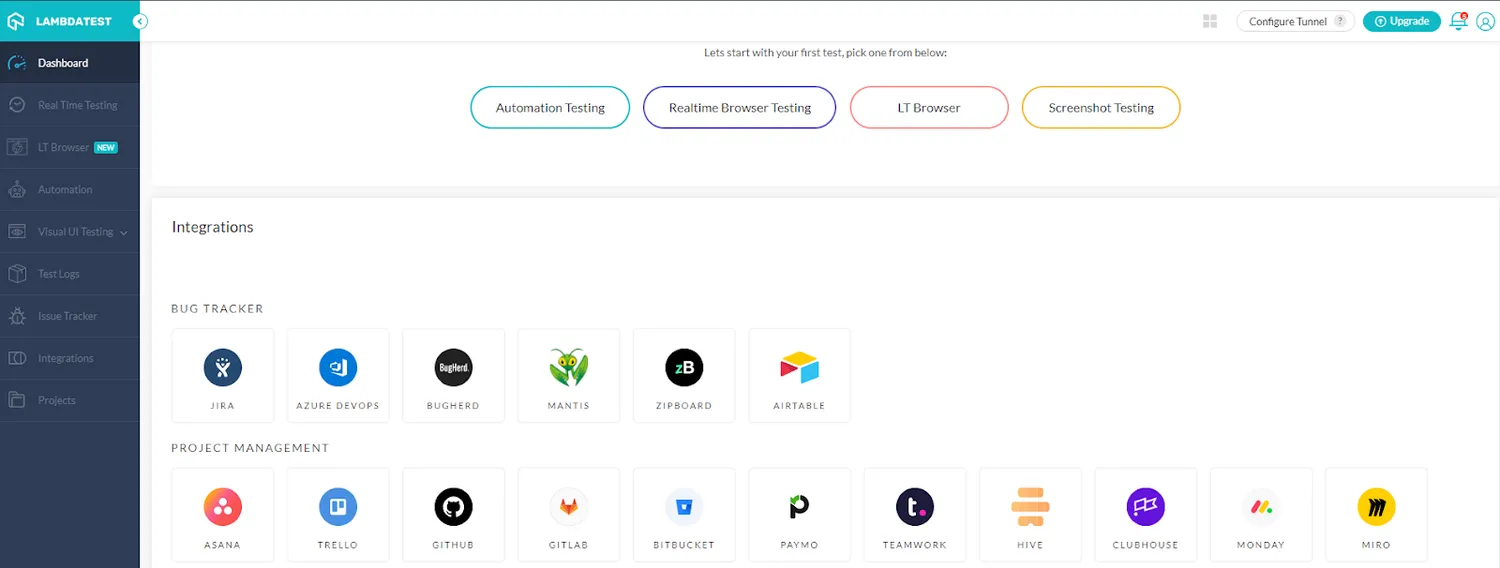
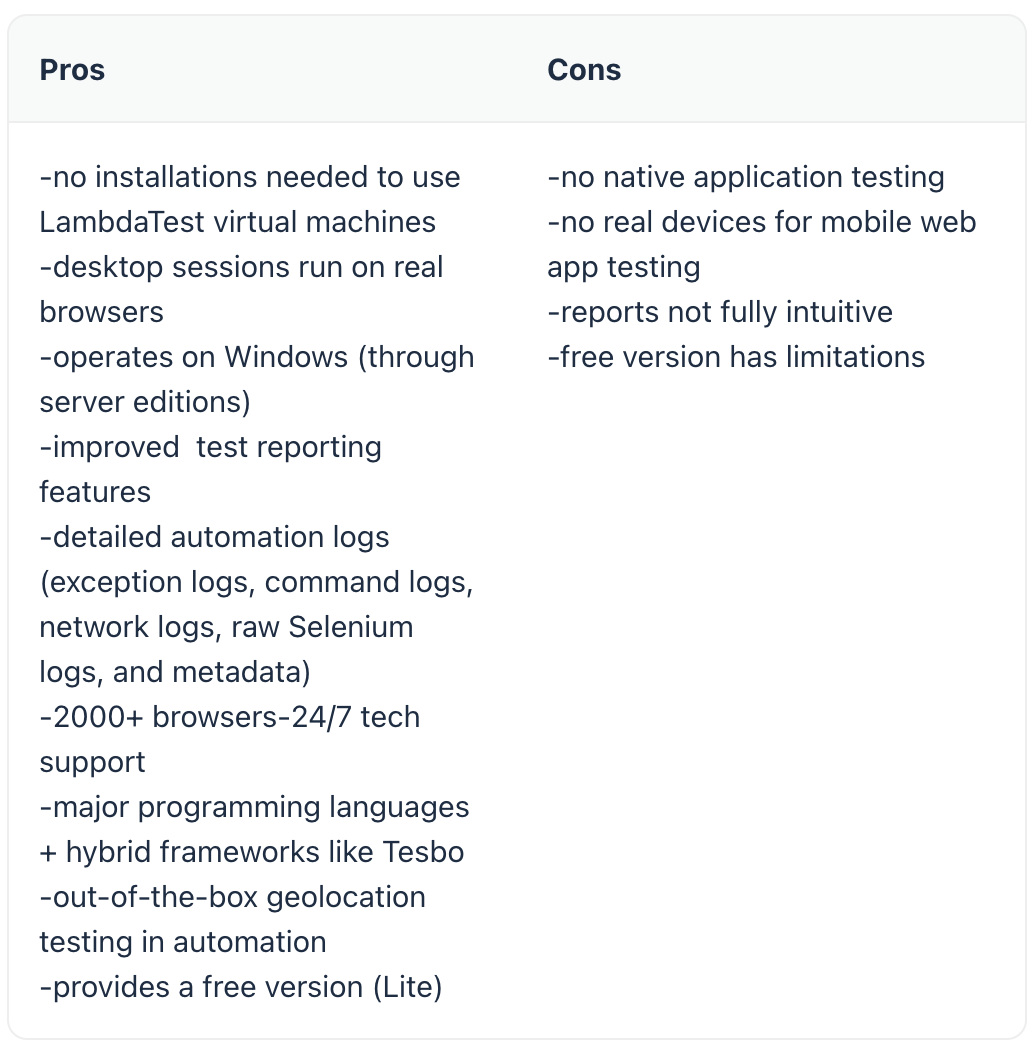
LambdaTest is an online cloud-based cross-browser testing platform for websites. It functions via Selenium Automation Grid. Online and cloud-based might be the keywords here, as it helps to avoid maintaining and running an in-house Selenium infrastructure. It has all the advantages of Selenium Grid, such as running parallel tests in multiple browsers and environments. This includes features for the latest and legacy browsers, and it supports all operating systems, including Microsoft, Linux, and MacOS.
Another thing about LambdaTest is that it has improved reporting capabilities since it offers not only command screenshots (as happens to be the case with Selenium) but also a video recording of the script execution. It’s one of the best automated performance testing tools for identifying speed and crashes. LambdaTest is also effective in identifying any issues in UI inconsistencies, design responsiveness, and code validation.
LambdaTest plans start from $15 a month. LambdaTest Lite, which is free, comes with limitations such as 60 minutes/month of real-time browser testing or six sessions of browser testing of 10 minutes each. The free test suite might be a good choice for individual testers or small businesses.
3. Cucumber
Cucumber is an open-source tool used for cross-browser user interface testing with a BDD (Behavior Driven Development) approach. Regarding BDD, the test scenarios are created before the actual code is written. Everything written in test scenarios must be presented in Given-Then-When-Gherkin syntax. Here’s an example of testing an ATM cash withdrawal scenario from Gherkin Open Studio:
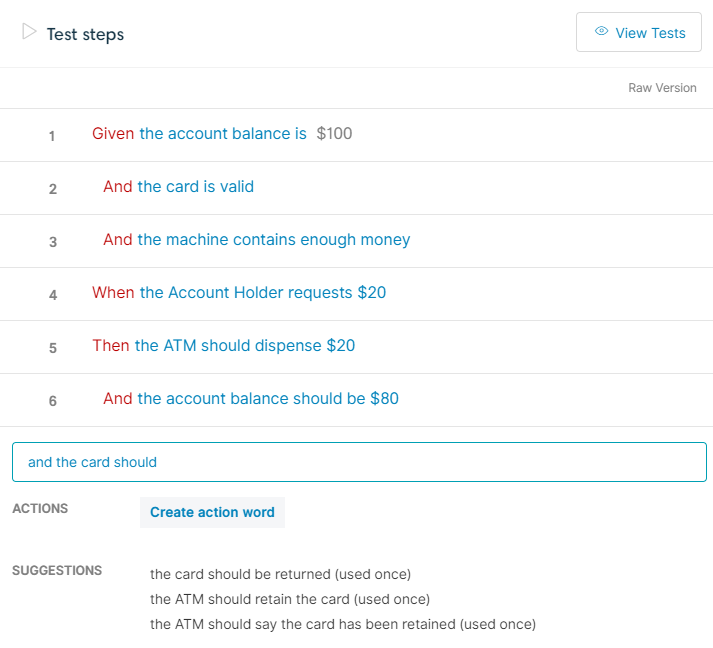
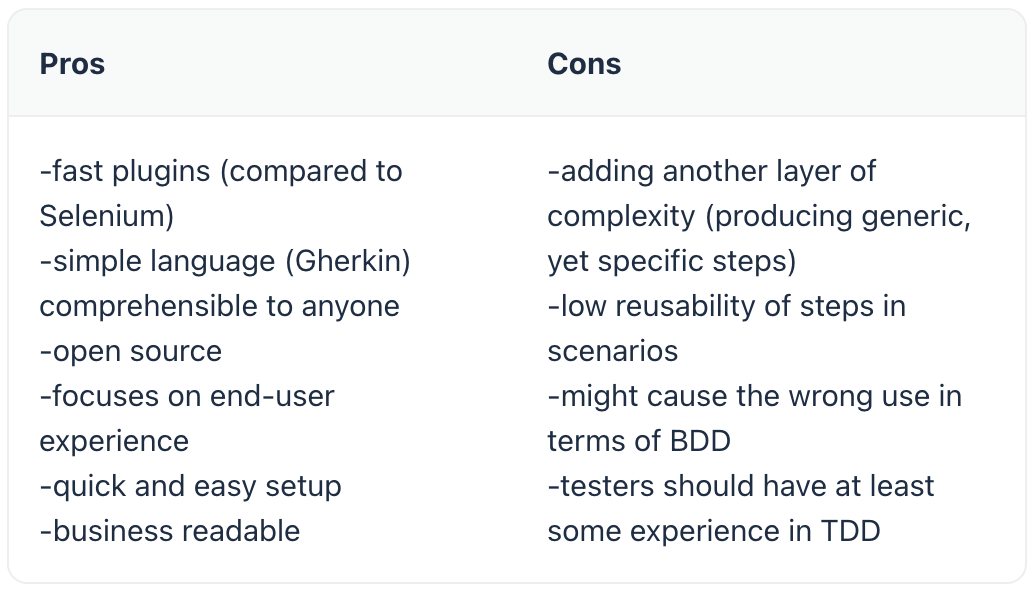
As Gherkin presupposes using “simple English sentences” for scenario creation, anyone on the team can read, understand, and contribute to the test case requirements regardless of their technical skills. Thus, due to its specific readable syntax, the Cucumber automation tool connects business and QA analysts, software engineers, automation and manual testers, product owners, and developers. Cucumber is relatively easy to use and might be a great tool for junior testers in UI test automation.
However, using Cucumber creates more dependencies, and parallelization could also become problematic.
4. Protractor
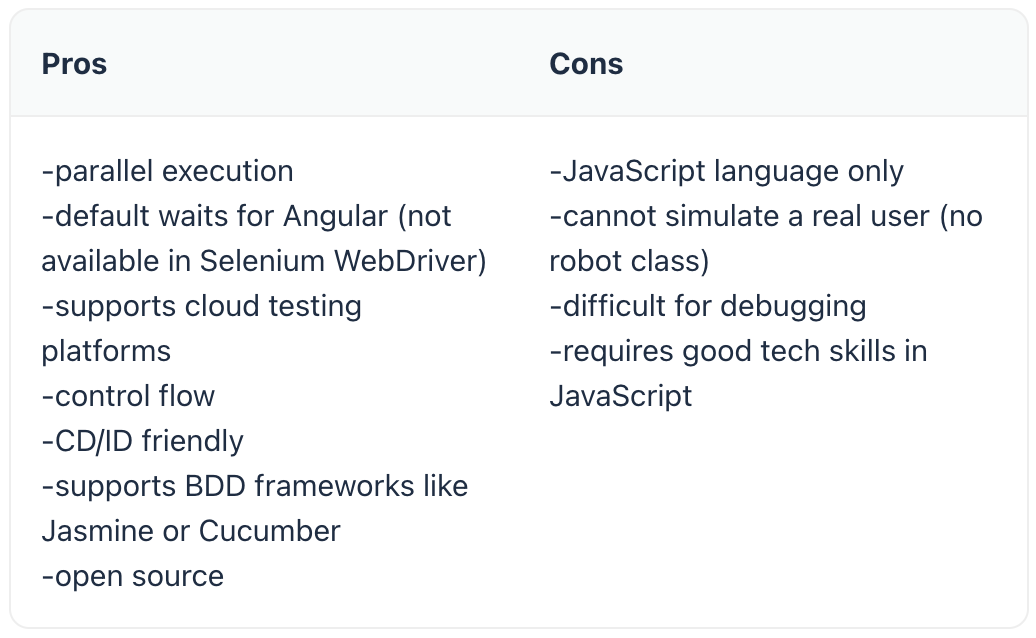
Protractor is one of the best integration testing tools for Angular and AngularJS applications. Integration testing aims to see how separate subsystems work when integrated into a single system. The legend claims the Google team initially developed Protractor to test Angular apps, and was later released as an open-source framework.
The most powerful feature of Protractor is that it hosts a combination of effective, smart tools and technologies such as NodeJS, Selenium WebDriver, Jasmine, Cucumber, and Mocha under one roof. Since Protractor was built as a wrapper around Selenium WebDriver, all the features supported in Selenium are supported along with the Angular features. Nowadays, Protractor supports non-angular as well as angular applications. Speaking of Angular-oriented features of Protractor, it can find and manage angular-specific attributes like ng-repeater, ng-controller, ng-model, and others using specific locators.
Another advantage of Protractor is that while testing, there is no need to add waits or sleeps to the test as it takes the pain of webpage and test synchronization off the tester’s plate. Protractor has been an official end-to-end automation testing tool for the Angular team for many years.