All you need is a wallet, and you’re all set to being your own bank. Fortunately, Stellar lumens, being one of the solid coins in crypto-space, there are plenty of options where you can store XLM.
Now, crypto wallets can be categorized into cold wallets, hot wallets, and paper wallets. Each has its own pros and cons.
In a nutshell, cold wallets are not connected to the internet, so they are suitable to long time holders or those people who don’t plan to actively trade their cryptocurrencies. Hot wallets on the other hand are connected to the internet like mobile, desktop, and exchange wallets. Paper wallets are the safest. It is an offline cold storage method of saving cryptocurrency where your public and private keys are printed on a piece of paper in a form of QR Code. To access your funds, you just need to scan the code.
Important Reminder: Never give your private key(seed phrase) to anyone. You will risk losing all your funds.
Cold Wallets
The typical example of cold wallets are hardware wallets. The most popular ones are Ledger, Trezor, and Tangem. I highly recommed either Trezor or Tangem because as much as Ledger is accessible with great user interface, it has compromised thousands of customers’ data.
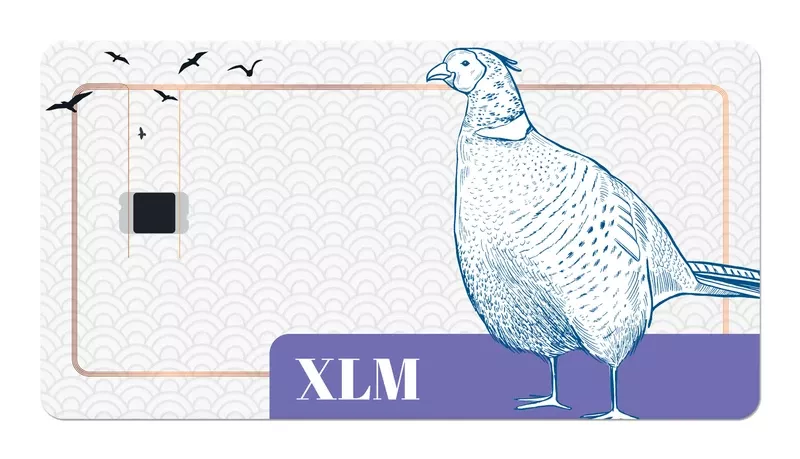
Now, take a look at this beautiful Tangem XLM card, and it only costs $19.99. It is cheaper than Ledger and Trezor.
What’s Tangem Card?
A Tangem Card is a highly secure hardware cold wallet made to store any kind of digital assets / cryptocurrency / Bitcoin on blockchain technology. With an NFC-enabled phone, you can verify your balance and extract your assets if you want to move them to another wallet. - Tangem
To learn how to use it, visit Tangem.
Hot Wallets
Recommended Mobile Stellar Wallets (Non-custodial)
With non-custodial wallets, you own your own private key. It is also known as the secret key. Never share this info with anyone or paste it on any site. You might lose your funds due to malcious hacks.
- Lobstr - is a non-custodial Stellar lumen wallet that is available as a web and mobile wallet. It has the best user interface, offers trade and swap feature, supports multisig, creating federated address, and buying lumens with Visa and Mastercard through its partner Moonpay. However I do not recommend it since the processing fee is high. To make sure that you can purchase as much as XLM without the huge spread or processing fee, you can buy lumens on other wallets or exchanges like Coinbase Pro or Anchorusd and send your XLM. Is there a con though? Well, the downside of Lobstr is it only supports creating one Stellar address.
- Solar - solar is both available on desktop and mobile. If you are looking for a simple XLM wallet where you just want to store your XLM for a long time, it is a great option. It also has a trade feature where you can trade your XLM with other assets issued on Stellar like Bitcoin and USDC.
- Interstellar - is available as a web wallet, desktop, and as a mobile app. It has full trading options like Lobstr and has PATH FINDER which means you can trade an asset even when there is no active market for it. However, Interstellar is more complicated than Lobstr and Path Finder does not work sometimes. On a positive note, Interstellar can create multiple Stellar addresses.
Below is a comparison of the three hot wallets:
Storing Your XLM on CeFi Centralized Finance)
The following are hot wallets where you can store your XLM, but you don’t own your private key, since they are custodial services. They are great for active traders.
- Anchorusd - store, trade(margin trading, stop loss, and limit orders) and earn 2.19% APY daily compounded interest on your XLM
- Nexo** - store, swap, and earn 6% daily compounded interest on your XLM.
- Celcius* - store and earn up to 4% on your XLM. If you sign up using my link, we will both earn $25 in BTC.
**Nexo has been accused of being shady because it doesn’t have an actual information where you can check their banking license.
*Celsius contains referral link
Web wallet extensions
Like Metamask for Ethereum, Stellar has Freighter and Albeido to store and access your lumens as well as sign transactions. You simply add them as extension on your browser. They are also non-custodial wallets, so you need to manage your private key carefully.
Choosing the Best Stellar Wallet
When it comes to choosing your Stellar lumen wallet, you have to consider the user interface, privacy, and security. You also need to test it by sending a small amount of XLM first. Furthermore, if you are going to buy a hardware wallet, it is highly recommended that you buy it from the main site. Do not buy it on Amazon or Ebay. Lastly, do not download any Stellar Wallets you see on Appstore or Playstore. Stick to the recommended ones. Take care of your precious lumens,