If you've spent any time reading about web scraping, sneaker bots, ad verification, or just plain old geo-unblocking, you've bumped into the phrase "residential proxy" more than once. And if you're new, chances are it sounded like jargon that everyone else already understood. No worries. This is the plain-English version.
Let's start from the floor.
First, what's a proxy at all
A proxy is a middleman. That's the whole idea, honestly. Instead of your computer talking directly to a website, your request goes to another server first, that server passes it along, and the answer comes back the same way. The website sees the proxy, not you. If you want the dry, technical definition, the Wikipedia entry on proxy servers lays it out well.
Why would anyone want a middleman? A few reasons. Privacy. Getting around region locks. Collecting data at scale without getting your one IP address blocked after twenty requests. Testing how your website or ad looks in another country. Stuff like that.
So a proxy hides your real IP by lending you a different one. Simple enough. The interesting part is whose IP you're borrowing.
The residential part
Here's where it splits. Proxies mostly come in two flavors that beginners care about: datacenter and residential.
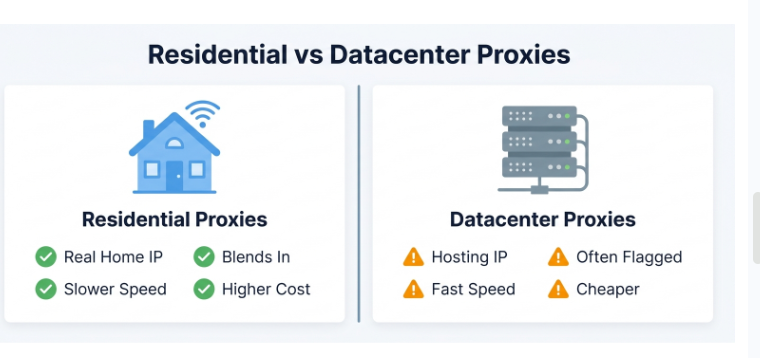
A datacenter proxy uses an IP that belongs to, well, a data center. A hosting company. Amazon, a cloud provider, some server farm somewhere. These are fast and cheap. The catch? Websites can smell them. IPs from known hosting ranges get flagged constantly because no normal grandma browsing Facebook is doing it from an Amazon server rack.
A residential proxy is different. It uses an IP address that a real internet provider handed to a real home. Your neighbor's Comcast connection, some apartment in Berlin, a phone plan in Brazil. To the website you're visiting, the traffic looks like an ordinary person sitting on their couch. Because, in a technical sense, it kind of is.
That's the magic and the whole reason people pay more for them. They blend in.
Okay but how do they actually work under the hood
Fair question. Let me walk through it without the fluff.
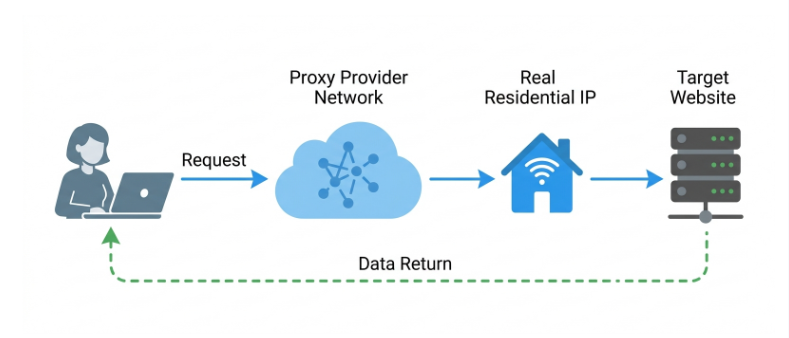
Say you want to scrape product prices from a retail site that blocks obvious bots. You send your request to the proxy provider's network. The provider routes it through one of the residential IPs in their pool. That IP belongs to a real device somewhere. The device forwards your request to the retail site. The site responds, thinking it's dealing with a genuine home user, and the data flows back to you through the same chain.
Now, where do those residential IPs come from? This is the part people skip over, and I think you should know it.
Most legit providers build their pools through consenting participants. People install an app, or opt into a program (often in exchange for a free VPN, some rewards, or cash), and agree to share a slice of their idle bandwidth. When they're not using it, their connection becomes part of the proxy pool. Some networks are peer to peer. Others lease IP blocks directly from ISPs.
The consent part matters. A lot. Sketchy networks have historically pulled IPs from people who had no idea their device was being used this way, sometimes through shady bundled software. So this isn't just an ethics lecture, it's a practical warning: the source of a provider's IPs tells you whether you're dealing with a real business or a headache waiting to happen.
Rotating vs. sticky sessions
Two more terms you'll see everywhere, and they're easy once someone explains them.
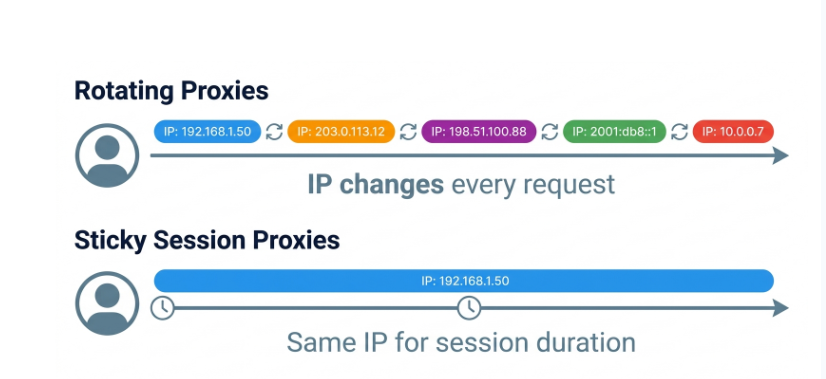
- Rotating means you get a fresh IP on every request, or every few minutes. Great for large scraping jobs where you want to spread traffic thin so no single IP looks suspicious.
- Sticky means you hold the same IP for a set window, maybe ten minutes, maybe an hour. You'd want this when a task needs continuity, like staying logged into an account or completing a multi-step checkout. Switching IPs mid-session is a fast way to get logged out or flagged.
Pick based on the job. There's no "better" one.
Residential vs. datacenter, side by side
Feature
Residential
Datacenter
IP source
Real homes / ISPs
Servers / hosting
Blends in?
Yes, very well
Often gets flagged
Speed
Slower
Fast
Price
Higher
Cheaper
Best for
Hard targets, geo-tasks
Bulk, easy targets
If your target site is chill and doesn't block much, datacenter is fine and you'll save money. If it fights back hard, you'll want residential. Plenty of people run both and route traffic depending on the site.
What people actually use them for
Real uses, not the movie-hacker fantasy:
- Web scraping and price monitoring at scale
- Ad verification (checking your ads show up correctly in different regions)
- SEO rank tracking from various locations
- Market research and travel fare comparison
- Testing localized versions of your own site
And yes, some folks use them for sneaker copping, ticket buying, and account management. That's a whole world of its own.
A quick note on ethics and legality, because I'd be doing you a disservice to skip it. Using proxies is legal in most places. Using them to break a site's terms of service, commit fraud, or scrape personal data can absolutely land you in trouble. The tool is neutral. What you do with it isn't. Scrape public data, respect rate limits, don't be a jerk, and you're generally in safe territory. When in doubt, read the target's terms.
Which provider should you choose
Here's the thing nobody tells beginners: the provider matters more than almost any technical detail you'll obsess over.
You can learn every setting and still get burned by a network with a small, overused, or ethically questionable IP pool. So what should you actually weigh?
Pool size and location coverage, first. A bigger pool spread across more countries means fewer overused IPs and better geo-targeting. Then pricing model, because some charge per gigabyte and others per IP, and the "cheap" option can get expensive fast depending on your usage. Success rate on your specific targets matters too, and honestly this is where a lot of marketing claims fall apart in real testing. Look at how they source their IPs (there's that ethics thing again), whether they offer a trial, and how responsive their support is when something breaks at 2 a.m.
Don't just take a provider's word for any of this. Marketing pages all say the same glowing stuff. What helps way more is looking at independent, hands-on comparisons where someone actually put the networks through their paces. A solid starting point is this breakdown of tested residential proxy providers, which is the kind of side-by-side reality check that saves you from picking on hype alone.
Start small. Grab a trial or the cheapest tier, throw your real target at it, and measure. Numbers beat promises every single time.
Wrapping up
Residential proxies are just borrowed home IPs that let your traffic look like a regular person's. That's the core of it. Datacenter proxies are faster and cheaper but easier to spot; residential ones cost more but slip through where it counts. Learn the rotating-vs-sticky difference, care about where the IPs come from, and test before you commit real money.
You don't need to master everything on day one. Get the concept, run a small test, and build from there. That's genuinely how most people who use these things well got started