Python provides multiple ways of testing emails. It has native options and the ability to integrate with a third-party tool, such as Mailtrap Email Testing.
I’ve recently explored a few approaches and will share my experience in this tutorial. I’ll cover native methods such as unit tests + aiosmtpd, Python’s subprocess function, as well as unit tests’ mock object library.
I’ll also demonstrate how to integrate and test emails in Python with Mailtrap Email Testing.
{% embed https://youtu.be/4-QZn5de72g %}
Native ways of testing emails in Python
Let’s start with the native ways of testing Python emails.
Using unit tests and aiosmtpd
Aiosmtpd is a library that lets you set up a local SMTP (Simple Mail Transfer Protocol) server. This will create a testing environment and handle email traffic internally. So, your test emails won’t reach the recipients. Refer to aiosmtpd’s GitHub page for more information.
I’ll create a test for a simple text email.
Prerequisites:
- Python 3.7 and up.
Note: I added the code snippets below in the tests.py file.
To install aiosmtpd, run the pip install aiosmtpd command.
Run the server with python -m aiosmtpd -n command.
I’ll use the unit test framework, a standard library in all versions of Python since 2.1, and the smtplib library. smtplib module uses standard RFC 821 protocol for formatting messages.
from unittest import TestCase

import smtplib
Create a class that will inherit the unit test from the TestCase object and configure the test case.
class EmailTestCase(TestCase):

    def test_send_email(self):

        sender_email = "your_email@gmail.com"

        receiver_email = "receiver_email@example.com"

        message = "This is a test email."
The sender_email and receiver_email variables can be populated with sample data as we simulate email sending. The message variable should contain the desired email body.
The next step is to send a test email using the smtplib.
with smtplib.SMTP(host="localhost", port=8025) as server:

            server.ehlo()

            server.sendmail(sender_email, receiver_email, message)
Here, we create a new instance of an SMTP client. By default, the server works on localhost with port number 8025. We also initiated an SMTP handshake with EHLO and added the sendmail method to send the emails. The sendmail method takes three arguments – sender_email, receiver_email, and message.
The script is now ready. Here’s the full sample:
from unittest import TestCase

import smtplib


class EmailTestCase(TestCase):

    def test_send_email(self):

        sender_email = "your_email@gmail.com"

        receiver_email = "receiver_email@example.com"

        message = "This is a test email."


        with smtplib.SMTP(host="localhost", port=8025) as server:

            server.ehlo()

            server.sendmail(sender_email, receiver_email, message)
To run the Python code, use the Run button.
If the test passes, you’ll see a message similar to the one below.

You’ll also see that the email was sent in the terminal.

Limitations of this approach
While this approach can be useful for testing simple email-sending scripts, I found that it has multiple limitations:
- Each time I ran the tests, I had to type aiosmtpd manually. This is okay for small and occasional tests, but it’s a huge pain during scaled testing.
- As we’re simulating the process of sending emails, we can’t test real-world email delivery.
- This setup doesn’t allow for testing high email load.
- It doesn’t allow testing advanced email functionalities or features, such as client rendering, for example.
Using Python’s subprocess function with unit tests and aiosmtpd
One way to automate processes while using unit tests and aisosmtpd is Python’s subprocess function. It allows us to run an external program from the Python script.
I first had to import the subprocess function and time module to improve and enhance the previous script. I’ll use the latter to wait for a few seconds before the server is ready.
from unittest import TestCase

import smtplib

import subprocess

import time
Then, I added the setUp method. It prepares the environment to run the server. subprocess.Popen function will execute the command in a new process.
In this case, the command is exec python -m aiosmtpd -n, meaning that the server will run in a new process.
shell-True will allow us to execute the command using the shell. We won’t have to create a new terminal. Rather, the process will run in the background.
As mentioned, time.sleep(2) will pause the execution of the script for 2 seconds to give the server enough time to be ready.
def setUp(self):

    self.process = subprocess.Popen(args='exec python -m aiosmtpd -n', shell=True)

    time.sleep(2)
The next step is to add a tearDown method, which will terminate the subprocess and wait for the process to finish termination.
def tearDown(self):

    self.process.kill()

    self.process.wait()
The test itself is essentially the same, but I added one more assertion. It checks if the server is working and the socket is open.
self.assertIsNotNone(server.sock)Here’s the complete code sample:
from unittest import TestCase

import smtplib

import subprocess

import time


class EmailTestCase(TestCase):

    def setUp(self):

        self.process = subprocess.Popen(args='exec python -m aiosmtpd -n', shell=True)

        time.sleep(2)


    def test_send_email(self):

        sender_email = "your_email@gmail.com"

        receiver_email = "receiver_email@example.com"

        message = "This is a test email."

        with smtplib.SMTP(host="localhost", port=8025) as server:

            server.ehlo()

            server.sendmail(sender_email, receiver_email, message)

            self.assertIsNotNone(server.sock)


    def tearDown(self):

        self.process.kill()

        self.process.wait()
At this point, we can run the script with the Run button.
The tests were successful, meaning the server was turned on and off as expected.

Running the script from the console
As you’ll notice, I used the Run button to run the scripts in the previous examples. I’ll add the if statement to run the code from the console, modify the unit test import, and reference the unittest.TestCase with the EmailTestCase class definition.
import unittest

import smtplib

import subprocess

import time


class EmailTestCase(unittest.TestCase):


    def setUp(self):

        self.process = subprocess.Popen(args='exec python -m aiosmtpd -n', shell=True)

        time.sleep(2)


    def test_send_email(self):

        sender_email = "your_email@gmail.com"

        receiver_email = "receiver_email@example.com"

        message = "This is a test email."


        with smtplib.SMTP(host="localhost", port=8025) as server:

            server.ehlo()

            server.sendmail(sender_email, receiver_email, message)

            self.assertIsNotNone(server.sock)


    def tearDown(self):

        self.process.kill()

        self.process.wait()


if __name__ == '__main__':

    unittest.main()
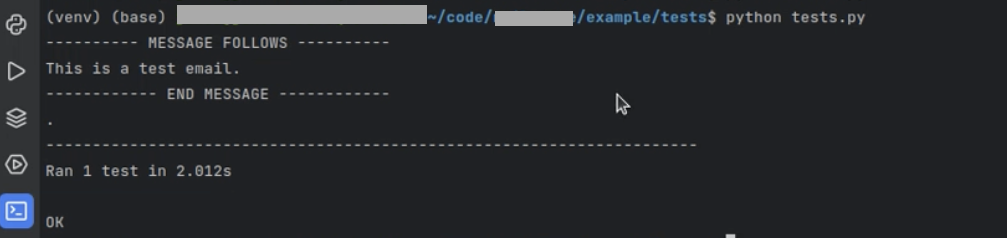
With the updated setup, we can now run the code directly from the console using the python tests.py command.
Testing if the script can read files
The last modification in the script was to enable it to read emails from the file. This would allow me to test if the variables in the template were substituted correctly. I went with the simple setup once again.
So, I created a new template file with only a message variable.
I went back to the tests.py file and added a with statement which would be responsible for opening and closing files.
with open('template.html') as file:

    template = file.read()
Using the format function, I added the message to the template.
template = template.format(message=message)And inserted the template into the sendmail function.
server.sendmail(sender_email, receiver_email, template)The whole script will look something like this:
import unittest

import smtplib

import subprocess

import time


class EmailTestCase(unittest.TestCase):


    def setUp(self):

        self.process = subprocess.Popen(args='exec python -m aiosmtpd -n', shell=True)

        time.sleep(2)


    def test_send_email(self):

        sender_email = "your_email@gmail.com"

        receiver_email = "receiver_email@example.com"

        message = "This is a test email."


        with open('template.html') as file:

            template = file.read()


        template = template.format(message=message)

        with smtplib.SMTP(host="localhost", port=8025) as server:

            server.ehlo()

            server.sendmail(sender_email, receiver_email, template)

            self.assertIsNotNone(server.sock)


    def tearDown(self):

        self.process.kill()

        self.process.wait()


if __name__ == '__main__':

    unittest.main()
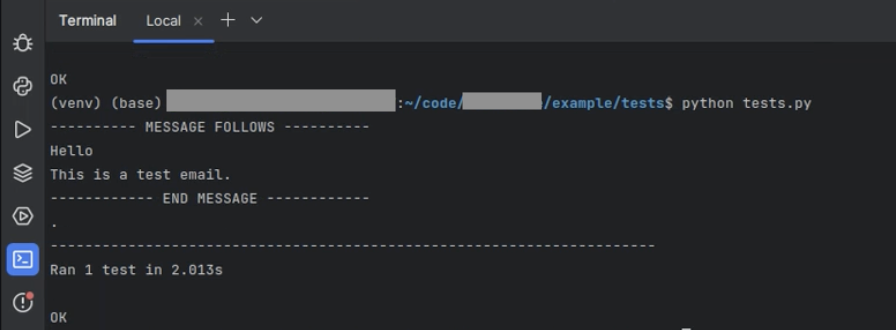
Run the code with python test.py and check the output. The message variable was replaced correctly, so the test was successful.
Limitations of this approach
Similar to using aiosmtpd and unit tests, this expanded approach also has its limitations:
- Doesn’t allow for testing how complex HTML will render on mobile or desktop devices;
- Doesn’t allow for deliverability testing;
- Doesn’t allow for checking client support for HTML emails;
- Doesn’t allow for testing the communication between the script and external mail servers;
- Relies on aiosmtpd and port 8025. Tests may fail if the server isn’t set up correctly.
Using the unit test’s mock object library
Another option for testing emails in Python natively is the unit test’s mock object library. It lets you mock the SMTP server connection without sending the emails.
Here’s the script:
import unittest

from email.mime.text import MIMEText

from unittest.mock import patch

import smtplib


def send_email(server, port, subject, message, from_addr, to_addr):


    smtp_user = 'username'

    smtp_password = 'password'

    msg = MIMEText(message)

    msg['From'] = from_addr

    msg['To'] = to_addr

    msg['Subject'] = subject

    with smtplib.SMTP(server, port) as server:

        server.starttls()

        server.login(smtp_user, smtp_password)

        server.send_message(msg)

class TestEmailSending(unittest.TestCase):

    @patch('smtplib.SMTP')

    def test_send_email(self, mock_smtp):

        # Arrange: Setup our expectations

        subject = "Test Subject"

        message = "Hello, this is a test."

        from_addr = 'from@example.com'

        to_addr = 'to@example.com'

        server = "sandbox.smtp.mailtrap.io"

        port = 587

        # Act: Call the send_email function

        send_email(server, port, subject, message, from_addr, to_addr)


        # Assert: Check if the right calls were made on the SMTP object

        mock_smtp.assert_called_with(server, port)

        instance = mock_smtp.return_value.__enter__.return_value

        instance.send_message.assert_called_once()

        call_args = instance.send_message.call_args[0]

        sent_email = call_args[0]


        # Verify the email content

        self.assertEqual(sent_email['Subject'], subject)

        self.assertEqual(sent_email['From'], from_addr)

        self.assertEqual(sent_email['To'], to_addr)

        self.assertEqual(sent_email.get_payload(), message)


if __name__ == '__main__':

    unittest.main()
The provided code defines a function and includes a test class, TestEmailSending, using Python’s unit test framework to test this function.
The send_email function takes server details, subject, message body, sender’s address, and recipient’s address as parameters, creates an email (MIMEText) object with these details, and then logs into an SMTP server to send it.
In the test case, the smtplib.SMTP class is mocked using the unittest.mock.patch, allowing the test to verify that the SMTP server is called with the correct parameters without actually sending an email.
The test checks if the send_message method of the SMTP instance is called correctly and asserts that the email’s subject, from address, to address, and payload match the expected values.
Limitations of this approach
- The mock object library isn’t sufficient for detecting issues with implementation;
- Doesn’t allow for checking client support for HTML emails;
- Doesn’t allow for testing how complex HTML will render on mobile or desktop devices.
Thank you for reading this part of the article! Read full version and find out how to test emails in Python with Mailtrap!