We all know that spam complaints are a nightmare for anyone sending marketing emails. But so are bounce rates, especially if they are high.
In today’s blog post, we’ll guide you through the maze of email bounce rates and provide useful tips for keeping them in check.
What is email bounce rate?
An email bounce rate is the percentage of emails that couldn’t be delivered from the total number of sent emails. Email bounce itself is a delivery failure, either temporary or permanent.
Let’s say you want to surprise a friend you haven’t seen for ages. You search for their address in your address book and head to their apartment. When you arrive, you find out that they don’t live there anymore. You go back home feeling frustrated.
Well, that’s what happens to your emails when they can’t reach your recipient’s email address. Sad bounced emails return back to you.
Generally, there are two types of email bounces:
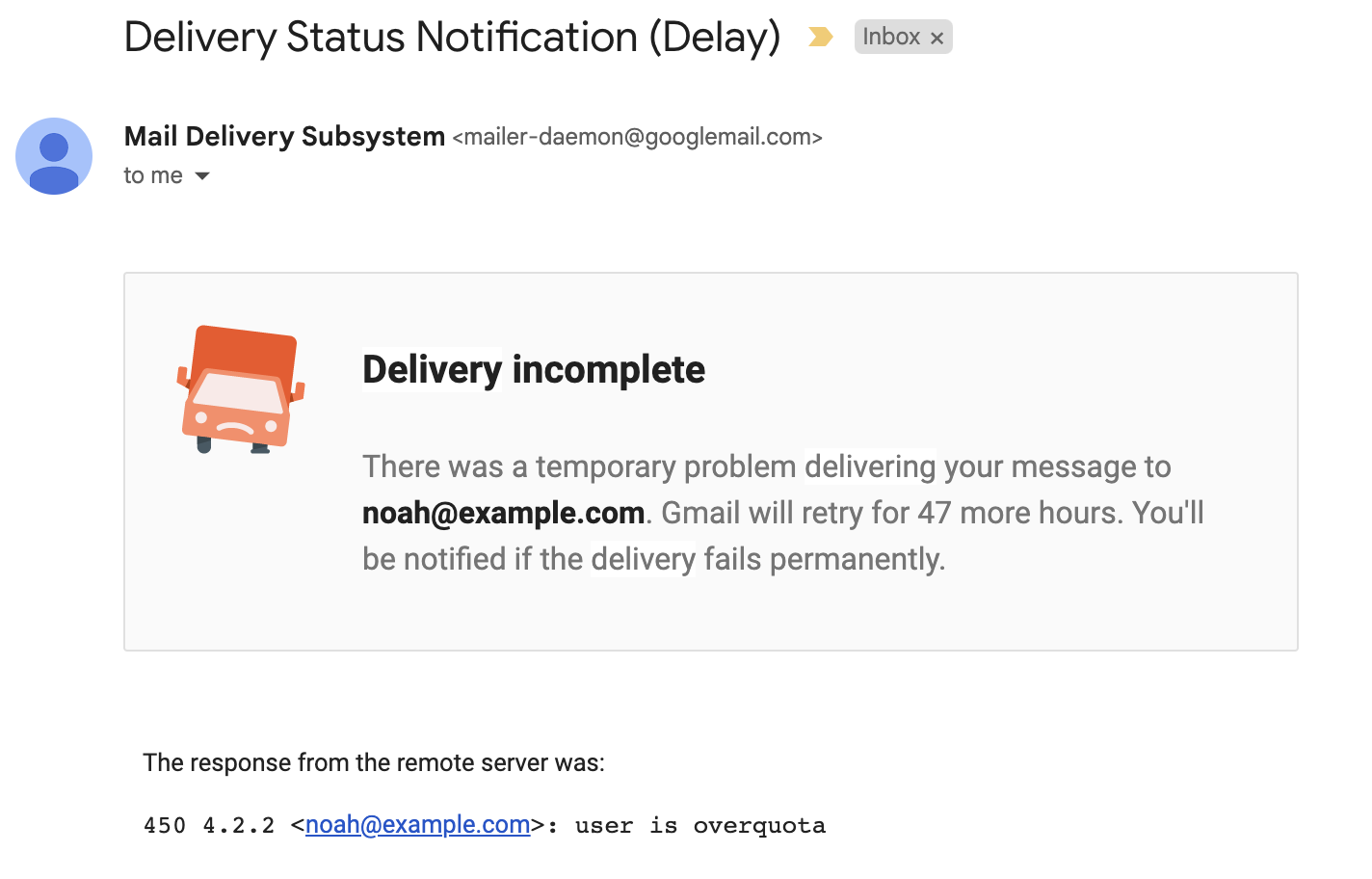
- Soft bounce: a temporary issue with delivery. It usually means that there’s a problem with the recipient’s email server or mailbox. Typical causes include full inbox, server overload or error, and spam filters. Since soft bounces are temporary, mail servers will attempt to deliver emails again later.
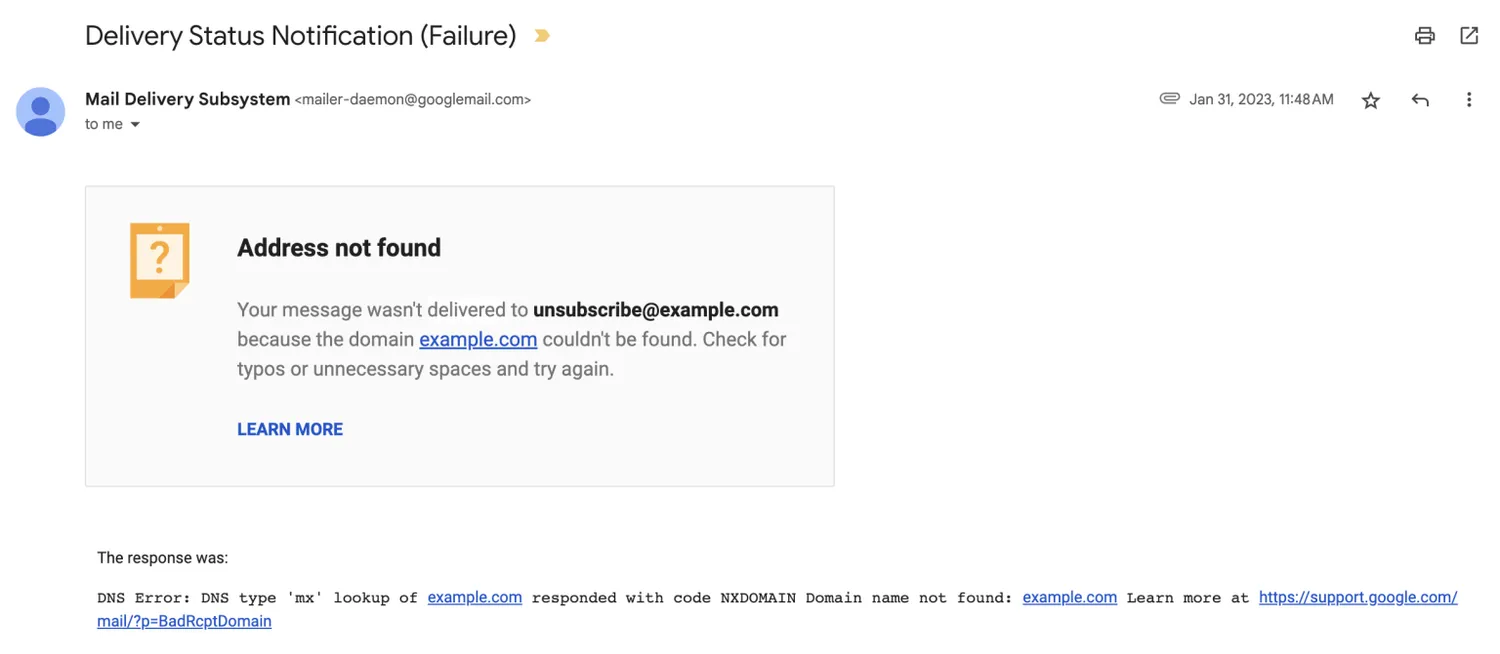
- Hard bounce: a permanent delivery failure. Hard bounces have a greater impact on sender reputation and email deliverability. Common causes include invalid email addresses, improperly configured (or not configured) email authentication protocols, or blacklisted IPs. Unlike soft bounces, mail servers won’t attempt to resend hard-bounced emails.
Read this blog post for more information on the differences between soft and hard bounces.
How to calculate email bounce rate
To calculate the email bounce rate, we have to divide the number of bounces by the number of total sent emails. Then we have to multiply the result by 100 to calculate the percentage. So, the formula would be:
Bounce rate = number of bounced emails ÷ number of emails sent × 100
If you send 1,000 emails and 100 of them bounce, the bounce rate would be 10%.
Those who send mass emails will probably have a hard time calculating bounce rates manually. If you’re sending emails from an email service provider (ESP), you should have statistical data for bounced rates.
Mailtrap Email Sending, for instance, has in-depth actionable analytics with drill-down reports and helicopter-view dashboards. That also includes email bounce rate data.
As an example, let’s see how to check your email bounce rate in Mailtrap.
- Sign into your account, choose Email Sending, and select ‘Stats’ in the left navigation panel.
- There, you’ll see the overall bounce rate for all domains in a selected timeframe. With quick filters, you can see stats for a specific domain.
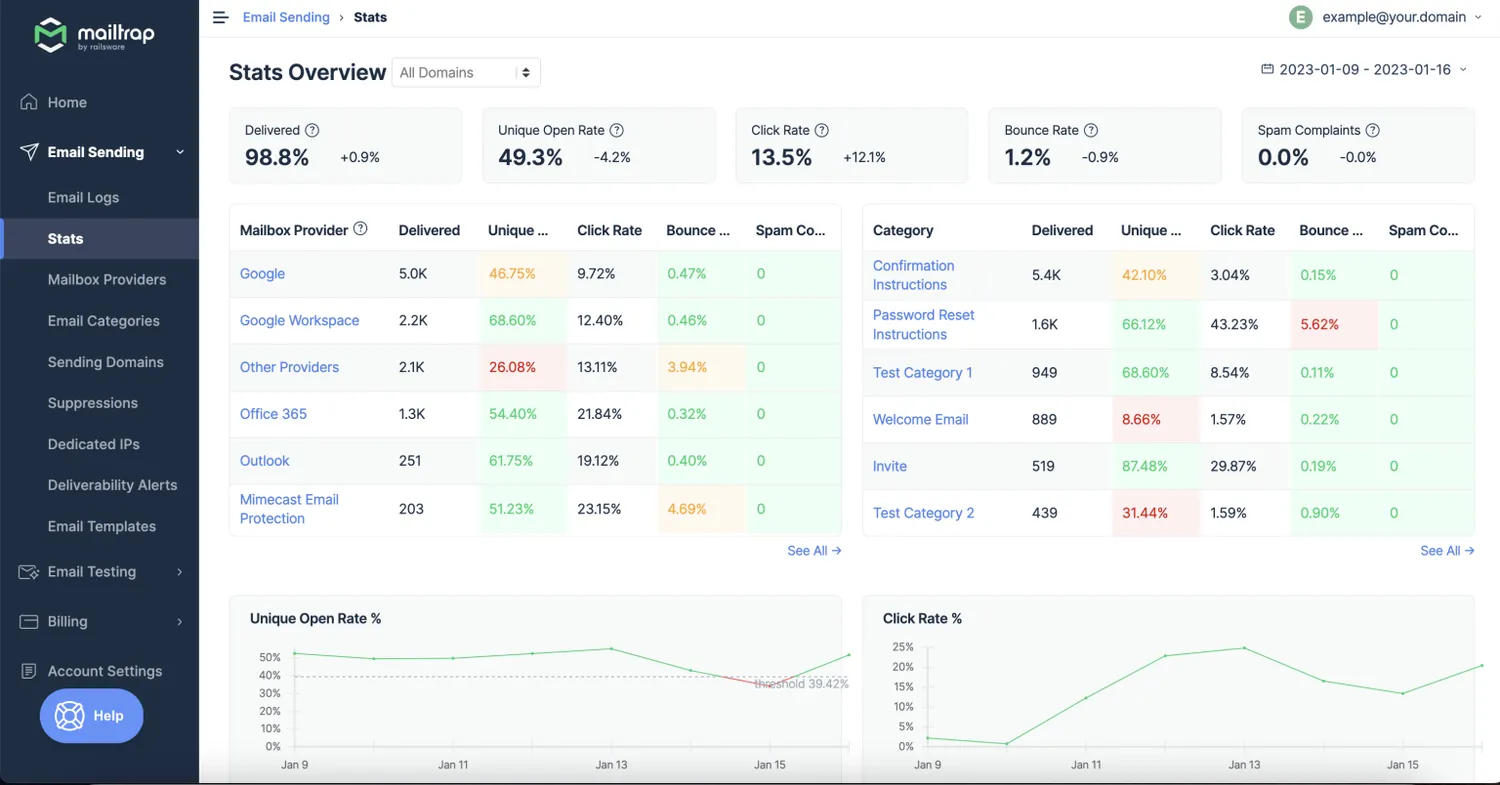
3. To explore trends, scroll down to find a dedicated chart for bounced rates. The critical threshold is 5% – the rates above that will be indicated with a red line.
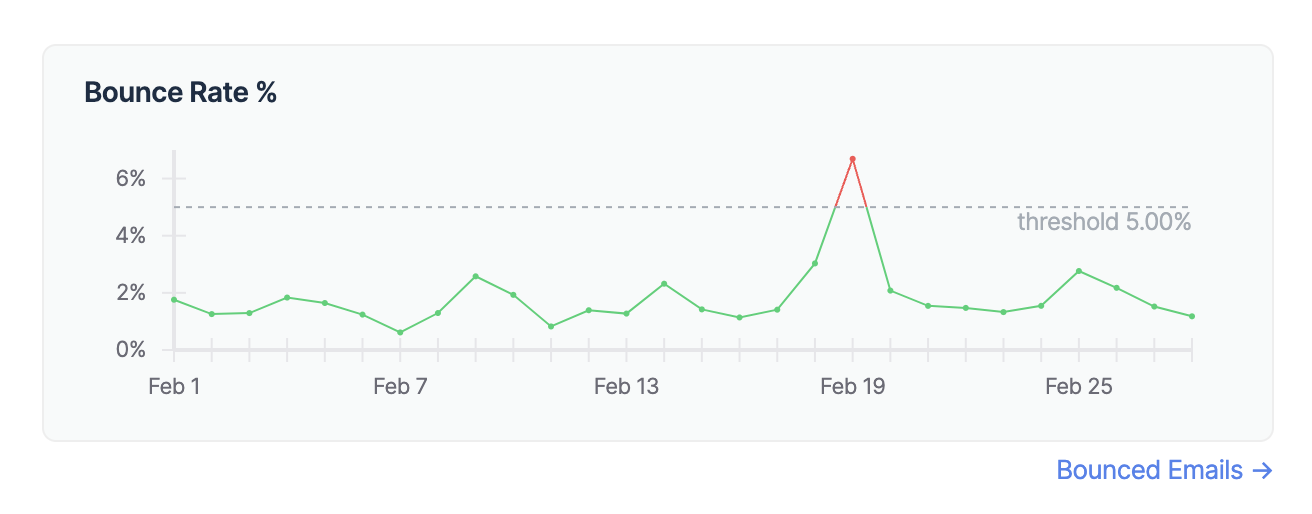
4. By clicking bounced emails, you’ll be redirected to Email Logs to find the reasons behind each bounce.
5. It’s also possible to check bounce rates for different mailbox providers and categories and filter them for a specific domain, time frame, category, or provider.
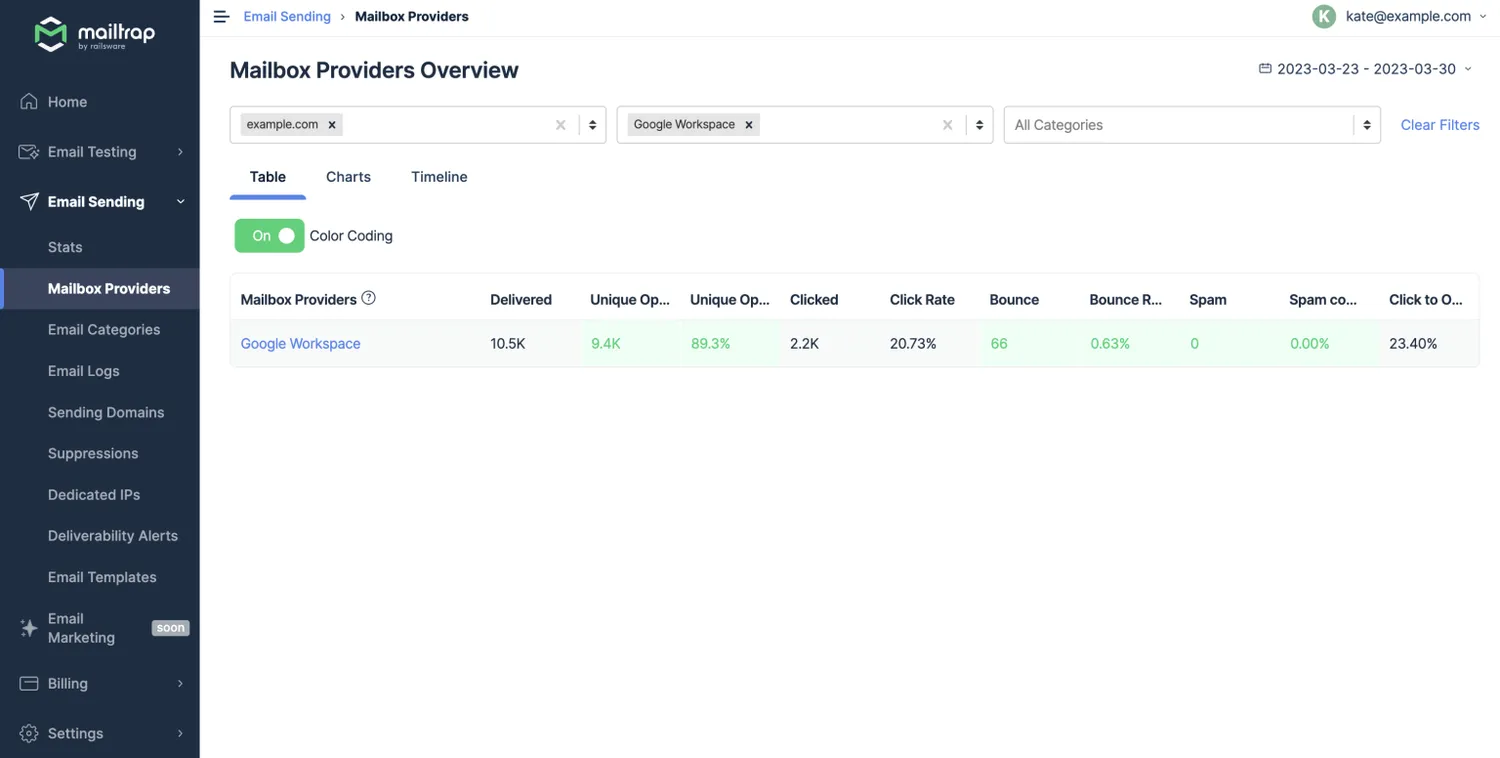
Email bounce rate benchmark
So, what is a good email bounce rate? Based on cross-industry research, anything below 2% is considered to be a normal bounce rate. 2% to 5% is a warning level, while above 5% is critical.
Email providers regularly conduct research to figure out typical email bounce rates. However, those reports are usually based on the campaign data gathered from their users. While the scope of the research makes us believe that the results are objective, we should still take those numbers with a grain of salt.
With that in mind, we decided to provide several examples of reports that have found typical bounce rates. That way, we won’t rely on one source of data.
Mailchimp email marketing benchmarks and statistics
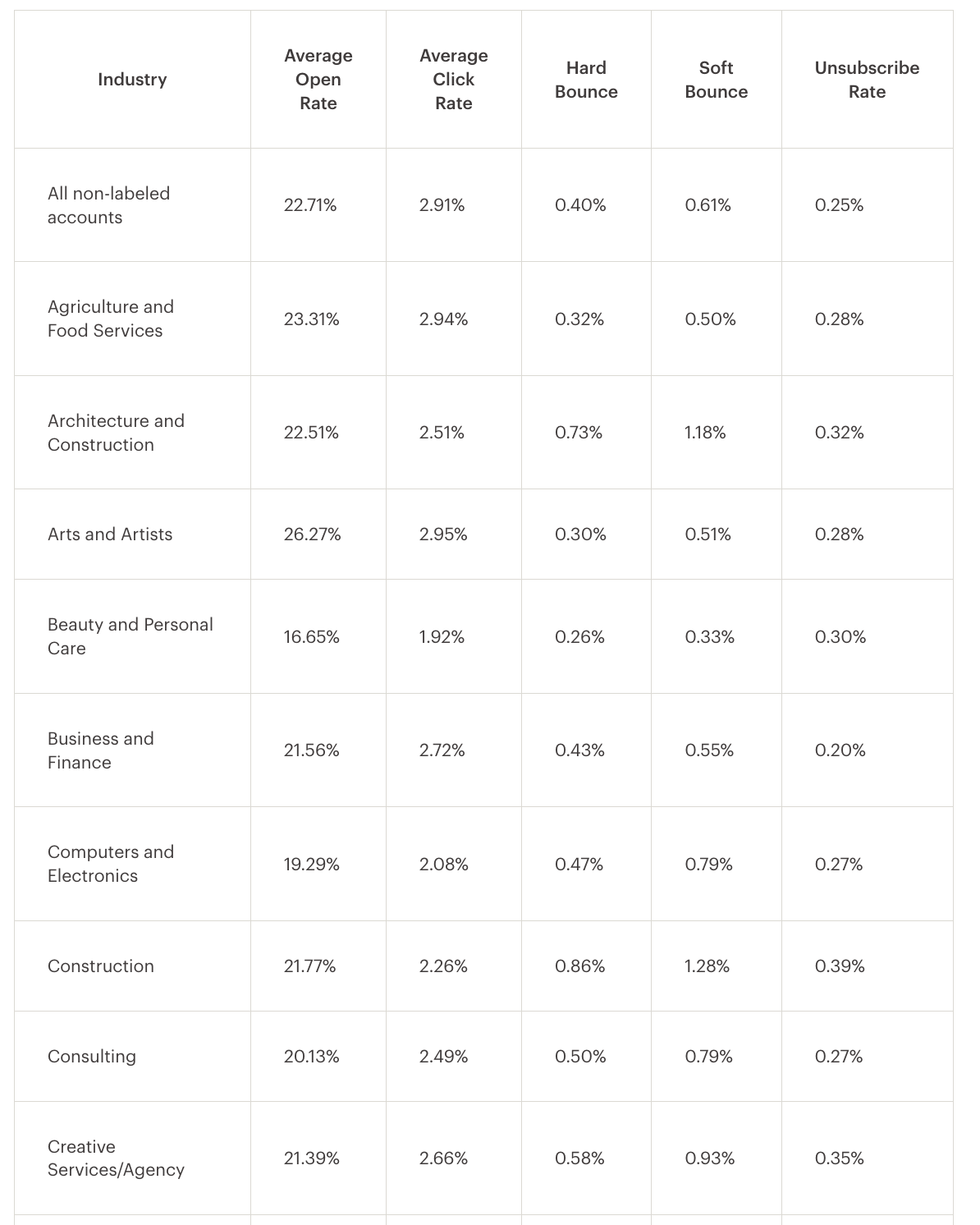
In 2019, Mailchimp created a comprehensive report on essential email marketing metrics, such as average open rates, click rates, soft and hard bounces, and unsubscribe rates. They analyzed campaigns with at least 1,000 recipients.
Mailchimp found that the Construction industry had the highest average hard bounce rate, amounting to 1.28%. The lowest, on the other hand, was in the Daily Deals/E-Coupons industry with 0.13%.
MailerLite email marketing benchmarks
MailerLite analyzed 2022 data from 40,000 accounts. They included the campaigns that were sent to at least 10 subscribers. As a result, their dataset included around 1M campaigns.
In their report, Publishing companies had the lowest bounce rates (0.2%), while the highest bounce rates (1.32%) were in Architecture and Construction industries.
Benchmark Email report
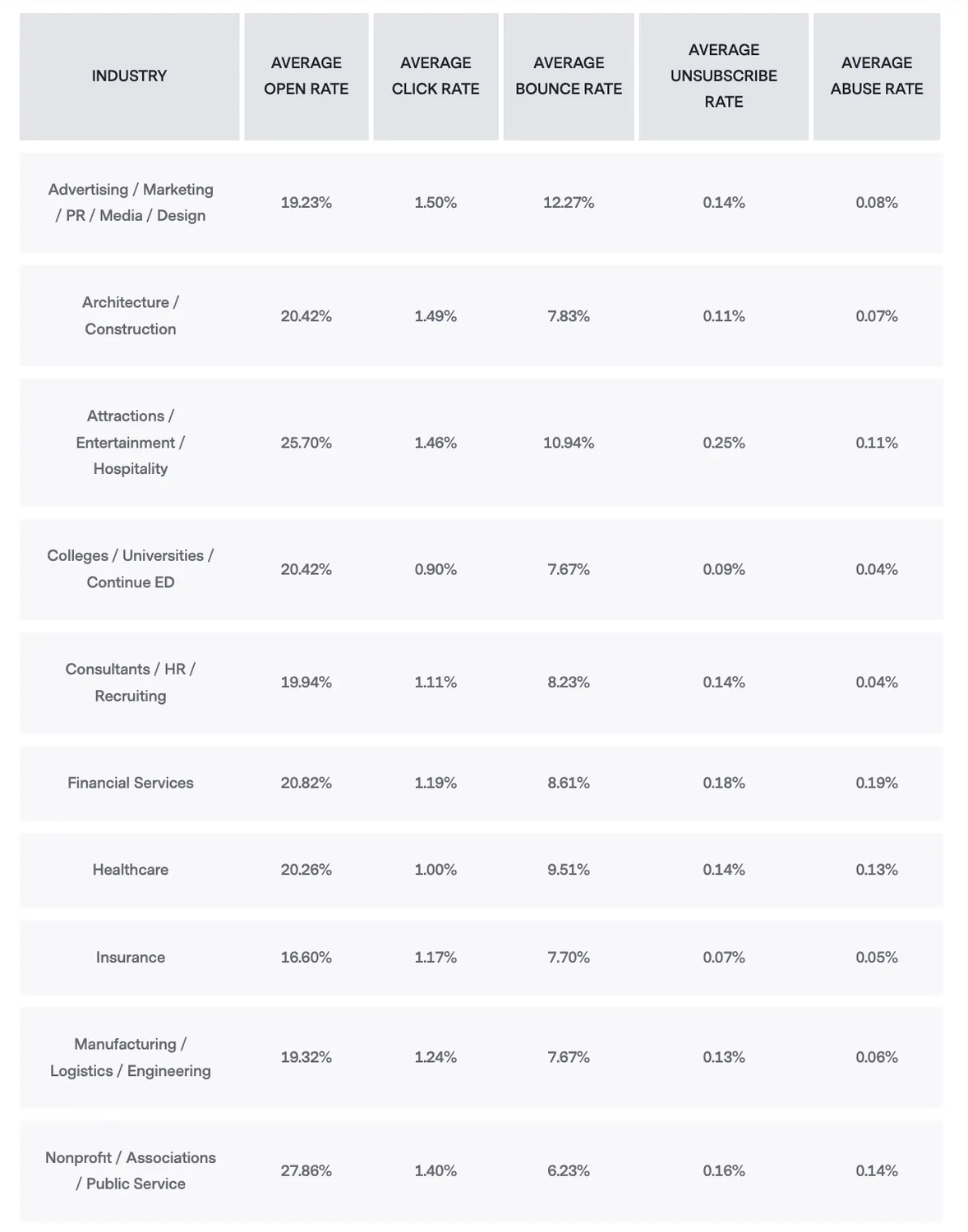
Benchmark email report analyzed a smaller group of users (≈7,470), and their numbers show a slightly different picture.
Advertising/Marketing/PR/Media/Design industries had critically high email bounce rates, averaging 12.27%. In their report, Retail/Consumer Services had the lowest average email bounce rate (6.08%).
Constant Contact average industry rates for emails
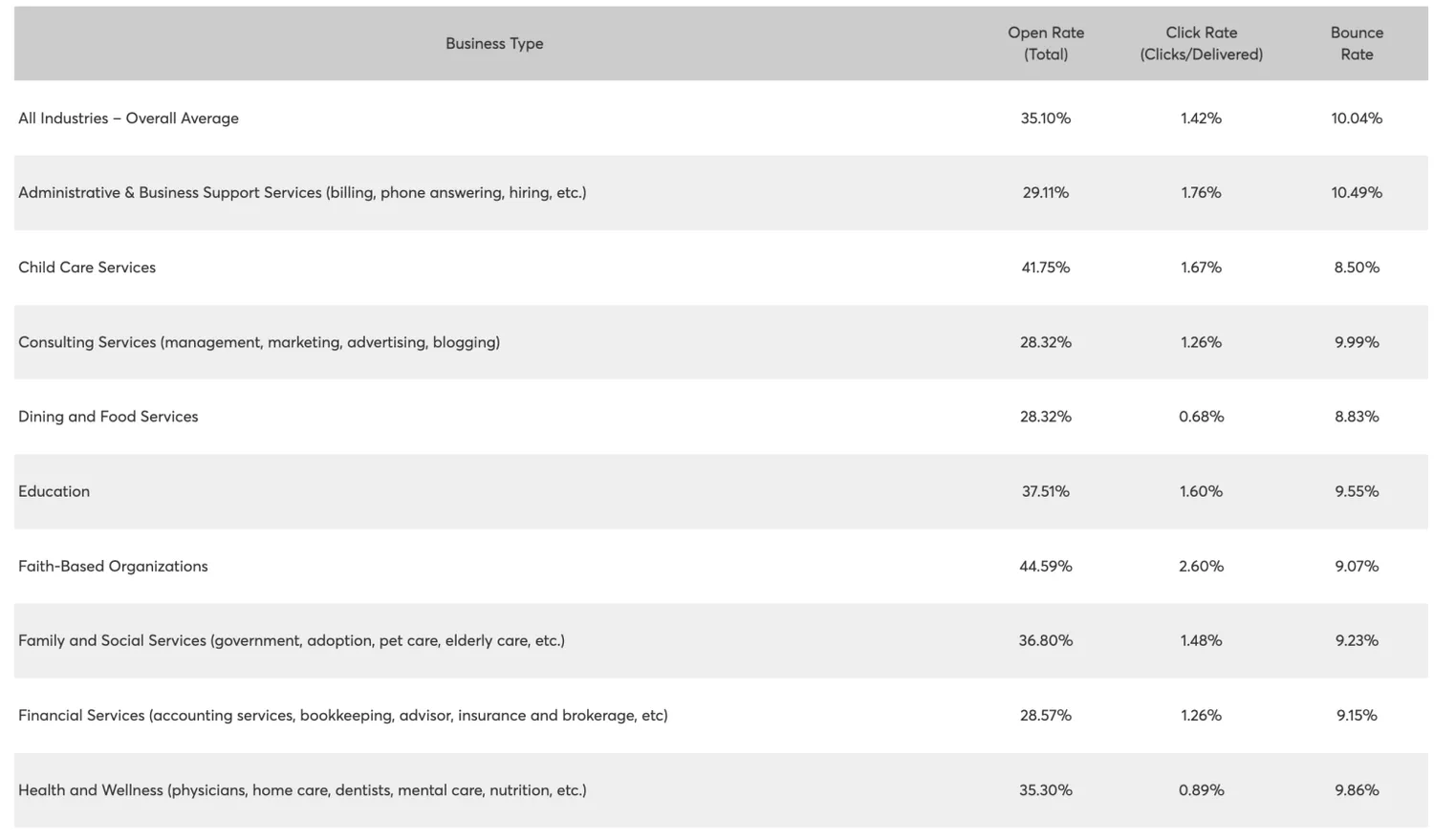
Constant Contact analyzes data from over 200 million emails each month. Their report shows higher bounce rates compared to that of Mailchimp and MailerLite as well:
- Legal Services – 16.27%
- Manufacturing and Distribution – 14.73%
- Real Estate – 12.72%
- Repair and Maintenance – 5.92%
We can make three main conclusions from the reports we saw above:
- The source of analysis makes a huge difference in average results;
- The acceptable email bounce rate is still below 2% regardless of industry averages;
- The bounce rates differ depending on the industry.
...
How to decrease the email bounce rate? 6 tips to follow
Not all is lost if your email bounce rates are high. By taking the necessary measures, you can gradually reduce them. Here’s how to improve email bounce rate and keep it as low as possible.
...
Test your emails before sending them to intended recipients
Testing your emails before sending them to recipients is always a good idea. It will help you eliminate any sending issues beforehand and test email bounce rate to some extent. There are two ways to go about it: messing with dummy email accounts and using dedicated tools. We don’t recommend the first option because it requires too much effort and doesn’t provide comprehensive insights.
One tool you could use is Mailtrap Email Testing. It’s part of the Mailtrap Email Delivery Platform. Email Testing provides you with a Sandbox to inspect and debug your emails in a staging environment. As it captures all the SMTP traffic, you can safely check the email-sending capabilities of your app and see if your emails get delivered to the inboxes.
Try Mailtrap Email Testing for Free
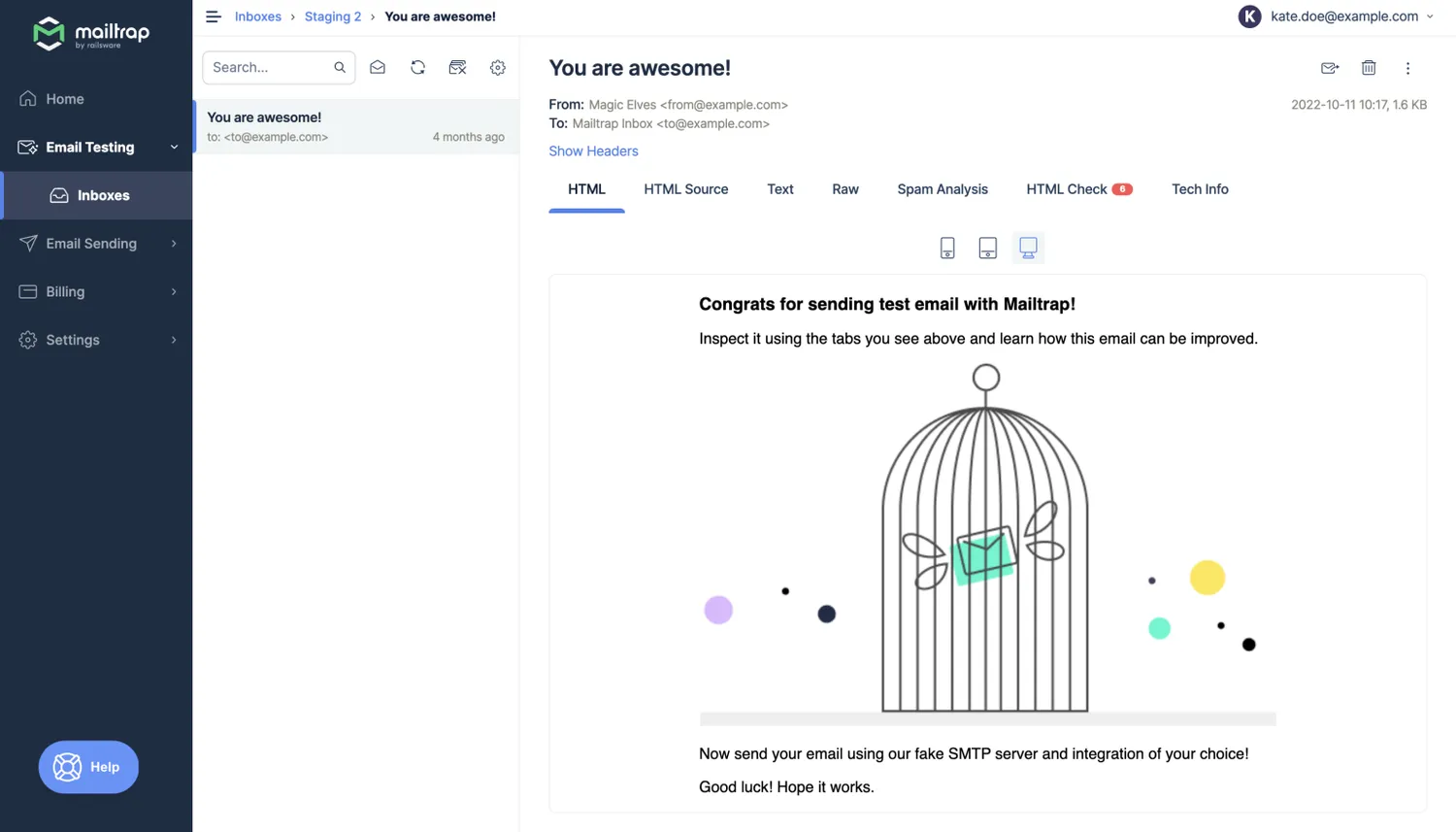
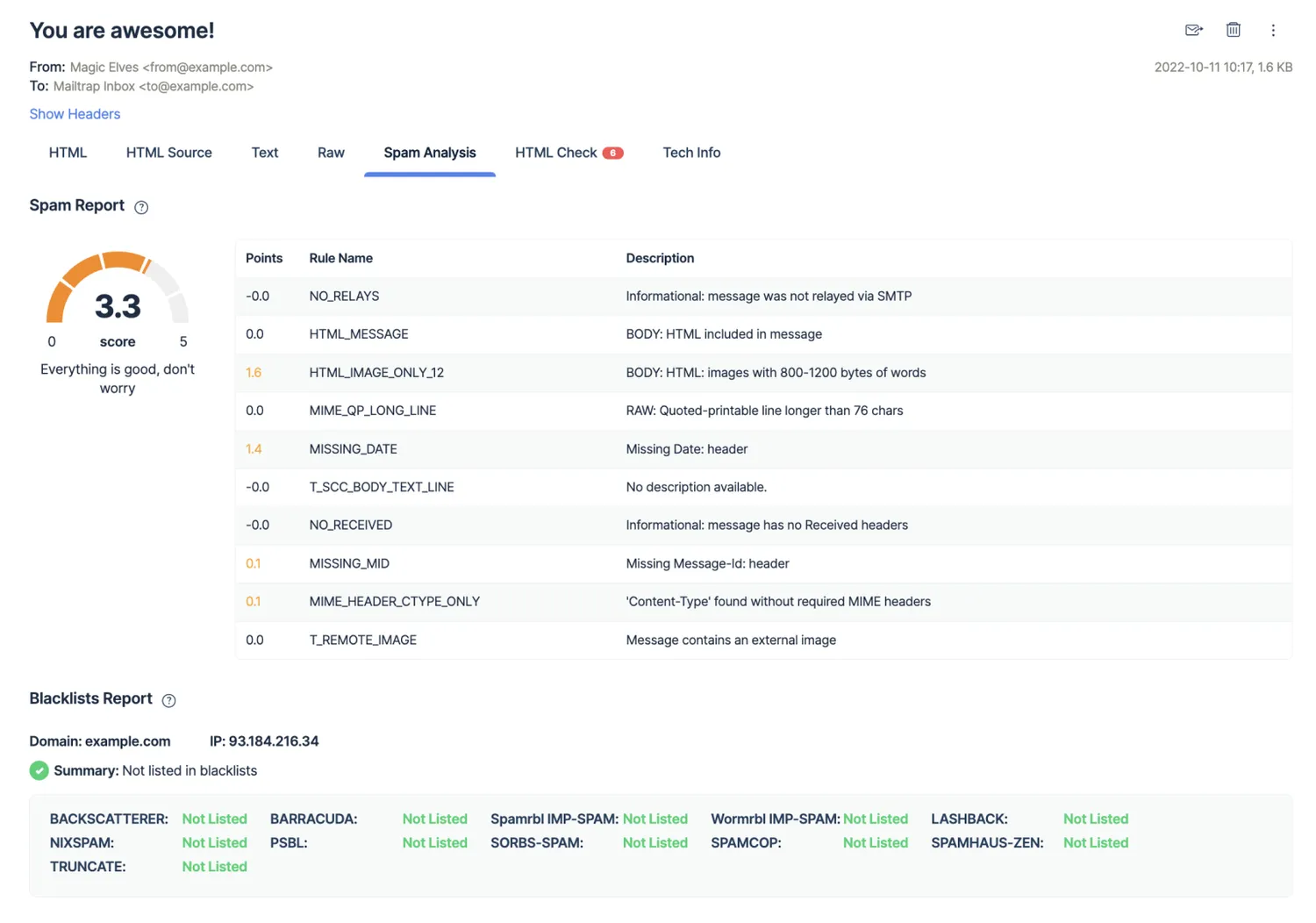
Apart from that, Email Testing has a Spam Analysis feature that shows you Spam and Blacklist reports. By viewing those, you’ll see where your IP and domain reputation stands. If your spam score is high, it’s likely that your emails will bounce or get blocked by the recipient’s mail server.
Your testing workflows can be a separate measure to send well-crafted emails or be part of email sending reputation audit. The latter is a comprehensive ‘investigation’ that reveals the main culprits behind your email deliverability. That way, you’ll know for sure what’s causing your bounce rates and work in that direction.
Alternatively, you could hire email deliverability consultants who will conduct the audit, provide feedback, and help you plan all the deliverability-related steps.
Send emails from a reliable email infrastructure
Sending emails from a reliable email infrastructure is a surefire way to reduce and prevent high bounce rates. It will also help you maintain good deliverability rates. The reason is simple: reputable ESPs have a good IP reputation for their shared IPs, as well as an option to use dedicated IPs if the sending volume is high enough. On top, they take strict security measures to keep the spammers at bay.
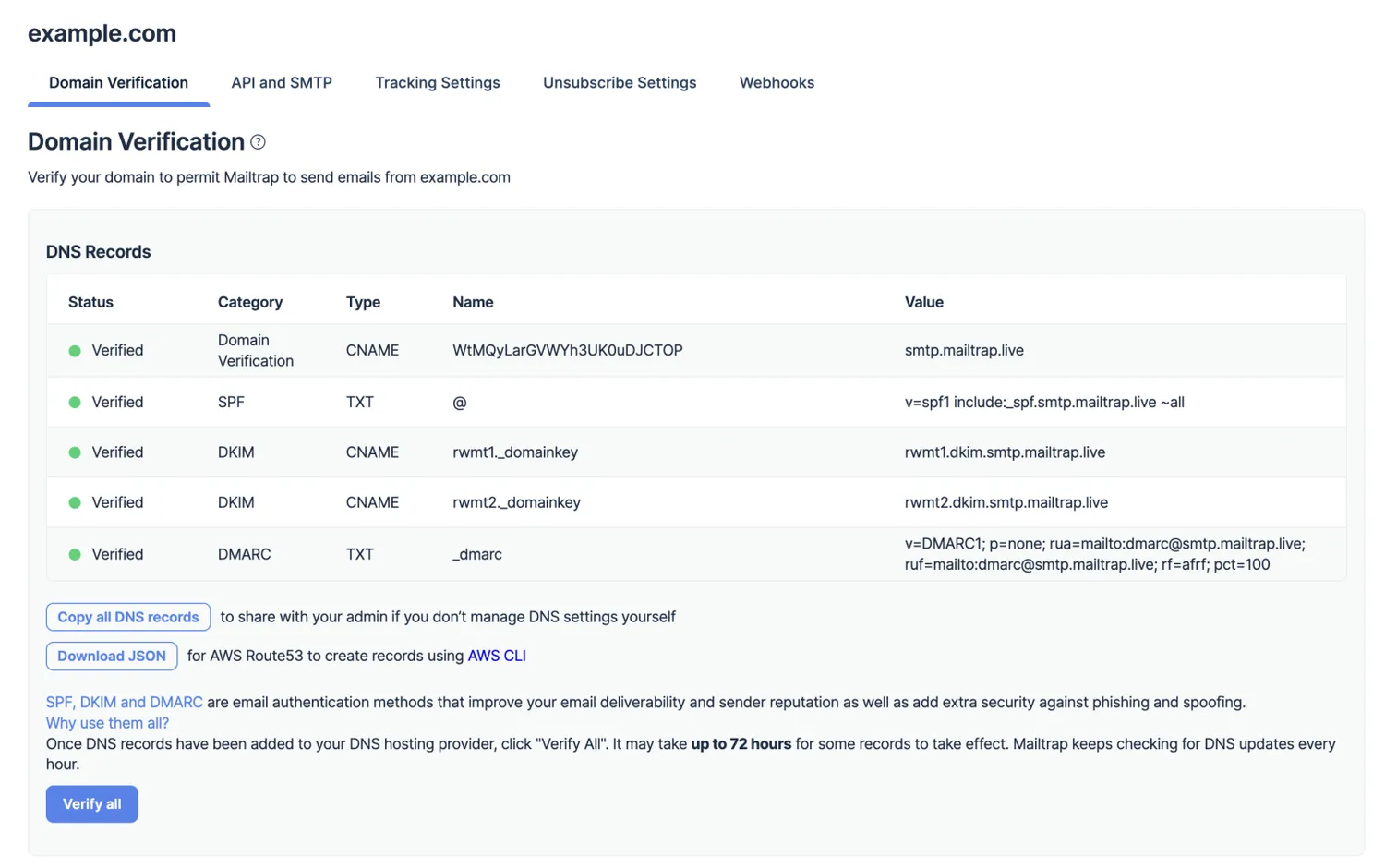
Typically, ESPs and sending solutions require you to authenticate your domains with SPF, DKIM, and DMARC records before you start sending. This adds to your domain’s credibility and lowers the chances of landing in spam folders. Not only that, Google and Yahoo now require regular and high-volume senders to have these records in place. You don’t have that option with free email accounts and email domains. Large volumes of emails coming from such addresses immediately raise the yellow flag (a.k.a. spam) among ISPs.
Using an ESP is sort of an industry-standard whether you’re sending email blasts, general marketing campaigns, or transactional emails.
One such software is Mailtrap Email Sending we mentioned above – the second solution offered by Mailtrap. It’s an email infrastructure to reach your recipients’ inboxes. This platform has RESTful API and SMTP services.
Try Mailtrap Email Sending for Free
To keep your bounce rates in check, Email Sending provides ready-made DNS records for authentication protocols. It runs regular security checks to prevent spam abuse and protect the reputation of shared IPs. As you start sending at least 100K emails a month, you get the option to use a dedicated IP included in your plan. Dedicated IPs have auto warm-ups to prevent email bounces and spam complaints.
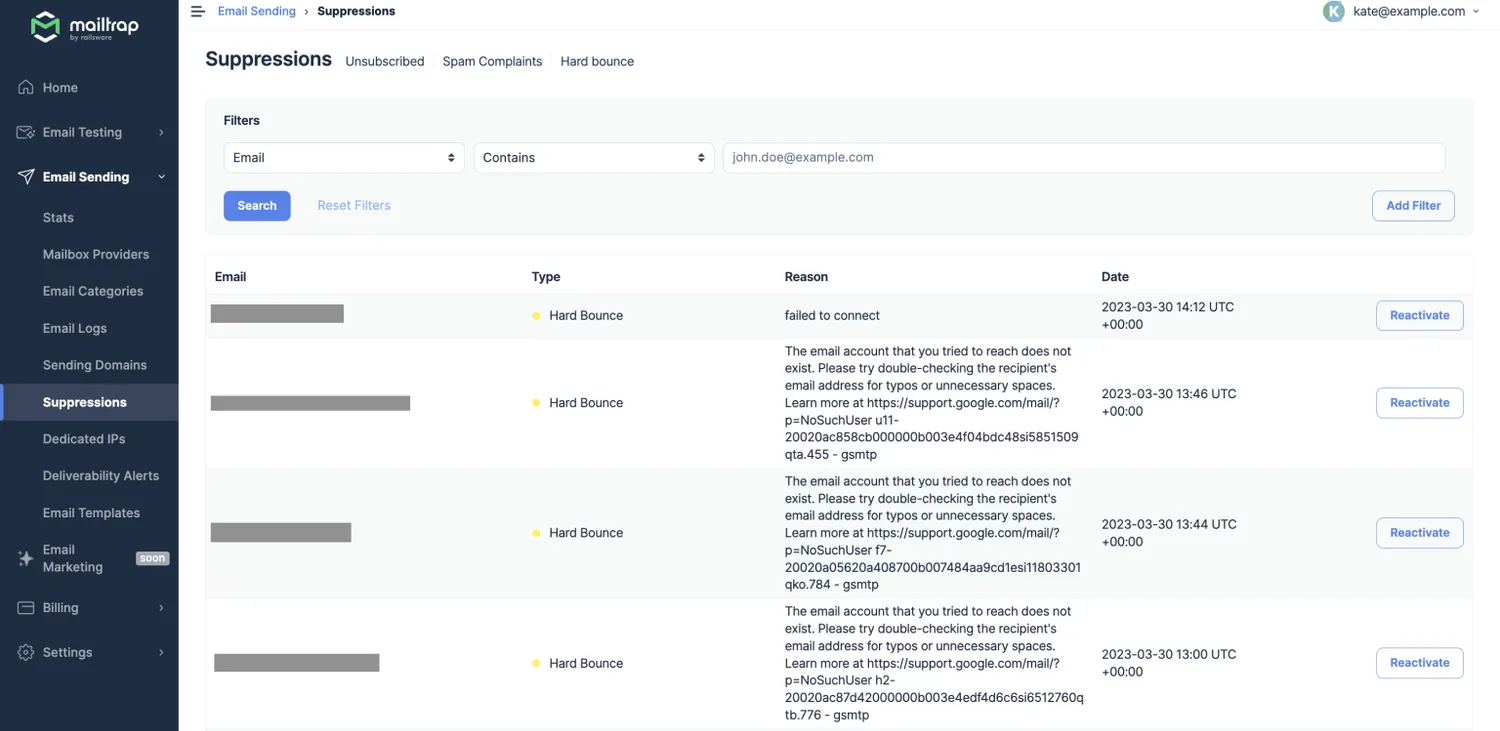
Email Sending also has strict policies regarding bounce rates. If your emails soft bounce, the platform will attempt to send them 10 more times. If the outcomes are unsuccessful, the emails will be hard bounced and added to your stats.
Hard-bounced emails are added to suppression lists automatically to protect your deliverability. You can view and manage those in the ‘Suppressions’ tab, and examine the reasons for each bounce. While you can reactivate any suppressed email address, we strongly recommend against activating invalid addresses.
Craft non-spammy email content
The spammy email content is another reason why your emails might get considered as spam and bounce. That’s why you should avoid spammy words (‘big bucks’, ‘free money’, ‘million dollars’, etc.) in your subject lines and copies.
Use A/B testing whenever possible. Whether you’re talking to new subscribers or trying to conduct surveys, it’s a good idea to test various portions of emails separately. Run A/B testing campaigns for subject lines, CTAs, email bodies, body formats, and other parts of your emails. That way, you’ll be sending the content your audience likes, which leads to fewer spam complaints.
Create and follow email marketing strategy
An email marketing strategy is a detailed roadmap for your campaigns. As it’s based on comprehensive research, it allows you to tailor your tactics and campaigns to your audiences. With a strategy, you won’t send random emails to random people. Each step will be carefully calculated, resulting in better open, click, and click-through rates. Good audience engagement improves your sender reputation and helps maintain low bounce rates.
Key takeaways
Let’s end this blog post with a few key takeaways:
- Email bounce rate affects your email deliverability
- To keep bounce rates low, you should avoid buying mailing lists and run permission-based email marketing
- Email list validation is a great way to reduce hard bounces
- Email infrastructure impacts your bounce rates
- It’s important to develop an email marketing strategy and run high-quality campaigns.
And with this good-ol’ meme, farewell folks!

We appreciate the you chose this part of the article to find out how to calculate email bounce rate. If you want to find out reasons that cause high bounce rate, read full version in Mailtrap blog!