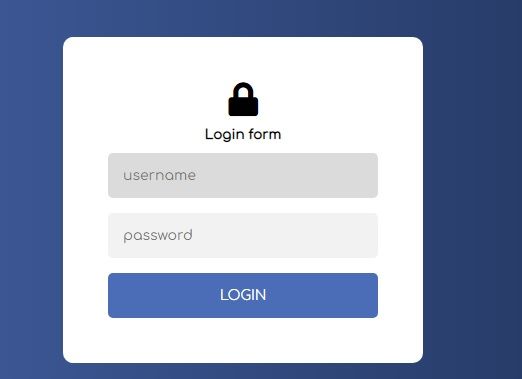
Login page is used for authentication of users and ensuring unauthorized access to software or application.Using this login page we can check whether the user can access the resources or not. It act as a gate which provides entry to verified person only.
Let us break down this project and understand the sequence first. We need to create a login.html page. Then we need to create a login form using bootstrap and design it with custom css.
Then we need to create a login.js page where we will code for the submit button click event.
First copy and paste the bellow code and save it as login.html.
<!DOCTYPE html>
<html lang="en" dir="ltr">
<head>
<meta charset="utf-8">
<title>Login Form</title>
<link rel="stylesheet" href="style.css">
<link rel="stylesheet" href="https://cdnjs.cloudflare.com/ajax/libs/font-awesome/5.12.0-2/css/all.min.css">
<script src="https://cdnjs.cloudflare.com/ajax/libs/jquery/3.5.1/jquery.min.js" charset="utf-8"></script>
<script src="login.js"></script>
</head>
<body>
<div class="login">
<div class="form">
<form id="form_id" method="post" name="myform">
<i class="fas fa-lock"></i>
<h2>Municipal Corporation Login</h2>
<input type="text" placeholder="username" id="username" required/>
<input type="password" placeholder="password" id="password" required />
<button type="button" class="btn btn-primary" value="Login" id="submit" onclick="validate()">Login</button>
</form>
</div>
</div>
</body>
</html>
Then open another notepad and save the file as style.css
@import url('https://fonts.googleapis.com/css2?family=Comfortaa&display=swap');
body {
background: linear-gradient(90deg, #4b6cb7 0%, #182848 100%);
}
.login {
width: 360px;
padding: 8% 0 0;
margin: auto;
font-family: 'Comfortaa', cursive;
}
.form {
position: relative;
z-index: 1;
background: #FFFFFF;
border-radius: 10px;
max-width: 360px;
margin: 0 auto 100px;
padding: 45px;
text-align: center;
font-size:9px;
}
.form input {
outline: 0;
background: #f2f2f2;
width: 100%;
border: 0;
border-radius: 5px;
margin: 0 0 15px;
padding: 15px;
box-sizing: border-box;
font-size: 14px;
font-family: 'Comfortaa', cursive;
}
.form input:focus {
background: #dbdbdb;
}
.form button {
font-family: 'Comfortaa', cursive;
text-transform: uppercase;
outline: 0;
background: #4b6cb7;
width: 100%;
border: 0;
border-radius: 5px;
padding: 15px;
color: #FFFFFF;
font-size: 14px;
-webkit-transition: all 0.3 ease;
transition: all 0.3 ease;
cursor: pointer;
}
.form button:active {
background: #395591;
}
.form span {
font-size: 75px;
color: #4b6cb7;
}
fa, .fas {
font-weight: 900;
font-size: 34px;
}
Finaly open another notepad page and paste the following code by saving the file as login.js
var attempt = 3; // Variable to count number of attempts.
// Below function Executes on click of login button.
function validate(){
var username = document.getElementById("username").value;
var password = document.getElementById("password").value;
if ( username == "vipul12345" && password == "Vipul@12345"){
alert ("Login successfully");
window.location = "index.html"; // Redirecting to other page.
return false;
}
else{
attempt --;// Decrementing by one.
alert("You have left "+attempt+" attempt;");
// Disabling fields after 3 attempts.
if( attempt == 0){
document.getElementById("username").disabled = false;
document.getElementById("password").disabled = false;
document.getElementById("submit").disabled = false;
return false;
}
}
}
We can create great responsive website using Java web development. Using Java we can code for front end as well as back end operations.This makes it even useful for those who use softwares for making complex business processes. In case you need a Java software development or want to hire full stack developers then you cn seek help from the best Java web development company now.