Who Benefits from This Guide
So, your support team is growing, and that big question pops up: shared inbox or ticketing system? Honestly, this debate can be quite divisive. Both options have distinct advantages and disadvantages. Choosing wisely depends on your team's size, your operational style, and what your customers expect. This guide will clarify the shared inbox vs. ticketing system dilemma, helping you make an informed decision.
This information is for founders, operations leads, and support managers fed up with constantly transferring customers. If your team is under 50 people and you're struggling with scattered communication, keep reading.
Quick Look
- Trying to decide between a shared inbox and a ticketing system? Shared inboxes are better for teams under 50 who value speed, context, and immediate collaboration, especially without per-seat pricing.
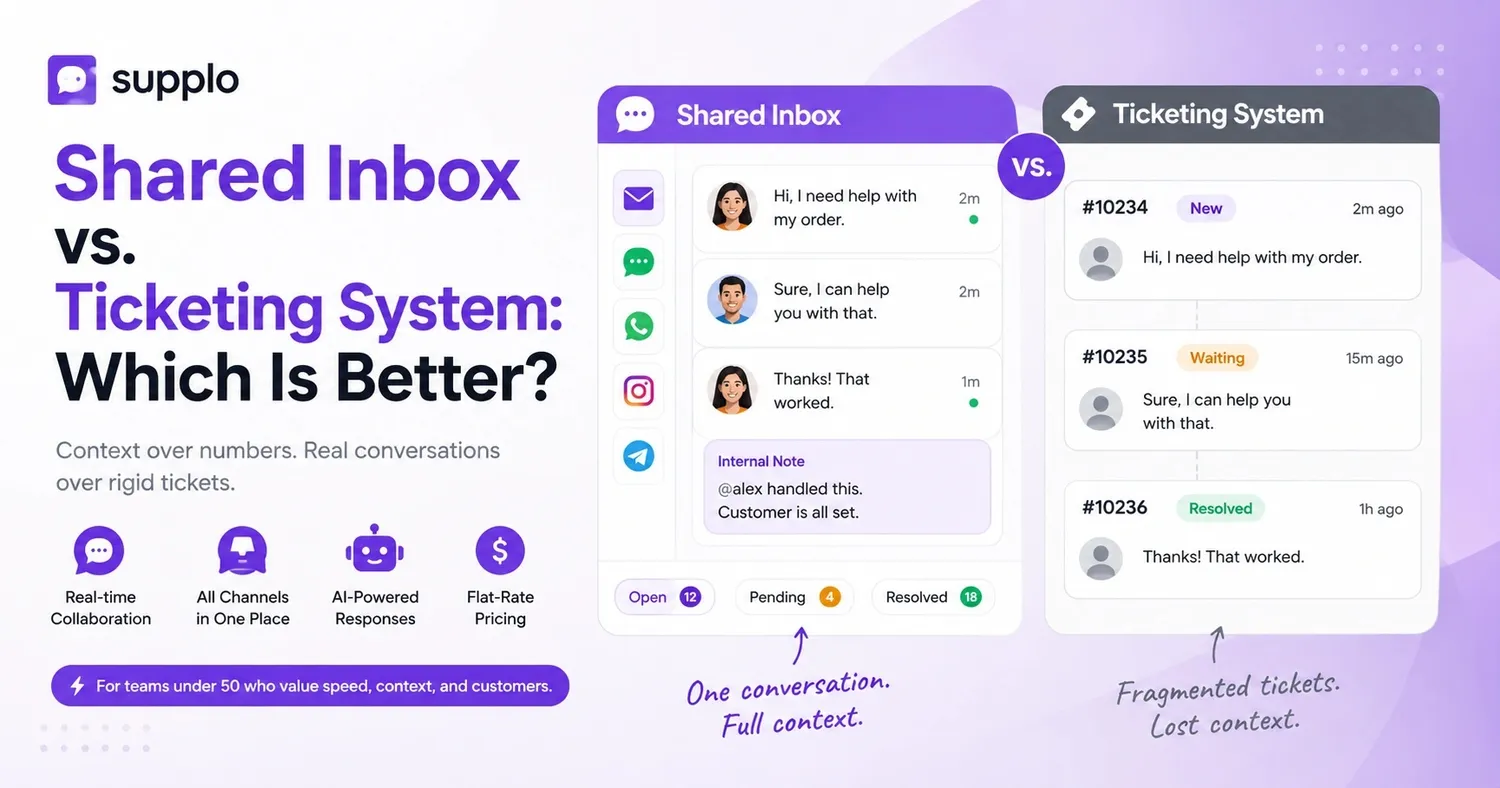
- What's the main difference? Ticketing systems break conversations into numbers, whereas shared inboxes keep everything in one easy-to-follow thread.
- Worried about costs? Traditional ticketing tools often charge per resolution or per agent. Modern shared inboxes like Supplo offer transparent, flat-rate pricing, sometimes as low as $0.04 per interaction.
- Who should switch? Any team fed up with losing context, managing high ticket volumes, or dealing with rising costs—a shared inbox simplifies things considerably.
What's a Shared Inbox? And When It's Your Best Bet
Simply put, a shared inbox is a central hub where your entire team can view every customer interaction. This includes emails, live chats, Instagram DMs, and more, all presented in a single, continuous thread. There are no ticket numbers, no long queues, and no confusion about who's handling what.
Imagine it as a team chat for customer service. Everyone on the team can see the complete history, jump in to answer questions, and leave private internal notes for colleagues. It’s quick, personable, and works incredibly well for smaller teams seeking a streamlined customer experience.
- Collaborative Assignments: Someone 'claims' a conversation, and everyone instantly knows it's being handled.
- Status-Based Sorting: Conversations are organized by their status (open, pending, resolved), not by arbitrary ticket numbers.
- Centralized Communication: No more forwarding emails; every message stays within the same unified thread.
If your team has fewer than 50 members and you're tired of losing important context in endless email chains, a shared inbox is likely your ideal solution for enhanced customer support.
What's a Ticketing System? The Conventional Approach
A ticketing system transforms every customer inquiry into a numbered "ticket," which then moves through a queue. This method was designed for large enterprises with strict service level agreements (SLAs) and multi-tiered support structures. It sounds efficient, right? In theory, perhaps.
However, there's a significant drawback: customers frequently have to repeat their issues to multiple agents. Agents often spend more time updating statuses and routing tickets than actually resolving problems.
- Workflow Stages: Tickets progress through various stages, much like items on an assembly line (new, open, waiting, closed).
- Automation Challenges: Automated rules can seem powerful, but they often fail when customers use unexpected language, leading to system breakdowns.
- Pricing Structure: The cost of these traditional tools can escalate quickly, charging per agent or per ticket.
Shared Inbox vs. Ticketing System: Key Differences
The fundamental distinction lies in context versus structure.
A shared inbox keeps all messages in a continuous, chronological thread. You get a complete view: the customer's sentiment, the entire communication history, and the resolution, all without switching screens. A ticketing system, conversely, prioritizes data points: ticket numbers, response times, and linear workflows.
For teams that prioritize speed and human connection in customer interactions, the shared inbox is superior. For heavily regulated call centers with complex, tiered support, a ticketing system still has its place. But for most growing teams seeking effective communication, the choice becomes clear.
- Context: Shared inbox offers threaded conversations, while a ticketing system provides fragmented ticket comments.
- Speed: Shared inboxes handle real-time chats and emails within a single view; ticketing systems often struggle with chat responsiveness.
- Cost: Shared inboxes (like Supplo) typically use flat-rate pricing models; ticketing systems charge per agent or per ticket.
- Transparency: No customer feels like just a "ticket number" with a shared inbox.
When you're trying to figure out which is better—a shared inbox versus a ticketing system—remember: robust context almost always leads to better customer satisfaction.
Top Benefits of a Shared Inbox for Customer Service Teams
A shared inbox eliminates the uncertainty of "who's handling this?" Everyone can see who's assigned, what's been discussed, and what still needs attention. The biggest advantages are enhanced speed, transparency, and significantly reduced context-switching.
- No More Forwarding: Messages remain in one thread, preventing lost "Can you cover this?" emails.
- Instant Status: Overviews of open, pending, and resolved conversations provide immediate insight into your team's workload.
- AI-Assisted Responses: Modern shared inboxes, such as Supplo, can draft replies or automatically resolve common questions.
- Native Multichannel Support: Email, website chat, WhatsApp, Instagram, Telegram—all integrated into one interface.
You can manage a chat, an email, and an Instagram DM from a single window. Internal notes and @mentions allow you to involve colleagues without making customers wait. It’s an exemplary model of collaborative support.
When a Ticketing System Is Still Practical—and Its Hidden Costs
To be fair, ticketing systems aren't entirely without merit. They excel in high-volume environments that demand strict SLAs, multi-tiered support, or compliance oversight (like in finance or healthcare). If you need to meticulously audit each step of a resolution and generate detailed agent performance reports, ticketing systems offer that necessary structure.
However, there's a downside often overlooked: the hidden costs.
- Escalating Per-Agent Pricing: Costs increase significantly as your team expands.
- Per-Ticket Fees: Charges like $0.99 per "resolution" can add up very quickly.
- Time-Consuming Setup: Implementation can take weeks, not just hours.
- Customer Frustration: Customers often find navigating ticket numbers and holding times inconvenient.
For small to mid-sized teams, ticket queues frequently introduce needless bureaucracy. You might find yourself managing the system more than actually assisting customers.
- Ideal Use Cases: Call centers with over 100 agents, strict escalation protocols, or detailed audit requirements.
- When It Fails: Smaller teams where ticket queues introduce unnecessary overhead.
- Hidden Expenses: Fees like $0.99 per resolution from legacy tools, agent seat fees that double with every new hire, and onboarding processes that stretch for weeks instead of hours.
How Modern Shared Inbox Features Rival Traditional Ticketing Systems
Here’s the reality: many desirable features of traditional ticketing systems, such as auto-assignment, priority queues, and SLA tracking, appear powerful on paper. Yet, a well-designed shared inbox now provides many of these capabilities without the associated heavy overhead.
While auto-routing exists in shared inboxes, it typically relies on conversation content rather than predefined ticket fields. Priority queues? Tags and status labels can immediately highlight urgent messages. The key difference is that a shared inbox functions as a collaborative team tool, whereas a ticketing system often feels more like a rigid database.
- Auto-assignment: Both systems offer this, but shared inboxes allow for easier human intervention.
- SLA tracking: Shared inboxes provide time tracking; ticketing systems enforce strict deadlines.
- Reporting: Ticketing systems are strong on raw data; shared inboxes offer actionable context.
- User Experience: Shared inboxes are generally simpler for agents to adopt and more customer-friendly.
The Edge of "Thread-Based" Over "Ticket-Based" for Real-Time Support
Reliability in customer support isn't just about system uptime; it's crucially about retaining context. A thread-based shared inbox ensures every message stays within a single, continuous, chronological flow. This means nothing gets lost or misdirected.
In contrast, with a ticketing system, a message can end up in the wrong queue or be prematurely closed, forcing the customer to start over. For real-time channels like live chat and WhatsApp, a shared inbox offers superior reliability because it treats conversations as dynamic threads rather than static records.
- No Lost Replies: In a ticketing system, an agent's response could inadvertently create a new, separate ticket, fragmenting the conversation.
- Consistent Context: Agents can instantly see the full interaction history, minimizing misunderstandings.
- Real-time Collaboration: Multiple agents can view and contribute to the same conversation simultaneously.
- Faster Resolution: Industry data indicates that conversational support can reduce resolution times by up to 30%.
Shared Inbox for Customer Support: Essential Features for Collaboration
A shared inbox is far more than just a place to read messages; it's a dynamic, collaborative workspace. Here’s what truly matters:
- Internal Notes: Add private context or instructions visible only to your team members.
- Conversation Assignment: Claim a conversation so that others know it’s being handled, preventing duplicated efforts.
- Customizable Statuses: Use labels like open, pending, waiting on customer, or resolved, tailoring them to your specific workflow.
- Thread Merging: Combine multiple messages from the same customer into a single, unified conversation.
These features transform a chaotic inbox into a highly organized, transparent operational hub. You’ll eliminate those frustrating "Did you see Sarah’s email?" moments.
What to Look for in a Customer Service Inbox
When you're evaluating a customer service inbox, whether it's shared or ticket-focused, consider these points:
Must-have list:
- Multichannel Integration: Support for email, chat, WhatsApp, Instagram, Telegram, and Facebook.
- AI-Powered Agent: An AI agent that can automatically resolve straightforward inquiries.
- Flat-Rate Pricing (per workspace): Avoid per-seat or per-ticket fees.
- Easy Migration: Simple transfer process from existing tools.
- Collaboration Features: Internal notes and assignment capabilities.
Red flags:
- Excessive Per-Resolution Fees: Avoid charges of $0.99 or more per resolution.
- Complex Setup: Beware of systems requiring extensive IT or developer assistance.
- Long-Term Contracts: Opt for flexible, month-to-month contracts.
Steer clear of tools that charge per ticket or lock you into multi-year commitments. Look for seamless integrations and a setup process that takes hours, not weeks. A 14-day free trial should be the minimum; anything less might signal hidden complexities.
Switching Gears: Migrating from a Ticketing System to a Shared Inbox
Making the switch doesn't mean sacrificing organization; it means upgrading to a more human-centered approach. Here’s how to do it:
Steps:
- Export Data: Extract support history, contacts, and macros from your old system.
- Set Up Channels: Configure your shared inbox for email, chat, and social media.
- Populate Knowledge Base: Upload your knowledge base content so the AI agent can begin learning and assisting.
- Onboard Team: Invite your team, assign roles, and launch—no complicated routing rules needed.
- Monitor Progress: Track the transition; you'll likely notice fewer lost conversations almost immediately.
The learning curve is typically shallow because the interface often resembles standard email. Most teams experience a boost in productivity within the first week.
Key Insights
- Shared inbox vs. ticketing system? Shared inboxes generally outperform for teams under 50, prioritizing speed, contextual understanding, and real-time collaboration, all without per-seat charges.
- What's the core difference? Ticketing systems dissect conversations into numbers, whereas shared inboxes maintain a single, coherent, readable thread.
- Beware of the cost trap. Traditional ticketing tools levy fees per resolution or per agent. Modern shared inboxes like Supplo provide flat-rate pricing, potentially starting from $0.04 per interaction.
- Who should transition? Any team struggling with fragmented conversations, high ticket volumes, or escalating costs—a shared inbox significantly reduces complexity.
FAQs
Can a shared inbox fully replace a ticketing system?
It truly depends on your team's size and specific requirements. For most small to mid-sized businesses, a shared inbox effectively handles everything a ticketing system does, offering the added benefits of real-time chat and multichannel support without the associated overhead. For large enterprises with strict SLAs and complex, multi-tiered support, a hybrid approach might be more suitable.
What’s the biggest drawback of a ticketing system?
The primary disadvantage is the loss of context. A ticketing system breaks conversations into numbered fragments, often forcing customers to repeat themselves and agents to piece together interaction histories. Additionally, per-seat or per-ticket pricing can become prohibitively expensive very quickly.
Do shared inboxes support both email and social media channels?
Yes, contemporary shared inboxes like Supplo integrate email, website chat, WhatsApp, Instagram DMs, Telegram, and Facebook Messenger into a single, thread-based view. This eliminates the need to constantly switch between various applications.
How does AI enhance a shared inbox?
AI can automatically answer common questions, suggest relevant replies based on your knowledge base, and intelligently route conversations to the appropriate team member. Supplo's AI agent can resolve up to 80% of incoming inquiries automatically (which is an industry-standard range), allowing your team to focus on more complex issues.
Is migrating from a ticketing system to a shared inbox difficult?
Typically, no. Most legacy ticketing systems allow for CSV exports of historical data. Setting up a shared inbox often takes just hours, not weeks. Look for platforms offering a 14-day free trial, like Supplo, to test the process before making a commitment.
What if my team operates across multiple time zones?
Shared inboxes are designed for seamless asynchronous collaboration. Team members can view the complete conversation thread, add internal notes, and resume work exactly where others left off, irrespective of their time zone.
Which is better for a 5-person support team: a shared inbox or a ticketing system?
For a team of 5 to 20 individuals, a shared inbox is almost always the superior choice. It offers a quicker learning curve, is more budget-friendly with flat-rate plans, and maintains the personal touch that customers value. A ticketing system would introduce unnecessary complexity for a team of this size.
Compliance line: Supplo is not affiliated with any app or website. Please follow each app's terms and local regulations.