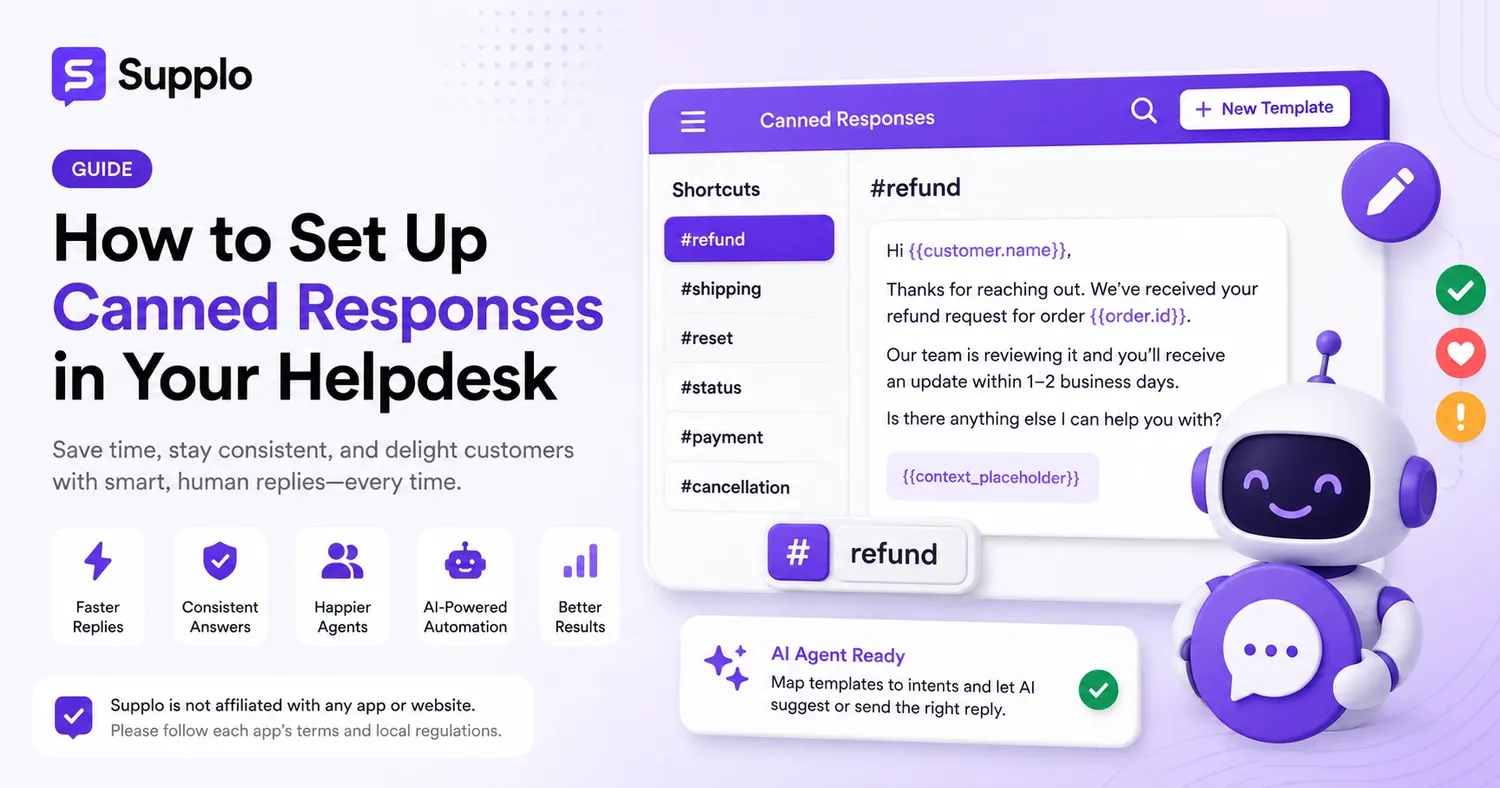
If your support team is repeatedly typing out the same refund explanation daily, it's a clear sign you need a better system. Canned responses—also known as saved replies or snippets—are essential for a support team to efficiently handle common inquiries instead of being overwhelmed by them. They help your customer service representatives be more productive and reduce support ticket volume.
This guide is designed for support managers and agents who want to eliminate repetitive tasks, ensure consistent communication, and ease their team's workload. We'll detail the precise steps to set up canned responses within your helpdesk, covering everything from initial preparation to leveraging AI for enhanced efficiency and improved customer satisfaction.
Quick Overview
- Canned responses are ready-made templates for frequently asked questions.
- To set them up, access your helpdesk's template library, craft concise replies, and assign quick shortcuts.
- Always test each template before deployment to confirm correct formatting and smooth personalization.
- Avoid relying too heavily on generic templates; always strive to add a personal touch.
- Integrate an AI agent to
automate routine ticket handling and streamline support operations.
What Are Canned Responses and Why Do They Matter?
Canned responses are pre-written answers to common customer queries that agents can quickly insert into conversations. Unlike general templates, they are specifically designed for repetitive use and can include dynamic placeholders for details like customer names or order numbers, boosting efficiency.
Canned Responses vs. Templates: Key Differences
- Templates generally offer more detail and cover a wider array of issues.
- Canned responses are sharper, more specific, and ideal for quick, high-volume replies.
How Canned Responses Improve Consistency and Reduce Agent Burnout
- Consistency: They guarantee all agents provide uniform information and language, minimizing contradictory answers. This ensures a consistent customer experience.
- Time Savings: New agents can quickly find and use appropriate responses, significantly shortening their training period.
- Burnout Reduction: By handling repetitive tasks efficiently, agents can focus on more intricate issues, reducing stress and improving job satisfaction.
Preparing Your Knowledge Base Before Crafting Templates
Developing templates without first reviewing your existing knowledge base often leads to inconsistencies. Begin by exporting the most frequent support ticket subjects. Identify the top 10–15 common question patterns and cross-reference them with articles in your help center, internal documentation, and recent agent responses. This proactive approach ensures a robust foundation for your customer support efforts.
Extracting Common Themes from Past Conversations
- Generate a report of frequently asked questions from your helpdesk to pinpoint recurring topics.
- Verify that all URLs and contact details referenced in your templates lead to current, accurate pages.
Identifying High-Volume Ticket Categories
- Pinpoint questions that arise only during specific periods, like promotional events or product launches.
- Look for queries that require quick escalation; these might need a template that clearly guides agents to transfer the issue appropriately.
Setting Up Canned Responses in Your Helpdesk
Most modern helpdesks, such as Supplo's shared inbox, offer tools to create canned responses directly from a settings or admin panel. Here’s a straightforward method to set one up:
Accessing the Template or Snippet Library
- Log in to your helpdesk and navigate to the section for templates or snippets.
- Click the "Add Template" or "Create Snippet" button to begin drafting a new response.
Crafting the Response with Clear Placeholders
- Choose short, memorable shortcuts that align with common ticket types (e.g., "#refund", "#reset", "#status").
- Enclose customer-specific details in variables like
{{customer.name}}or{{order.id}}to ensure a personalized template. - Establish permissions to control who can edit templates versus who can only use them.
Assigning Keywords/Shortcuts for Quick Insertion
- Always test new templates by sending them to yourself as a reply to confirm that formatting and variable substitutions appear correct on both desktop and mobile devices.
- Within Supplo, the AI agent can also be trained to trigger the most relevant canned response based on the intent and sentiment of the query, not just keywords. This enhances the overall efficiency of your customer service.
Configuring Advanced Canned Responses
Once your basic template library is established, enhance its functionality by incorporating variables, conditional logic, and role-based permissions. This ensures your customer support templates remain both adaptable and secure.
Using Dynamic Placeholders for Personalization
- First, test variable substitutions with dummy customer data to catch any formatting issues, such as missing spaces after merge tags.
- Only use conditional blocks if your helpdesk software supports them; otherwise, you risk rendering errors.
Organizing by Team, Department, or Ticket Type
- Maintain an audit log that tracks who edits or deletes templates, allowing for quick rollbacks of errors.
- Categorize templates into "public" and "internal" notes; internal-only templates can provide agents with guidance on escalation procedures.
Organizing Your Canned Response Library for Efficiency
A library with hundreds of unorganized templates can be more counterproductive than having no templates at all. Structure your customer service responses using either hierarchical folders (e.g., "Billing" > "Refunds" > "Partial") or a flat tag system that allows templates to belong to multiple categories, improving searchability and agent efficiency.
Folder Structures vs. Tag-Based Categorization
- Use descriptive, action-oriented names like "Password-Reset-Step1" instead of generic identifiers like "Response-12."
- Instead of deleting seasonal templates, archive them. This way, they can be reused without needing to be rewritten.
Naming Conventions That Scale
- Conduct a quarterly check for inactive templates; any template unused for 90 days should be reviewed or removed.
- In Supplo's inbox, you can link your template categories to your knowledge base sections, creating a unified and streamlined structure.
Best Practices for Crafting Effective, Human-Sounding Canned Responses
The most effective canned responses are concise, empathetic, and include a specific point where the agent can effortlessly add a personal touch. Begin with a greeting that uses the customer's name, address the main question in two to three brief sentences, and conclude with an open invitation for further conversation. This approach enhances the customer experience and avoids a robotic feel.
Eliminating Jargon and Corporate Speak
- Write naturally, as if you're speaking. If you usually say "Happy to help!", use that phrasing in your template.
- Avoid formality; never start a template with phrases like "Please be informed that"; get straight to the point.
Adding a Personal Touch to Each Template
- Include a where the agent can insert a single sentence addressing the specific issue.
- Always read your templates aloud before saving; if they sound stiff to you, they'll sound stiff to your customers.
Optimizing and Improving Your Canned Responses Over Time
Canned responses quickly become outdated due to product changes, policy updates, and new FAQs, making old templates risky. Conduct a quarterly review by comparing your most-used templates with actual customer replies and satisfaction scores. This continuous improvement process is crucial for maintaining effective customer service.
A/B Testing Response Variations
- Track the ratio of "template sent" versus "template modified before sending." A high modification rate indicates the template is inaccurate or incomplete.
- Utilize sentiment analysis tools (or manually review samples) to determine if customers react more positively to specific tones.
Tracking Usage Rates and Customer Sentiment
- Monitor tickets where a canned response led to a "customer asked again" situation; this clearly signals the template failed to address the issue.
- Immediately discontinue templates that link to retired products or outdated workflows to maintain accuracy.
Common Canned Response Setup Pitfalls to Avoid
The most frequent error is treating canned responses as a "set it and forget it" system. Outdated templates that reference old prices, discontinued features, or former policies rapidly erode customer trust. Consistent review and updates are crucial for maintaining effective customer service.
Over-Reliance Leading to Generic Replies
- Never use a canned response as the sole reply to an angry or escalated customer; always begin with a personal acknowledgment.
- Avoid overly lengthy templates; if a response exceeds four sentences, it likely needs a link to a knowledge base article.
- Duplicate templates with slight phrasing differences cause confusion; standardize on one version per question.
Stale or Outdated Answers That Confuse Customers
- Skipping the variable test might result in sending "Hi instead of "Hi John" on your first live ticket.
Integrating Canned Responses with AI for a Smarter Helpdesk
A meticulously maintained library of canned responses serves as the cornerstone for your AI agent. In Supplo, you can directly link your template library to the AI. This allows the AI to select the correct "shipping-ETA" template when a customer inquires about their shipment, automatically populate it with order details, and either send the reply or draft it for agent review, significantly enhancing customer service efficiency.
How AI Agents Can Suggest or Auto-Send the Right Template
- Map each canned response to a specific intent (e.g., "refund status," "account lockout") to enable automatic routing by the AI.
- Set a confidence threshold: the AI will send a response only if its confidence is above 90%; otherwise, it will suggest the response to a human agent.
Blending Human Oversight with Automated Consistency
- Maintain human involvement for any canned response that includes pricing, legal disclaimers, or sensitive account information.
- Supplo supports various payment methods including Crypto, Binance Pay, Payeer, GCash, AmanPay, QIWI Wallet, DOKU, cards from Nigeria and South Africa, Skrill, and Payoneer, allowing AI to seamlessly handle billing-related inquiries.
Reviewing and Updating Your Canned Response Library
Set a quarterly reminder to thoroughly review your entire canned response library, even those templates that haven't been used recently. During this audit, verify that all links are active, product references are accurate, and shortcuts remain clear to your newest agents. This regular maintenance ensures your customer service resources are always current and effective.
Quarterly Audits Tied to Product or Policy Changes
- Align your audits with major product releases or policy updates (e.g., review all billing templates after a pricing change).
- Track "template usage vs. search" in your helpdesk; if a template is never searched for, its shortcut might be ineffective.
Archiving Obsolete Templates
- Involve your support team in the audit; they can identify templates that feel outdated in daily use.
- Consider versioning your templates (e.g., v1, v2) to allow rollbacks if a rewritten version performs poorly, ensuring continuous improvement in customer support.
Key Takeaways
- Canned responses are pre-written answers to common questions, significantly boosting consistency and reducing agent burnout.
- Prepare your knowledge base by analyzing past conversations and pinpointing high-volume ticket categories.
- Set up templates with clear placeholders, assign intuitive shortcuts, and rigorously test them before deployment.
- Configure advanced features like dynamic placeholders and role-based permissions to enhance flexibility and security in your responses.
- Organize your library using folder structures or tags for easy access and scalability, improving agent efficiency.
- Craft templates that sound human, avoid jargon, and incorporate a personalized touch to connect better with customers.
- Regularly review and update your templates to maintain relevance and effectiveness in your customer service.
- Avoid common pitfalls such as over-reliance on generic templates and outdated content that can confuse customers.
- Integrate with an AI agent to automate routine tickets while ensuring human oversight for complex issues.
- Establish a consistent maintenance schedule to keep your library current and aligned with your business needs.
FAQ
Are canned responses safe for use in regulated industries?
Yes, provided each template undergoes compliance review before deployment. In sectors like finance, healthcare, or legal support, avoid canned responses for specific numbers, confidential instructions, or regulatory disclaimers unless a compliance officer has approved them.
Why are my canned responses not appearing with the shortcut?
Most helpdesks require a specific trigger character (e.g., "#" or "/") before the shortcut. If the shortcut doesn't perfectly match the template, including spaces and capitalization, it won't activate. Check your helpdesk's settings for the correct keyboard shortcut syntax.
Can I use canned responses for refunds or cancellations?
Yes, but only as a starting point. Refund and cancellation templates must be updated whenever your refund policy changes. Agents should always verify the customer's specific situation before using the template verbatim to ensure accuracy and customer satisfaction.
Should every agent have access to every canned response?
No. Restrict access to sensitive templates, such as those with internal escalation instructions or pricing override language, to senior agents or specific teams. Poor permission management can lead to incorrect replies and service disruptions.
How often should I update my canned response library?
At a minimum, quarterly. Updates should also occur immediately after any product launch, pricing adjustment, or policy change. Many teams additionally conduct quick checks after reviewing negative support surveys to identify if an outdated template contributed to a poor customer experience.
What should I absolutely avoid doing with canned responses?
Never use a canned response as the sole reply for emotionally charged tickets (e.g., angry customers, service outages, or personal data issues); always add a personalized human sentence at the beginning. Also, never copy-paste blindly without first filling in all variables to maintain accuracy and a personal touch.
Compliance line: Supplo is not affiliated with any app or website. Please follow each app's terms and local regulations.