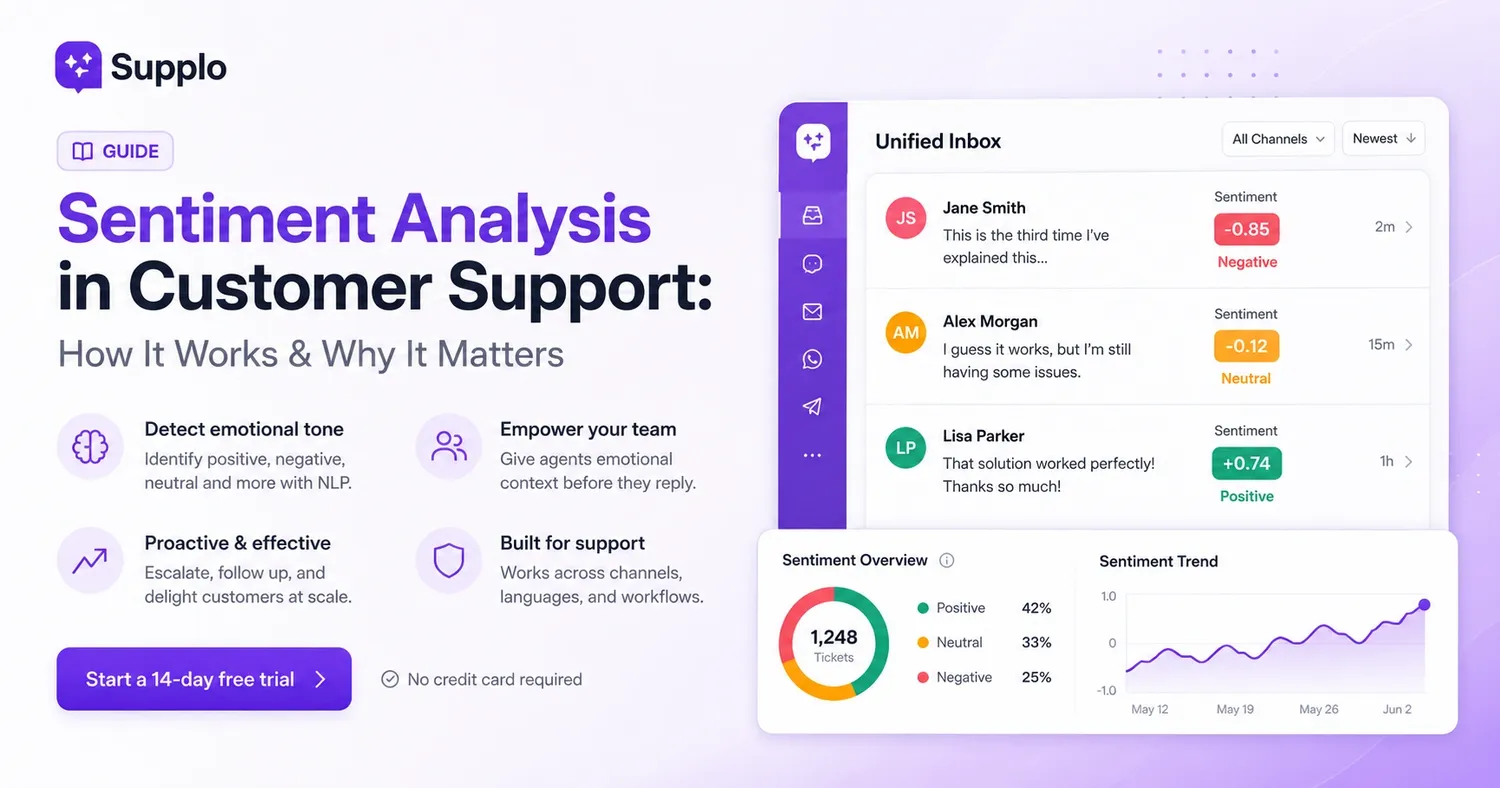
Customers don't always directly express their true feelings. They might type "fine" when they're actually furious, or say "I guess it works" when they're secretly delighted. That's exactly where sentiment analysis really shines in customer support. This technology lets you read between the lines, picking up on emotional cues your support team might miss when juggling a stack of tickets. Leveraging natural language processing can significantly enhance your customer interaction.
What Sentiment Analysis Means for Customer Service
Simply put, sentiment analysis in customer service is an automated system that figures out the emotional tone of a customer's message. It identifies whether their feedback is positive, negative, neutral, or somewhere in the nuanced middle. It scours support tickets, chat conversations, and emails to pinpoint frustration, satisfaction, or confusion. This way, your team understands the emotional landscape without having to guess. This customer feedback analysis is crucial for understanding your audience.
A few important points to consider:
- It's not magic; it's deep learning in action, powered by natural language processing (NLP). This advanced technology trains on millions of support interactions to recognize emotional signals.
- Most tools assign a sentiment score (like from -1 to +1) and can detect specific feelings such as anger, urgency, or relief.
- It works best when integrated with your actual support data and knowledge base, rather than relying on generic models that don't understand your business context.
- The main purpose is to add emotional context to ticket priority, not to replace human judgment.
Quick Overview
- Sentiment analysis uses NLP to detect the emotional tone (positive, negative, neutral) in customer messages.
- It's most effective when trained on your specific support data and integrated into a unified inbox.
- Three high-value applications include escalating negative tickets, proactively following up on neutral ones, and celebrating positive interactions.
- It boosts empathy by giving agents emotional context before they even respond, improving the overall customer experience.
How Sentiment Analysis Helps Customer Service Operations
Ever wonder how this technology actually works? Sentiment analysis employs machine learning models, trained on labeled text, to categorize emotional tone. For instance, when a customer types, "This is the third time I've explained this," the system picks up on frustration indicators. It notes specific word choices ("third time," "explained"), punctuation (like capital letters or repetition), and context from previous messages in the conversation thread. Understanding these emotional cues is paramount.
Here's a peek behind the curtain:
- Common approaches involve lexicon-based methods (scoring keywords), machine-learning techniques (using trained models), and hybrid models that combine the best of both.
- It analyzes sentence structure, recognizes negations (how "not happy" flips a positive to negative), and assesses intensity modifiers (like "very" versus "slightly").
- When integrated with a support inbox, it can scan every incoming ticket and assign sentiment tags in real time.
- More advanced systems can even learn from your team's past resolutions to boost accuracy over time – pretty clever, right?
Deciphering Sentiment in Support Tickets
The sentiment of a support ticket goes beyond just a customer being mad or happy. It can reveal subtle shifts: someone starting off frustrated but ending up satisfied post-resolution, or a neutral tone that actually hides quiet dissatisfaction. Recognizing these intricate patterns helps you route tickets effectively and measure the true emotional impact of your support. Text analytics plays a critical role here.
Things to observe:
- Sentiment can evolve mid-conversation; a ticket beginning at -0.8 (angry) might conclude at +0.6 (relieved) after an effective resolution.
- Neutral sentiment is often misunderstood. It doesn't mean "fine"; it frequently points to a customer who hasn't yet expressed strong emotions.
- Tickets with multiple intentions (like a complaint that also contains a question) require context beyond just a simple overall sentiment score.
- Tracking sentiment over time helps you see if customers are becoming more or less satisfied with your team's responses, providing valuable business intelligence.
Implementing Sentiment Analysis for Resolving Support Tickets
Ready to put this into action? Start by connecting your support channels—email, chat, social DMs, and even WhatsApp—to a unified inbox that can automatically tag sentiment. Once sentiment is being tracked, set up routing rules: negative tickets can go straight to senior agents, neutral tickets might get a proactive follow-up, and positive ones can be flagged for case studies or upsells.
Here’s a practical action plan:
- Select a tool or platform that offers a sentiment analysis API or built-in tagging (like Supplo's AI agent, which interprets tone in addition to content).
- To enhance relevance, train your model or adjust thresholds using your last 500+ support tickets.
- Create automated actions: for instance, trigger an escalation if sentiment drops below a certain score, or send a satisfaction survey after a negative-to-positive shift.
- Review sentiment data weekly, not just ticket by ticket, to identify systemic issues.
Try it absolutely free: no commitments, no credit card needed.
See sentiment analysis at work within a real shared inbox. Connect your first channel in under 5 minutes and watch Supplo automatically categorize emotional tone.
Start your 14-day free trial.
Boosting Customer Support with Sentiment Analysis
Sentiment analysis skillfully transforms vague emotional details into actionable triggers. Here are three highly effective workflows that genuinely make a difference:
- Automate escalation for negative tickets – Any tickets scored -0.7 or lower immediately get a red flag and skip the queue, landing directly with a senior agent.
- Proactive follow-ups for neutral tickets – An automated email is sent for neutral or slightly negative tickets that remain unresolved after 24 hours.
- Celebrate positive tickets – Automatically tag positive tickets (scored +0.6 or higher) for your marketing or success teams to use as testimonials.
These workflows can operate without constant human oversight, freeing your team to concentrate on complex cases that truly demand their expertise. This optimization leverages data-driven insights for improved operational efficiency.
Enhancing Customer Service with Proactive Sentiment Analysis Outreach
Proactive customer support involves reaching out before the customer even asks, and sentiment analysis provides the perfect trigger. If a customer gives a negative score in a survey or their recent tickets show a downward trend in sentiment, you can contact them. Offer a special deal, a personal apology, or a check-in before they churn or air their grievances publicly. This strategic customer retention approach is invaluable.
Here’s how to make it effective:
- Monitor sentiment trends for each account: if a usually positive customer’s sentiment drops to neutral or negative over three tickets, flag it for proactive outreach.
- Automate a "we’re sorry this experience hasn’t been great" email or chat, providing a direct line to a human manager.
- Use sentiment shifts after an outage or billing issue to prioritize follow-up calls.
- Sentiment-based proactive support significantly boosts loyalty, far more effectively than merely reactive fixes.
Selecting a Sentiment Analysis API for Customer Support
An effective sentiment analysis API for customer support needs three crucial elements: real-time scoring, multilingual capabilities, and the ability to adapt to your specific domain (for example, how "cancel" means different things in a cancellation ticket versus a bug report). Steer clear of generic APIs designed for social media sentiment; they often miss the subtle nuances found in support conversations.
What to look for:
- APIs that provide customizable thresholds and let you import your own training data.
- Multi-language support is essential if your customers communicate in various languages. Some APIs translate before analysis, while others analyze natively.
- Examine pricing: some charge per API call, while others bundle it into a flat platform fee (like Supplo’s $0.04-per-resolution model).
- Before committing, test with your own support data; run 100 past tickets through a trial and compare the sentiment tags with human judgment.
Need a sentiment tool that truly scales?
Free APIs often fail under high volume. Supplo’s AI agent resolves tickets at a flat $0.04 per resolution, featuring built-in sentiment tagging, multi-language support, and seamless handoff to your team.
Free Sentiment Analysis Tools for Customer Service
Several free sentiment analysis tools are suitable for testing or for very small teams. Google Cloud Natural Language, for instance, offers a free tier supporting up to 5,000 requests per month, and MonkeyLearn provides a free plan with limited features. However, free tools typically lack customization, don't learn from your unique data, and won't scale efficiently with significant support volumes.
Here’s a look at what’s available:
- Google Cloud Natural Language: Excellent for basic sentiment scoring, free for up to 5,000 requests/month, but requires some technical setup.
- MonkeyLearn: Offers a free sandbox with pre-built models, allowing you to test on your own tickets before considering an upgrade.
- VADER (Python library): A free and open-source option specifically designed for social media and support-style text.
- Limitations: Free tools rarely handle multi-language support, team inbox integration, or proactive routing without extensive additional work.
- For dedicated support teams, investing in a platform with integrated sentiment analysis (like Supplo) typically offers faster and more accurate results.
Identifying At-Risk Customers with Sentiment Analysis
Your support tickets contain crucial early warnings of potential churn. These include customers who shift from satisfied to frustrated, those who submit multiple tickets about the same issue, or whose language changes from specific ("the login button") to vague ("your software always fails"). Sentiment analysis quantifies these shifts, enabling you to intervene proactively before a cancellation occurs. This predictive analytics helps mitigate churn.
Critical red flags to watch for:
- A consistent negative trend across three or more tickets, even if each individual ticket isn't extremely angry.
- Accounts where sentiment improves after resolution but then drops again within weeks, signaling a recurring problem.
- Combining sentiment data with support volume: a previously quiet customer suddenly opening multiple tickets is a significant red flag.
- Set up a "customer health" dashboard that tracks sentiment scores alongside ticket frequency and response times.
Empathetic Customer Support Enhanced by Sentiment Analysis: Keeping the Human Aspect
Here’s the truth: sentiment analysis helps teams become more empathetic, not less. Knowing a customer is frustrated even before you open their ticket allows you to adjust your tone, avoid standard replies, and acknowledge their feelings immediately. The goal isn't to automate empathy; it's to highlight emotional context so your team can respond with genuine care. This is the essence of human-centered design in customer service.
Best practices for maintaining a human touch:
- Begin responses with emotional acknowledgment: "I understand this has been frustrating, and I apologize."
- Avoid the pitfall of using sentiment scores as a substitute for human interpretation; always read the actual message.
- Train agents to use sentiment flags as valuable cues, not as shortcuts. An angry ticket still requires a human who genuinely listens.
- A platform featuring a shared inbox and an AI agent can flag sentiment and then hand off to a human when the emotional complexity goes beyond what automation can handle.
Don’t let silent frustration lead to churn.
Start your free trial today. No seat limits, no hidden fees—just honest, transparent AI support that empowers your team to respond with clarity and genuine empathy.
Key Takeaways
- Sentiment analysis leverages NLP to detect the emotional tone in customer messages.
- It works best when integrated with a unified inbox and uses custom-trained models.
- Three key workflows involve escalating negative tickets, following up on neutral ones, and celebrating positive interactions.
- Proactive outreach, guided by sentiment analysis, can effectively prevent churn and foster loyalty.
- When choosing an API, prioritize real-time scoring and comprehensive multi-language support.
- While free tools are useful for testing, they often have limitations for production-level support.
- Sentiment analysis ultimately boosts empathy by providing essential emotional context.
FAQ
What exactly is sentiment analysis in customer support?
Sentiment analysis is the automated process of identifying the emotional tone in customer messages—whether positive, negative, or neutral—using natural language processing. It assists support teams in prioritizing tickets and responding with appropriate empathy and urgency.
Can sentiment analysis replace human judgment?
No, not at all. It's a tool designed to surface emotional context, not to substitute human interpretation or decision-making. The most effective results come from combining AI tagging with human review and thoughtful responses.
How accurate is sentiment analysis for support tickets?
Accuracy varies depending on the model and your specific data. General-purpose models might achieve 60–70% accuracy on support text, but custom-trained models, using your own historical tickets, can reach significantly higher accuracy levels. It’s always wise to test with real-world data.
Does sentiment analysis function across different languages?
Yes, it can, but not all tools manage every language equally well. Some tools translate text before analysis, while others perform native analysis. It's crucial to select tools that support the languages your customers actually use.
Can I rely on free sentiment analysis tools for production support?
Free tools are great for initial testing but are rarely sufficient for managing real support volumes. They typically lack customization, deep multi-language capabilities, and seamless inbox integration. For ongoing use, investing in paid platforms or APIs is a more robust solution.
How do I implement sentiment analysis for my support team?
Begin by connecting your support channels to a unified inbox that includes built-in sentiment tagging. Then, establish routing rules and automated workflows based on the sentiment scores. Always test with historical tickets first to fine-tune your thresholds.
What should I not use sentiment analysis for?
You should never use it to automatically respond to angry customers or to make critical decisions without human oversight. Sentiment analysis should inform, not automate, your team's empathetic responses.
Compliance line: Supplo is not affiliated with any app or website. Please follow each app's terms and local regulations.