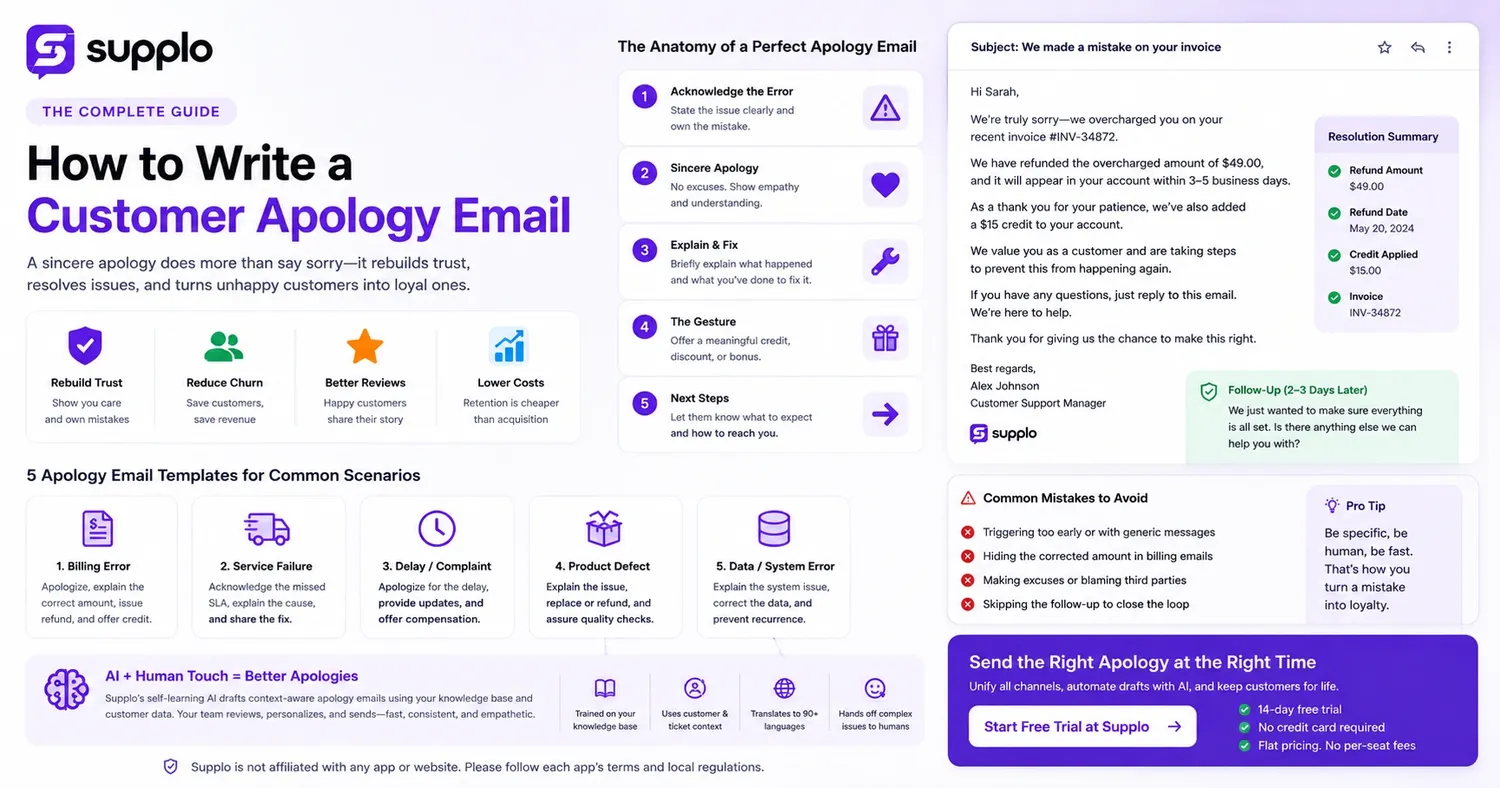
Why a Genuine Customer Apology Email Is Your Ultimate Retention Strategy
Let's be real—nobody enjoys the task of writing a "sorry" email. But here’s the scoop: a thoughtfully crafted apology does so much more than just say sorry; it actively helps rebuild trust and can stop customer churn in its tracks. When customers feel heard and fairly compensated, they're much more likely to forgive a mistake and stick around. Plus, retaining an almost-lost customer is way more cost-effective than finding a new one, plain and simple.
- Customers who receive a personalized, timely apology are less likely to post harsh public reviews.
- A sincere apology shows that your company truly values the relationship over a single transaction.
- If you skip the apology, or worse, send a generic "we appreciate your feedback" message, you risk turning a fixable problem into a permanent loss.
When you master the art of writing a customer apology email, you transform a moment of error into a prime opportunity to build lasting customer loyalty.
The Secret to a Perfect Service Apology Email
The most effective apology emails follow a straightforward structure: they pinpoint the specific mistake, apologize without making excuses, briefly explain what went wrong, detail the solution, and offer a meaningful gesture. Skip the legalese and defensive language. And definitely avoid vague promises like "we’ll do better." Instead, demonstrate exactly what you've already done to fix the situation for the customer.
- Subject Line: Make it specific to the issue (e.g., “We made a mistake on your invoice”). This really helps boost open rates.
- Opening Line: Address the customer by name and get straight to the error. Don't beat around the bush.
- The Fix: Clearly describe the concrete steps you've taken (like a processed refund, a replacement shipment, or a fixed feature).
- The Gesture: Offer a credit, discount, or loyalty bonus that matches the inconvenience they experienced.
5 Customer Apology Email Templates for Common Situations
Having templates ready to go helps your support team maintain consistency, but remember, you absolutely must personalize each one before hitting send. Below are five adaptable templates for common issues like billing errors, service failures, complaints, product defects, and data problems. Each follows the effective structure outlined above.
- Template 1: Apology for Billing Error to CustomerFocus on the exact overcharged amount, the refund timeline, and a small service credit.
- Template 2: Apology Email for Service Failure to CustomerClearly state the missed service level agreement (SLA), the reason for the delay, and the immediate fix or workaround.
- Template 3: Customer Complaint Apology Email Examples (Generic Delay)This flexible template works well for shipping delays, feature outages, or miscommunications.
- Template 4: Customer Service Apology Email Script (Product Defect)Cover the return/replacement process and the quality assurance steps your team has taken.
- Template 5: How to Write an Email for Billing Errors (Data-Focused Fix)Explain the system bug that caused the mistake, plus the steps taken to prevent it from happening again.
How to Apologize for Bad Service Via Email Without Sounding Like a Robot
Customers can spot a pre-written, impersonal apology from a mile away. To sound genuinely human, use conversational language, include specific details from their service ticket, and steer clear of corporate clichés like "we strive to provide." Use their name, mention the exact product or service involved, and write the email as if you're talking to them in person.
- Ditch the jargon: Say "we let you down" instead of "inconvenience caused."
- Be specific: Instead of "regarding your recent issue," try "about your order #12345 that arrived damaged."
- Own the mistake: Use "I/we made a mistake," not "there was a mistake."
- Let a little of your brand's personality shine through; a controlled, consistent tone makes the apology feel authentic.
Avoiding the Biggest Mistake in a Customer Billing Issue Apology
Here’s the critical one: sending a billing apology without confirming the corrected amount. If you just say "we apologize for the billing error" but don't clearly state the accurate charge, the customer still won't trust your system. Always include the correct charge, the refund amount, and the date the adjustment will appear on their statement.
- Never hide behind a "system glitch" without explaining the root cause in simple terms.
- Don't blame a third-party processor unless it's the direct, verified cause, and you can show proof.
- Always provide a direct link or button for them to view the corrected invoice within your customer portal.
- If the error involves overcharging, confirm the refund has been processed before you send the email, not after.
A well-structured email that nails this detail is precisely what composing a powerful customer apology email is all about.
How AI Can Help You Craft Consistent, Empathetic Apology Emails at Scale
A self-learning AI agent can draft context-aware apology emails leveraging your knowledge base and past successful resolutions. This technology handles the structure, allowing your team to add the human touch, reducing response times from hours to mere minutes without sacrificing quality. The AI thoughtfully translates the apology into your customer's language and routes complex billing issues to the right human agent when necessary.
Supplo is not affiliated with any app or website. Please follow each app's terms and local regulations.
- The AI pulls the customer’s history, the ticket context, and the relevant solution from your knowledge base.
- It generates a draft with the correct tone, but a human always reviews and approves it before sending.
- For billing errors, the AI can verify the issue against your customer relationship management (CRM) data and include exact amounts in the draft.
- Translation capabilities ensure non-native speakers receive a culturally appropriate apology, avoiding awkward, literal translations.
Need a quick way to track which customers still require a follow-up? Give Supplo’s free 14-day trial a shot. Discover how a unified multichannel inbox and an AI agent can help you deliver the perfect apology at precisely the right moment. Start your Free Trial at Supplo!
Service Complaint Resolution Email: The Crucial Follow-Up
One apology email is rarely enough. A service complaint is truly resolved when you follow up to confirm the fix worked as expected. Two to three days after the initial apology, send a brief email asking if the resolution met their expectations. This simple step demonstrates that you genuinely care about the outcome, not just closing a ticket.
- The follow-up should be concise: "We hope the refund has processed correctly. Is there anything else we can assist you with?"
- Use a survey link or a direct reply-to-this-email prompt to gauge their sentiment.
- If the customer responds negatively, immediately escalate the issue to a senior agent instead of auto-closing the ticket.
Utilize email ticketing for billing issues to keep everything organized and easily trackable.
Key Takeaways
- A sincere apology email must include: 1) Acknowledgment of the specific error, 2) A clear resolution or refund process, and 3) A follow-up to ensure everything is resolved.
- While templates save time, they must be personalized with the customer’s name and specific issue details.
- AI can draft consistent apology emails, but human review is essential to maintain empathy and accuracy.
- Billing error apologies absolutely must include the corrected amount before being sent.
FAQ
Should I admit fault in a written apology email?
Yes, but only for verifiable issues. Avoid speculative admissions that could create legal exposure without basis. Stick to what you know for sure has happened.
How fast should I send a customer apology email?
Within 24 hours for non-critical issues; within 2 hours for billing or service outages. Speed communicates priority to the customer.
What if the customer doesn’t reply to my apology?
Wait 48 hours, then send one brief follow-up message. If there’s still no response, close the loop internally and note the resolution in your CRM.
Can I use the same apology template for every situation?
No. Each scenario—a billing error, service failure, or product defect—requires a unique structure, specific details, and a tailored resolution.
Should I include a discount or credit in every apology?
Not always. A sincere explanation and a fast fix often matter more than a generic coupon. Reserve compensation for significant, tangible inconvenience.
Is it safe to apologize for a billing error caused by the customer?
Frame it as a misunderstanding, not blame. Use neutral language like “It appears our system processed the amount differently than intended.”
What is the best subject line for a billing apology email?
“Your Name, we’ve corrected an error on your recent invoice” or “Important: Correction to your billing statement.” Be specific and honest.
Compliance line: Supplo is not affiliated with any app or website. Please follow each app's terms and local regulations.