From devs’ perspective, email delivery is sort of a set-and-forget task; but only until something goes wrong.
The moment you need to troubleshoot poor deliverability and debug emails, you realize that you may have chosen the wrong transactional email sending service.
Of course, SendGrid is among the oldest players in the niche. So, it’s no surprise that Twillo’s product has become the sending solution for many engineers, QAs, and marketers.
Mailtrap hit the market in 2011. It started as an Email Sandbox Service and evolved into an all-in-one Email Delivery Platform with more than 1M users and counting.
Impressive indeed, but why would you choose Mailtrap over SendGrid?
To help you make a more informed decision, this article gives you a detailed overview of Mailtrap and how it compares to Twillo’s service.
Mailtrap as a SendGrid Alternative
In just a decade, Mailtrap has scaled from the go-to email sandbox solution to easily test emails in staging to a fully-fledged email delivery platform to Test, Send, and Control emails.
We’ve trapped about 2 billion emails thus far. And it’s safe to say that Mailtrap Sandbox is on par, if not better than SendGrid’s sandbox and sink domain solutions, particularly when it comes to UI, UX, and debugging.
On top of that, Mailtrap features an email API service and provides world-class support and infrastructure to ensure high deliverability rates.
How?
Designed and built by engineers for their peers, Mailtrap Email API leverages well-established infrastructure solutions and brings them to the cloud.
The engineering team didn’t try to create a stable service on open-source foundations. Instead, they use a high-performance MTA cluster, which allows for sustainable scalability. Plus, we’re lighting-fast on AWS-to-AWS because of super-low delays and fast cluster handling.
Mailtrap Email API has the capacity to easily scale to sender volumes of millions of emails a day. Okay, SendGrid’s infrastructure can certainly support high-volume enterprise senders, but there’s a catch.
Mailtrap doesn’t have to struggle with legacy code and support features hardly anybody uses. Our engineering team had the resources to focus on UX and UI to create one of the most streamlined email delivery services available.
On top of that, Mailtrap has built all of the business features from scratch based on engineers’ needs. These include email tracking, reporting, account management, unsubscribe options, etc.
Mailtrap vs SendGrid Comparison
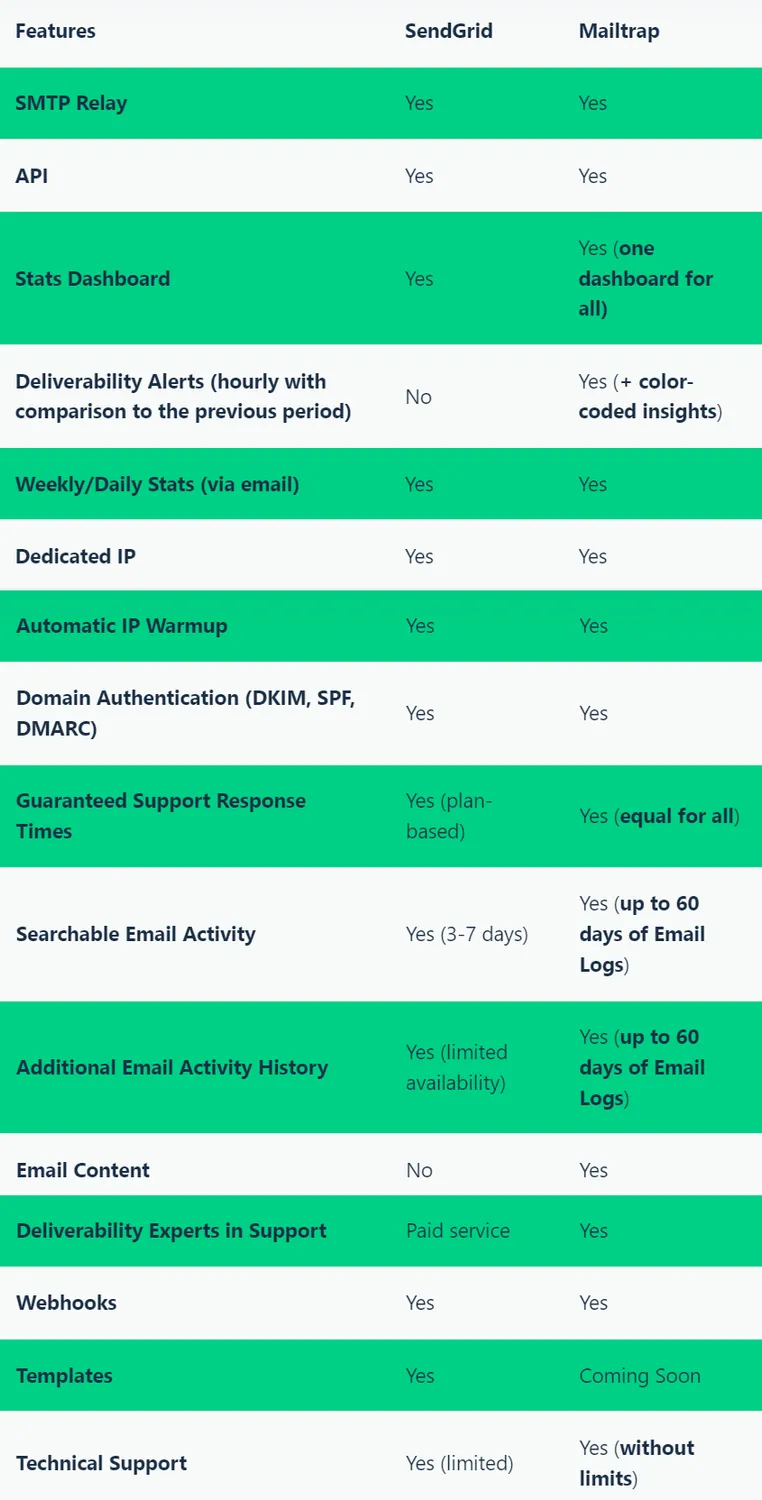
From looking at the table, you might be thinking that Mailtrap and SendGrid are pretty much neck and neck. In many respects, they are, but what are the biggest points of difference?
Right now, there are two, and it’s not about the features themselves, but the approach to the delivery of those features.
First, SendGrid offers limited Searchable Email Activity and Additional Email Activity History as separate options. With Mailtrap, that’s all in one dashboard under Email Logs, and you have the upper hand to filter the search and history as you see fit. You can select the date range, mailbox provider, type of emails, inspect HTML email, and more.
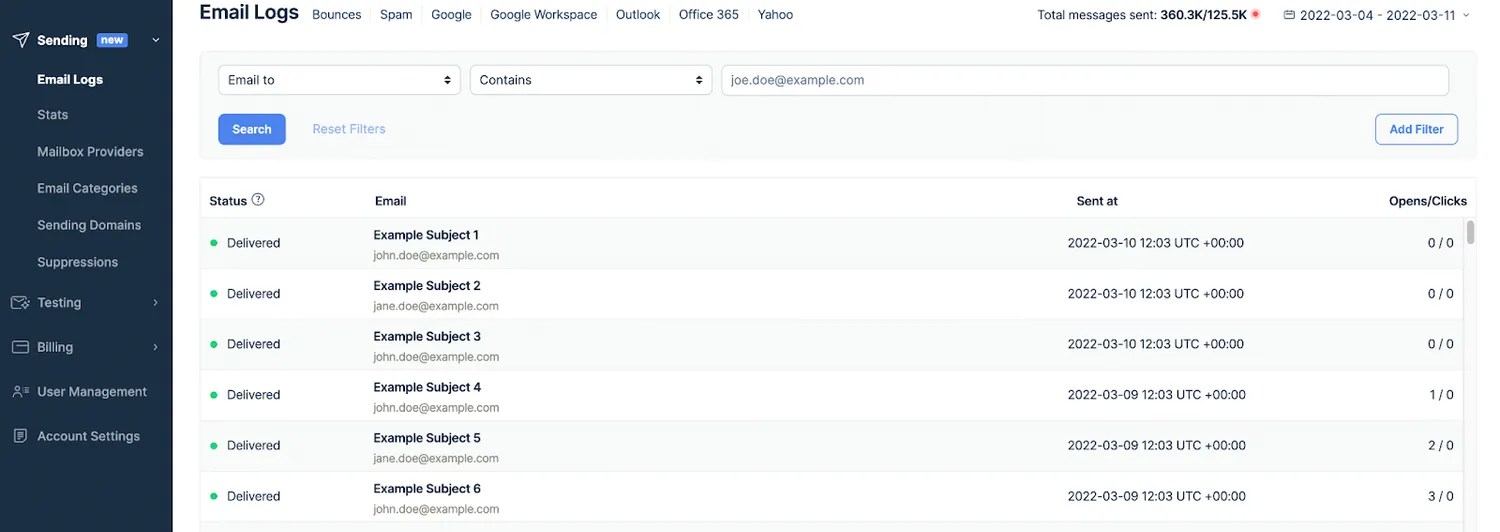
Mailtrap Email Logs Preview
Critically, the limitations on how far back you can dig into historical data are more generous – up to 60 days. And yes, Mailtrap keeps your hard data that long.
As a result, you’ll be able to troubleshoot your emails faster and be better equipped to protect your domain authority.
Second, all Mailtrap users get the same support. There aren’t “guaranteed support response times” based on the plan you get.
Click here to discover the biggest points of difference between Mailtrap and Sendgrid in a detailed features overview.