Guys, this is not the first time when something is written for exceptions and error handling in the web. There are enormous articles written earlier for this topic. I have tried writing this article for beginners explaining these concepts in simple language and step-by-step.
This is a very basic article for beginners that show exception handling and error handling techniques in ASP.NET.
Where there are codes, the chances for exceptions/error always exist so it is very important for developers when developing web applications to understand the errors and implement the error handling techniques to avoid breaking pages or providing unhandled errors to end uses.
What Exceptions are
Guys, the MSDN says that an exception is an error condition or unexpected behavior encountered by an executing program. Exceptions can be raised because of a fault in your code or in code that you call (such as a shared library), unavailable operating system resources or unexpected conditions the Common Language Runtime encounters (such as code that cannot be verified).
Get practical knowledge on Exceptions at Dot Net Online Training
Exceptions are nothing but an unseen error occurs when executing code logic.
Demo Web Application
I have created a web application as an example to understand the exception handling.
Sample Code
- namespace ErrorHandlingDemo
- {
- public partial class _Default : Page
- {
- protected void Page_Load(object sender, EventArgs e)
- {
- if (!IsPostBack)
- {
- string connectionString = ConfigurationManager.ConnectionStrings["MyConn"].ConnectionString;
- string selectSQL = "SELECT * FROM tblEmployees";
- SqlConnection con = new SqlConnection(connectionString);
- SqlCommand cmd = new SqlCommand(selectSQL, con);
- SqlDataAdapter adapter = new SqlDataAdapter(cmd);
- DataSet ds = new DataSet();
- adapter.Fill(ds, "Employees");
- GridView1.DataSource = ds;
- GridView1.DataBind();
- }
- }
- }
- }
Using this web page I am trying to display employee's details in a grid view control on page load. The following is the output page with employee details.
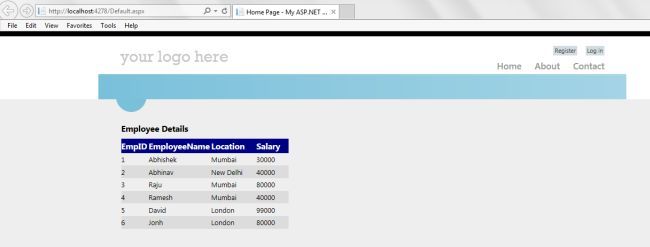
Example to show data on the webpage from the database using some ADO.NET code:
Now from this basic what if the table containing employees is deleted or renamed or the developer has used the wrong table name in the code behind.
I have now changed the table name in the code and complied and run the page.
- string selectSQL = "SELECT * FROM tblEmployees1";
After running the application a broken Yellow screen is shown with the message Invalid Object name
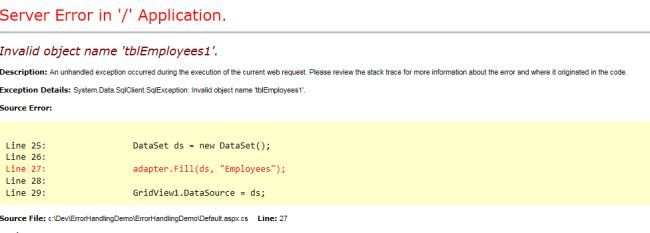
But exposing this error message in Yellow page format is a bad practice because:
- It does not make any sense to the end user although it can be helpful for developers for debugging and investigating the issue.
- This exposure can help hackers to get information about your application that is not good according to security.
Handling Exceptions
Using Try catch finally Block
Using a try catch finally block, exceptions can be handled.
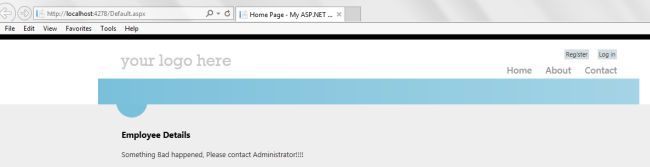
Whenever an exception happens when executing the logic in a try block, the control is immediately moved to the catch block that reads the exception message and after catching the exception in the catch block a user-friendly error can be shown to the end users.
Sample Code
- namespace ErrorHandlingDemo
- {
- public partial class _Default : Page
- {
- protected void Page_Load(object sender, EventArgs e)
- {
- if (!IsPostBack)
- {
- try
- {
- string connectionString = ConfigurationManager.ConnectionStrings["MyConn"].ConnectionString;
- string selectSQL = "SELECT * FROM tblEmployees1";
- SqlConnection con = new SqlConnection(connectionString);
- SqlCommand cmd = new SqlCommand(selectSQL, con);
- SqlDataAdapter adapter = new SqlDataAdapter(cmd);
- DataSet ds = new DataSet();
- adapter.Fill(ds, "Employees");
- GridView1.DataSource = ds;
- GridView1.DataBind();
- }
- catch (Exception ex)
- {
- // Log the exception
- Label1.Text = "Something Bad happened, Please contact Administrator!!!!";
- }
- finally
- {
- }
- }
- }
- }
- }
Apart from the try catch exception handling technique, the ASP.NET Framework has error handling events where exceptions can be caught.
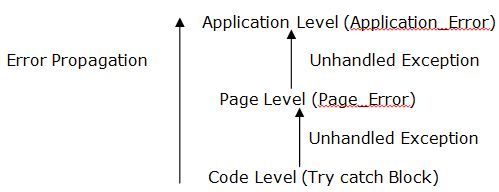
When there is an unhandled error at the code level, meaning if the code does not have a structured try catch block to handle exceptions, then that can be handled at the page level.
An unhandled exception is being propagated to the page level if not handled at the code level.
At the page level Page_Error is the event that catches the exception and we can handle the exception at the page level.
If an exception is not handled at the page level then it will be propagated to the application level and at the application level in the global.aspx file there is an application_Error event where the exception can be handled.
Get practical knowledge on it from live experts at Dot Net Training
It could be a centralized place to handle all the required exception handling at the project level.
- Page level error event
protected void Page_Error(object sender, EventArgs e)
{
Exception Ex = Server.GetLastError();
Server.ClearError();
Response.Redirect("Error.aspx");
}
- Application level error event
void Application_Error(object sender, EventArgs e)
{
// Code that runs when an unhandled error occurs
Exception Ex =Server.GetLastError();
Server.ClearError();
Server.Transfer("Error.aspx");
}
Exception Propagation at ASP.NET web application
Custom Error in ASP.NET
An exception in the application can be handled using the custom error pages.
Custom error pages can be displayed instead of a Yellow broken page as per the exception if it is not handled at any lower level.
Custom error pages are displayed depending on the ASP.NET HTTP status codes.
It can be defined at two levels.
- Application level: In the web.Config File
In the Webconfig file at the application root level we need to set the CustomErrors element “On” and error with statusCode and Redirect.
<customErrors mode="On" defaultRedirect="DefaultError.aspx">
<error statusCode="404" redirect="PageNotFound.aspx"/>
<error statusCode="500" redirect="ServerError.aspx"/>
</customErrors>
A Custom Errors Element has the following three modes available:
Off: Custom Error pages are not displayed.
On: Custom Error page are displayed on both local and remote machines
Remote Only: Custom Error pages are displayed on the remote machine and an exception on
the local machine

- Page Level: At Page directive
We can set the custome error page at the page level using as below:
ErrorPage="~/ServerError.aspx"
It will work especially for this page only.
Note
If Pagelevel custom error, the application level custom error and redirection from application_error from global.aspx are present then the page level has the highest priority then application_error and then application level custom in web Config file.
Exception Logging In ASP.NET
- Logging to Event Viewer
- Logging to Database Table
- Logging to Text file
Logging to Event Viewer
The Wiki says the Event Viewer is nothing but an Event Viewer, a component of Microsoft's Windows NT line of operating systems. It lets administrators and users view the event logs on a local or remote machine.
Go to Run -> Type EentVwr.
Event Log Types
- Application Log
- Security Log
- System Log
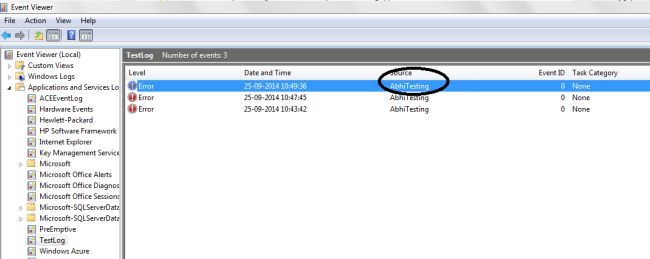
In the Application and Service Logs, I have created a Custom Event Log with the following details using the code.
- EventLog.CreateEventSource("AbhiTesting", "TestLog");
Log Name: Test Log
Source: AbhiTesting
You can modify the Name and source depending on your requirements and provide some dynamic way to create it I have hardcoded the values.
Sample Code
- public static void LogErrorToEventViewer(Exception ex)
- {
- StringBuilder sb = new StringBuilder();
- sb.Append("********************" + " Error Log - " + DateTime.Now + "*********************");
- sb.Append(Environment.NewLine);
- sb.Append(Environment.NewLine);
- sb.Append("Exception Type : " + ex.GetType().Name);
- sb.Append(Environment.NewLine);
- sb.Append("Error Message : " + ex.Message);
- sb.Append(Environment.NewLine);
- sb.Append("Error Source : " + ex.Source);
- sb.Append(Environment.NewLine);
- if (ex.StackTrace != null)
- {
- sb.Append("Error Trace : " + ex.StackTrace);
- }
- Exception innerEx = ex.InnerException;
- while (innerEx != null)
- {
- sb.Append(Environment.NewLine);
- sb.Append(Environment.NewLine);
- sb.Append("Exception Type : " + innerEx.GetType().Name);
- sb.Append(Environment.NewLine);
- sb.Append("Error Message : " + innerEx.Message);
- sb.Append(Environment.NewLine);
- sb.Append("Error Source : " + innerEx.Source);
- sb.Append(Environment.NewLine);
- if (ex.StackTrace != null)
- {
- sb.Append("Error Trace : " + innerEx.StackTrace);
- }
- innerEx = innerEx.InnerException;
- }
- if(EventLog.SourceExists("AbhiTesting"))
- {
- EventLog eventlog=new EventLog("TestLog");
- eventlog.Source = "AbhiTesting";
- eventlog.WriteEntry(sb.ToString(), EventLogEntryType.Error);
- }
- }
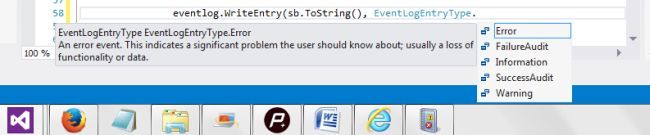
EventLogentry has options to write the error as various entry types.
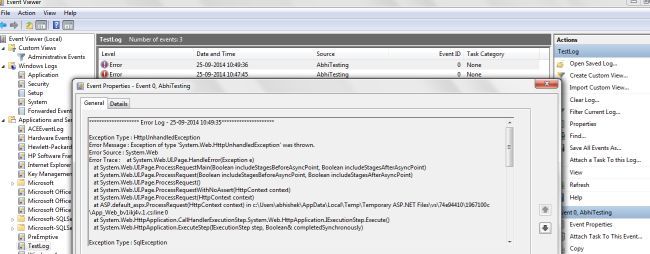
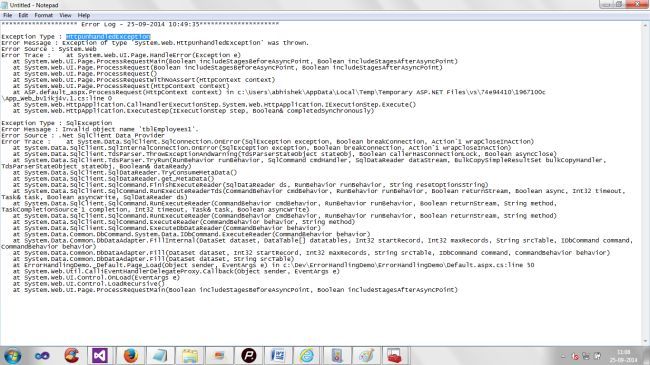
The Windows Event Log can be used to store the error logs for developers to see the error messages and provide solutions to the issues.
Know more information from live experts at Dot Net Online Course
Logging to Database Table
An exception can be written to a database table for the developer to get the log and investigate the error to provide a solution for it.
Table Script
- CREATE TABLE [dbo].[tblExceptionLog]
- (
- [ID] [int] IDENTITY(1,1) NOT NULL,
- [ExceptionMesage] [nvarchar](max) NULL,
- [LogDate] [datetime] NULL,
- [Source] [varchar](50) NULL,
- [Trace] [varchar](max) NULL,
- CONSTRAINT [PK_tblExceptionLog] PRIMARY KEY CLUSTERED
- (
- [ID] ASC
- )WITH (PAD_INDEX = OFF, STATISTICS_NORECOMPUTE = OFF, IGNORE_DUP_KEY = OFF, ALLOW_ROW_LOCKS = ON, ALLOW_PAGE_LOCKS = ON) ON [PRIMARY]
- ) ON [PRIMARY]
Stored Procedure
- Create PROCEDURE Sp_LogException
- (
- @ExceptionMessage nvarchar(max),
- @Source Varchar(50)
- )
- AS
- BEGIN
- SET NOCOUNT ON;
- INSERT INTO [School].[dbo].[tblExceptionLog]
- ([ExceptionMesage]
- ,[LogDate]
- ,[Source]
- ,[Trace])
- VALUES
- (@ExceptionMessage,GETDATE(),@Source,null)
- END
Sample Code
- public static void LogErrorToDB(Exception ex)
- {
- StringBuilder sb = new StringBuilder();
- sb.Append("********************" + " Error Log - " + DateTime.Now + "*********************");
- sb.Append(Environment.NewLine);
- sb.Append(Environment.NewLine);
- sb.Append("Exception Type : " + ex.GetType().Name);
- sb.Append(Environment.NewLine);
- sb.Append("Error Message : " + ex.Message);
- sb.Append(Environment.NewLine);
- sb.Append("Error Source : " + ex.Source);
- sb.Append(Environment.NewLine);
- if (ex.StackTrace != null)
- {
- sb.Append("Error Trace : " + ex.StackTrace);
- }
- Exception innerEx = ex.InnerException;
- while (innerEx != null)
- {
- sb.Append(Environment.NewLine);
- sb.Append(Environment.NewLine);
- sb.Append("Exception Type : " + innerEx.GetType().Name);
- sb.Append(Environment.NewLine);
- sb.Append("Error Message : " + innerEx.Message);
- sb.Append(Environment.NewLine);
- sb.Append("Error Source : " + innerEx.Source);
- sb.Append(Environment.NewLine);
- if (ex.StackTrace != null)
- {
- sb.Append("Error Trace : " + innerEx.StackTrace);
- }
- innerEx = innerEx.InnerException;
- }
- String Connection = ConfigurationManager.ConnectionStrings["MyConn"].ConnectionString;
- SqlConnection conn = new SqlConnection(Connection);
- SqlCommand cmd = new SqlCommand("Sp_LogException", conn);
- cmd.CommandType = CommandType.StoredProcedure;
- SqlParameter param = new SqlParameter();
- cmd.Parameters.Add("@ExceptionMessage", SqlDbType.NVarChar).Value = sb.ToString();
- cmd.Parameters.Add("@Source", SqlDbType.VarChar).Value ="Your Appliaction Name";
- conn.Open();
- cmd.ExecuteNonQuery();
- conn.Close();
- }
Global.aspx Error Event
- Application_Error(object sender, EventArgs e)
- {
- // Code that runs when an unhandled error occurs
- Exception Ex = Server.GetLastError();
- Server.ClearError();
- // ExceptionLogging.LogErrorToEventViewer(Ex);
- ExceptionLogging.LogErrorToDB(Ex);
- Server.Transfer("Error.aspx");
- }
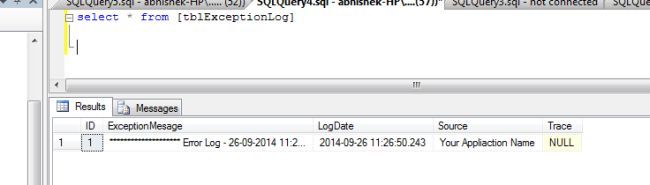
Data Stored in DB
Logging to Text file
An exception can be logged to a text file also according to the application requirements and company policy. I have provided the example to a written log to a text file at root directory of the application. You can modify the code and store to a server or to a folder for the error log for debugging and investigating the issues.
Sample Code:
- public static void LogErrorToText(Exception ex)
- {
- StringBuilder sb = new StringBuilder();
- sb.Append("********************" + " Error Log - " + DateTime.Now + "*********************");
- sb.Append(Environment.NewLine);
- sb.Append(Environment.NewLine);
- sb.Append("Exception Type : " + ex.GetType().Name);
- sb.Append(Environment.NewLine);
- sb.Append("Error Message : " + ex.Message);
- sb.Append(Environment.NewLine);
- sb.Append("Error Source : " + ex.Source);
- sb.Append(Environment.NewLine);
- if (ex.StackTrace != null)
- {
- sb.Append("Error Trace : " + ex.StackTrace);
- }
- Exception innerEx = ex.InnerException;
- while (innerEx != null)
- {
- sb.Append(Environment.NewLine);
- sb.Append(Environment.NewLine);
- sb.Append("Exception Type : " + innerEx.GetType().Name);
- sb.Append(Environment.NewLine);
- sb.Append("Error Message : " + innerEx.Message);
- sb.Append(Environment.NewLine);
- sb.Append("Error Source : " + innerEx.Source);
- sb.Append(Environment.NewLine);
- if (ex.StackTrace != null)
- {
- sb.Append("Error Trace : " + innerEx.StackTrace);
- }
- innerEx = innerEx.InnerException;
- }
- string filePath = HttpContext.Current.Server.MapPath("ErrorLog.txt");
- if (File.Exists(filePath))
- {
- StreamWriter writer = new StreamWriter(filePath, true);
- writer.WriteLine(sb.ToString());
- writer.Flush();
- writer.Close();
- }
- }
Conclusion
Guys we have seen in the preceding about the exceptions happening at the application level and various levels and determine how and where to handle and log the errors.
Exceptions/Errors in an ASP.NET web application propagates from code to the page to the application level.
You can handle and use the error handling techniques according to the project and company policy. It is very important to understand the requirements and uses of available techniques for better performance and error handling.
Get more information with practical examples at .net online training