Tiers and components
You install IBM® InfoSphere® Information Server product modules in logical tiers. A tier is a logical group of components within InfoSphere Information Server and the computers on which those components are installed.
If you want to Gain In-depth Knowledge on DataStage, please go through this link DataStage Training
Each tier includes a subgroup of the components that make up the InfoSphere Information Server suite and product modules. The tiers provide services, job execution, and storage of metadata and other data for your product modules.
InfoSphere Information Server has these tiers:
Client tier
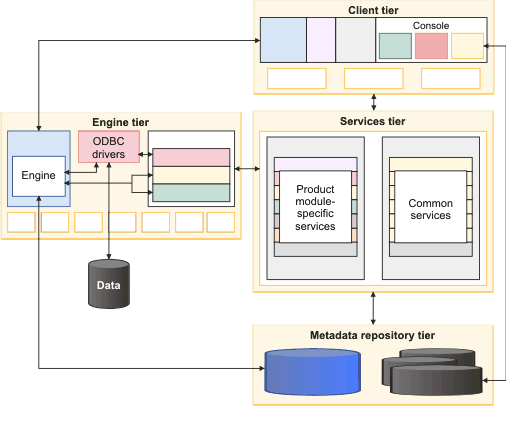
The client programs and consoles that are used for development and administration and the computers where they are installed.
Engine tier
The logical group of components (the InfoSphere Information Server engine components, communication agents, and so on) and the computer where those components are installed. The InfoSphere Information Server engine runs jobs and other tasks for product modules.
Services tier
The application server, common services, and product services for the suite and product modules and the computer where those components are installed. The services tier provides common services (such as security and logging) and services that are specific to certain product modules. On the services tier, IBM WebSphere® Application Server hosts the services. The services tier also hosts InfoSphere Information Server applications that are Web-based.
Metadata repository tier
The metadata repository and, if installed, other repositories to support various product modules in the suite. The metadata repository contains the shared metadata, data, and configuration information for InfoSphere Information Server product modules. The other repositories store extended data for use by the product modules they support.
- Client tier
The client tier consists of the client programs and consoles that are used for development, administration, and other tasks and the computers where they are installed. - Services tier
The services tier consists of the application server, common services for the suite, and product module-specific services and the computer where those components are installed. - Engine tier
The engine tier consists of the logical group of engine components (the IBM InfoSphere Information Server engine components, communication agents, and so on) and the computer where those components are installed. - Metadata repository tier
The metadata repository tier consists of the metadata repository and, if installed, other databases or database schemas in the suite. - Tier relationships
The tiers provide services, job execution, and storage of metadata and other data for the product modules that you install.
Client tier
The client tier consists of the client programs and consoles that are used for development, administration, and other tasks and the computers where they are installed.
The following tools are installed as part of the client tier, based on the products and components that you select:
- IBM® InfoSphere® Information Server console
- IBM InfoSphere Business Glossary Client for Eclipse
- IBM InfoSphere DataStage® and QualityStage® Administrator client
- IBM InfoSphere DataStage and QualityStage Designer client
- IBM InfoSphere DataStage and QualityStage Director client
- IBM InfoSphere FastTrack client
- Metadata interchange agent and InfoSphere Metadata Integration Bridges. The metadata interchange agent enables the use of bridges with InfoSphere Metadata Asset Manager.
- IBM InfoSphere Connector Migration Tool
- IBM InfoSphere Information Server istool command line. The istool framework is installed on the engine tier and client tier. Commands for IBM InfoSphere Information Analyzer, IBM InfoSphere Business Glossary, and InfoSphere FastTrack are installed on the clients only when those products are installed.
- The Multi-Client Manager is installed when you install a product that includes InfoSphere DataStage and InfoSphere QualityStage client tier components. The Multi-Client Manager enables you to switch between multiple versions of InfoSphere DataStage clients. For example, you can switch between Version 8.5 and Version 7.5 clients.
- The MKS Toolkit is installed in the client tier. This toolset is used by the InfoSphere QualityStage migration utility.
The following diagram shows the client tier.
Figure 1. Client tier components
Engine tier
The engine tier consists of the logical group of engine components (the IBM® InfoSphere® Information Server engine components, communication agents, and so on) and the computer where those components are installed.
Take your career to new heights of success with an DataStage Online Training
Several product modules require the engine tier for certain operations. You install the engine tier components as part of the installation process for these product modules. The following product modules require the engine tier:
- IBM InfoSphere DataStage®
- IBM InfoSphere Information Analyzer
- IBM InfoSphere Information Services Director
- IBM InfoSphere Metadata Workbench
- IBM InfoSphere QualityStage®
- IBM InfoSphere Information Server istool command line. The istool framework is installed on the engine tier and client tier. Commands for InfoSphere Information Analyzer and InfoSphere Metadata Workbench are installed on the engine tier only when those products are installed.
IBM InfoSphere FastTrack, IBM InfoSphere Business Glossary, and IBM InfoSphere Business Glossary Anywhere do not require an engine tier.
AIX® HP-UX Solaris Linux: The following configurations are supported:
- Multiple engines, each on a different computer, all registered to the same InfoSphere Information Server services tier.
- Multiple engines on the same computer. In this configuration, each engine must be registered to a different services tier. This configuration is called an ITAG installation.
Microsoft Windows: Only one InfoSphere Information Server engine can be installed on a single computer.
The installation program installs the following engine components as part of each engine tier:
InfoSphere Information Server engine
Runs tasks or jobs such as discovery, analysis, cleansing, or transformation. The engine includes the server engine and parallel engine and other components that make up the runtime environment for InfoSphere Information Server and its product components.
ASB agents
Java™ processes that run in the background on each computer that hosts an InfoSphere Information Server engine tier. When a service that runs on the services tier receives a service request that requires processing by an engine tier component, the agents receive and convey the request.
AIX HP-UX Solaris Linux: The agents run as daemons that are named ASBAgent.
Microsoft Windows: The agents run as services that are named ASBAgent.
ASB agents include:
Connector access services agent
Conveys service requests between the ODBC driver components on the engine tier and the connector access services component on the services tier.
InfoSphere Information Analyzer agent
Conveys service requests between the engine components on the engine tier and the InfoSphere Information Analyzer services component on the services tier.
InfoSphere Information Services Director agent
Conveys service requests between the engine components on the engine tier and the InfoSphere Information Services Director services component on the services tier.
Logging agent
Logs events to the metadata repository.
AIX HP-UX Solaris Linux: The agent runs as a daemon that is named LoggingAgent.
Microsoft Windows: The agent runs as a service that is named LoggingAgent.
ODBC drivers
The installation program installs a set of ODBC drivers on the engine tier that works with InfoSphere Information Server components. These drivers provide connectivity to source and target data.
Resource Tracker
The installation program installs the Resource Tracker for parallel jobs with the engine components for InfoSphere DataStage and InfoSphere QualityStage. The Resource Tracker logs the processor, memory, and I/O usage on each computer that runs parallel jobs.
dsrpcd (DSRPC Service)
Allows InfoSphere DataStage clients to connect to the server engine.
AIX HP-UX Solaris Linux: This process runs as a daemon (dsrpcd).
Microsoft Windows: This process runs as the DSRPC Service.
Job monitor
A Java application (JobMonApp) that collects processing information from parallel engine jobs. The information is routed to the server controller process for the parallel engine job. The server controller process updates various files in the metadata repository with statistics such as the number of inputs and outputs, the external resources that are accessed, operator start time, and the number of rows processed.
DataStage engine resource service
Microsoft Windows: Establishes the shared memory structure that is used by server engine processes.
DataStage Telnet service
Microsoft Windows: Allows users to connect to the server engine by using Telnet. Useful for debugging issues with the server engine. Does not need to be started for normal InfoSphere DataStage processing.
MKS Toolkit
Microsoft Windows: Used by the InfoSphere Information Server parallel engine to run jobs.
The following diagram shows the components that make up the engine tier. Items marked with asterisks (*) are only present in Microsoft Windows installations.
Figure 1. Engine tier components
Note: InfoSphere Metadata Integration Bridges are installed only on the client tier, not on the engine tier.
Metadata repository tier
The metadata repository tier consists of the metadata repository and, if installed, other databases or database schemas in the suite.
The metadata repository tier includes the database for the metadata repository for IBM® InfoSphere® Information Server. The metadata repository exists as its own schema in this database. The metadata repository is a shared component that stores design-time, runtime, glossary, and other metadata for product modules in the InfoSphere Information Server suite.
The metadata repository tier also includes other repositories. Some of these repositories might be referred to as databases throughout the documentation, based on legacy naming conventions. However, they might exist as either separate database schemas in a shared database or as separate databases in the product suite. Some of these repositories can exist on other computers, and in that sense the metadata repository tier can be thought of as a logical tier. However, when this documentation refers to the metadata repository tier computer, it is the computer that hosts the database for the metadata repository. Location and connection information for the other repositories in the metadata repository tier is stored in the metadata repository.
The metadata repository tier can include these repositories:
- If InfoSphere Information Analyzer is installed, the metadata repository tier also includes one or more analysis databases, one per project, for example, which are installed as distinct databases outside of the metadata repository database. The analysis databases are used by InfoSphere Information Analyzer when it runs analysis jobs.
- An operations database can be installed with IBM InfoSphere DataStage® and QualityStage® as a separate schema in the database for the metadata repository or as a separate database. Additional operations databases can be created, one per InfoSphere Information Server engine, if desired.
- As part of IBM InfoSphere Metadata Asset Manager, a repository called the staging area is installed as a separate schema in the database for the metadata repository.
- A Standardization Rules Designer repository is installed with Standardization Rules Designer. By default, it is installed as a separate schema in the metadata repository database. However, you can choose to install it in a separate schema in another existing database.
The services tier must have access to the metadata repository. When product modules store or retrieve metadata, services on the services tier connect to the metadata repository and manage the access to the databases from the product modules.
The engine tier and the client tier must have direct access to the analysis databases and operations databases, which are part of the metadata repository tier.
The following diagram shows the components that make up the metadata repository tier.