Why Quick Communication Speeds Really Matter
Customers might not outright say they want immediate answers, but they definitely want predictable ones. When you clearly set response time expectations upfront, you achieve three things simultaneously. You ease their worries, foster genuine trust, and put an end to that dreadful "are they ignoring me?" feeling.
The moment customer expectations don't align with what you actually deliver, that's when customer churn becomes a real problem.
- Initial contact speed is a backward-looking metric. Clear expectations, however, predict success.
- Unmanaged expectations can make even a super-fast team seem sluggish.
- Predictability often trumps sheer speed when it comes to customer happiness. It's often surprising, but true!
- This principle applies across the board: email, live chat, Instagram DMs—you name it.
Quick Solutions
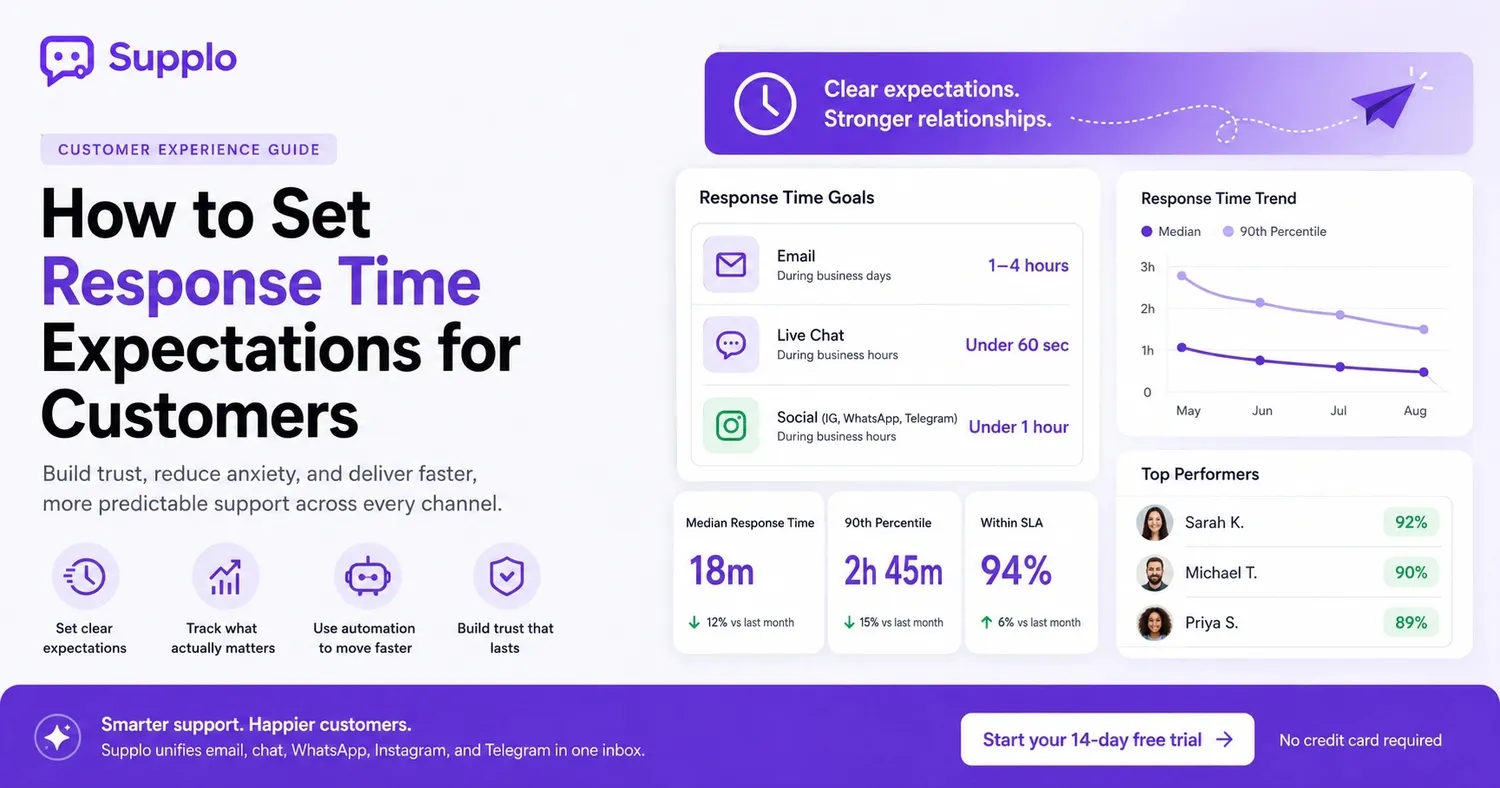
- Establish and publicize clear, channel-specific response-time targets (e.g., email: 1–4 hours; chat: under 60 seconds).
- Develop a straightforward policy for customer response times, including instructions for escalations and what to expect after business hours.
- Leverage automation tools—like an AI agent, a shared inbox, or saved replies—to reduce wait times without needing more staff.
- Focus on the median and 90th-percentile response times, not just averages, to pinpoint actual bottlenecks.
How to Set Realistic Customer Service Response Time Goals
Effective goals stem from honest data, not just wishful thinking. First, track your current median response time for each channel. Then, aim for a target that's 10–15% faster but still achievable 90% of the time. The challenge lies in balancing speed with your team's capacity. Promising one-minute live chat responses with only one agent on duty is a recipe for frustration.
- Use response time ranges (e.g., "We respond within 2 hours") instead of rigid limits that could backfire.
- Tailor goals to ticket priority; urgent concerns should get a quicker response.
- Review your goals monthly, as your team's capacity changes with growth.
- Share your public goals both internally and externally to boost accountability.
Curious just how fast your team can be? Start your 14-day free trial of Supplo today—no credit card needed. Test our shared inbox and AI agent to see how they stack up against your current processes.
What Constitutes "Good" Service for Each Channel
- Email: Expect a response within 1–4 business hours.
- Live Chat: Aim for under 60 seconds.
- Social Media (Instagram, WhatsApp, Telegram): Less than 1 hour.
The Metric That Erodes Trust and How to Avoid It
The dreaded average response time—that's the number. Averages can hide significant deviations, giving you a misleading sense of your team's performance. Customers don't care about your mathematical average; they're interested in the median response time and the 90th percentile. These figures truly reflect the typical experience and the worst-case scenario.
Stop reporting averages. Start reporting what actually matters for customer satisfaction.
Crafting an Effective Customer Support Response Time Policy
An effective policy is concise, channel-specific, and easily accessible to customers before they even need it. Clearly state what to expect: "We'll reply to emails within 4 business hours," and outline what they should do if that timeframe passes. Skip the legal jargon and corporate fluff. Write it like a human making a promise.
- Include distinct targets for business hours versus after-hours support.
- Provide an escalation route: "If you haven't heard back in X time, here's what to do."
- Publish your policy on your contact page, help center, and in email auto-replies.
- Revisit the policy whenever your team size, tools, or inquiry volume changes.
Setting Live Chat Response Time Expectations Without Overpromising
Live chat is a high-stakes channel, where customers expect instant replies. Be transparent from the start; show the typical wait time before they even begin typing (e.g., "Usually responds in under 2 minutes"). If you're short-staffed, use a queue message that openly states the expected delay instead of concealing it.
- During peak hours, display both queue position and estimated wait time.
- Never promise instant replies unless you have robust automation ready to act as a backup.
- Only offer proactive chat invitations when you genuinely have the capacity to handle them.
- Set a cutoff: if the wait exceeds 5 minutes, offer an alternative like email or a callback option.
Managing Customer Expectations During a Support Crisis
When faced with a sudden surge in volume—be it from an outage, a product launch, or a holiday rush—going silent is the quickest way to lose trust. Immediately update your public response time policy. Place a banner on your website or help center. Send proactive messages to customers with open tickets. Acknowledge the delay rather than surprising people with it.
- Establish an emergency "delayed" SLA and broadcast it across all communication channels.
- Utilize automation or auto-replies to immediately set new expectations.
- Prioritize existing customers over new inquiries during peak periods.
- Follow up after the crisis to express gratitude for customer patience.
How to Measure Your Team Against Communication Standards
Choose three key metrics and track them diligently: median response time, 90th percentile response time, and the percentage of tickets resolved within your stated target. Avoid relying on averages, as they can conceal issues and lead to a false sense of security.
- Measure time-to-first-response, not just resolution time (especially for managing expectations).
- Track "abandoned chat rate" as a good indicator of unmet expectations.
- Compare your actual performance against your published policy every month.
- Use your shared inbox to generate reports by agent, channel, and time of day.
Strategies to Reduce Wait Times Without Overworking Your Team
The fastest way to cut down on wait times is to make every initial interaction count. Divert simple queries, order status checks, and password resets to a knowledge base or an AI agent. Only complex issues should reach your human agents. Then, group similar tickets and use saved replies to maintain efficiency without causing burnout.
- Implement a self-service knowledge base for recurring questions.
- Use a shared inbox to prevent duplicate responses and messy handoffs.
- Train agents to "resolve on first touch" instead of simply replying.
- Add a priority-tag system to fast-track urgent tickets.
If a ticket seems too intricate for automation, seamlessly transfer it to your team. Supplo's AI agent can resolve up to 80% of common tickets for just $0.04 per resolution, and it passes context-rich conversations to your inbox when human intervention is necessary. Witness it firsthand during your free trial.
Boosting Customer Support Speed Without Sacrificing Quality
Speed and quality aren't mutually exclusive when you standardize your responses. Create a library of pre-approved, personalized saved replies for common scenarios. Use macros to insert pre-written answers that still sound human. Alongside response time, monitor CSAT (Customer Satisfaction Score) to ensure faster service doesn't negatively impact quality.
- Review your top 10 most frequently asked questions and develop polished templates for each.
- Utilize a snippet tool to automatically insert variables like names or order numbers.
- Designate "fast lanes" for repeat customers or known issues.
- During speed pushes, verify reply accuracy; quick but incorrect answers often generate more tickets.
Leveraging Automation to Reduce Customer Wait Times and Boost Efficiency
Automation isn't about replacing your team; it's about protecting them from overwhelming volumes of routine tasks. An AI agent can instantly handle password resets, order lookups, and shipping inquiries—which often account for 50-80% of incoming tickets. This frees up your human agents to focus on complex, nuanced issues that truly require their expertise.
- Begin by automating the highest-volume, lowest-complexity ticket types.
- Employ an AI agent that can seamlessly transfer to a human without losing context.
- Implement auto-tagging to route tickets efficiently without manual triage.
- Track deflection rate and resolution rate to gauge the success of your automation efforts.
Live Chat Response Time Best Practices: Your Tactical Checklist
For live chat, aim for a first response under 60 seconds at peak times and try to keep the entire conversation under 15 minutes. Use a queue message that sets realistic, not overly optimistic, expectations. The biggest mistake? Opening chat windows when you lack the staff to cover them effectively. It's better to be closed than slow.
- Display a visible wait time before the chat begins (e.g., "2–3 minute wait").
- Limit concurrent chats per agent to 2–3 to maintain service quality.
- Only show a "typing indicator" when an agent is actually typing.
- Review chat transcripts to identify bottlenecks in common workflows.
How to Establish and Maintain Live Chat Service Levels
Start with one clear SLA (Service Level Agreement): "95% of chats answered within 90 seconds." Measure this weekly. Display it on a team dashboard. Adjust staffing to your busiest hours. If you miss the target, don't change the number; first, add automation or reallocate coverage.
- Set different SLAs for sales versus support chats.
- Implement overflow rules: if the wait hits 60 seconds, offer a callback option.
- Publish internal SLA charts so every agent can see their real-time impact on response times.
- Review SLA adherence during every weekly team sync.
Key Takeaways
- Establish clear, predictable customer service response time expectations across all channels.
- Draft a straightforward, human-readable response time policy and make it publicly available.
- Use data to set achievable goals and accurately monitor performance.
- Utilize automation and shared inboxes to accelerate support without increasing staff.
- Regularly review and adjust your goals to match your team's capacity.
- Maintain open communication during crises to preserve customer trust.
Struggling to Meet Your Live Chat Response Time Goals?
You don't necessarily need more staff; you need smarter coverage. Supplo integrates email, chat, WhatsApp, Instagram, and Telegram into a single, thread-based inbox. Enjoy flat pricing per workspace, not per agent. Get started for free today.
FAQ
How quickly should my team respond to a live chat message?
Most customers expect an initial reply within 60 seconds. If you can't meet that, display your average wait time before they even start typing.
What's the difference between response time and resolution time?
Response time refers to the time until your first reply. Resolution time is the total duration to resolve the issue. Both are important, but customers often judge your reliability based on the initial response.
Should I publicly state my response time goals?
Yes, as long as you're confident you can meet them 90% of the time. Public goals build trust, whereas hidden ones help no one.
What if we fail to meet our response time targets?
Be transparent. Update your policy or adjust staffing/automation to close the gap. Remaining silent after a miss erodes trust more quickly than the miss itself.
Can automation help us achieve our live chat response time goals?
Absolutely. An AI agent or chatbot can handle common questions immediately and seamlessly transfer to your team when necessary. This helps keep your human team's response time low.
How do I set response time expectations for email versus chat?
For email, aim for 1–4 hours during business days; for chat, target under 60 seconds. Be very clear about these differences for each channel in your policy and auto-replies.
Is it acceptable to have different response time standards for different ticket priorities?
Definitely. Urgent issues (like billing errors or outages) should have a significantly faster target response time. Standard inquiries can be given a more extended window.
Compliance line: Supplo is not linked with any specific app or website. Please adhere to each app's terms and local regulations.