Let's face it, getting customer support staffing right often seems simple until you're deep in the weeds. If you hire too many people, you'll be throwing money away on agents who aren't busy. On the flip side, hiring too few tanks your response times, frustrates customers, and boosts churn.
There's definitely a sweet spot. You need the right formula, accurate operational data, and maybe a little help from automation tools.
This guide will walk you through exactly how to calculate your customer support staff requirements. No fluff, no guesswork—just solid numbers you can actually apply.
Quick Insights
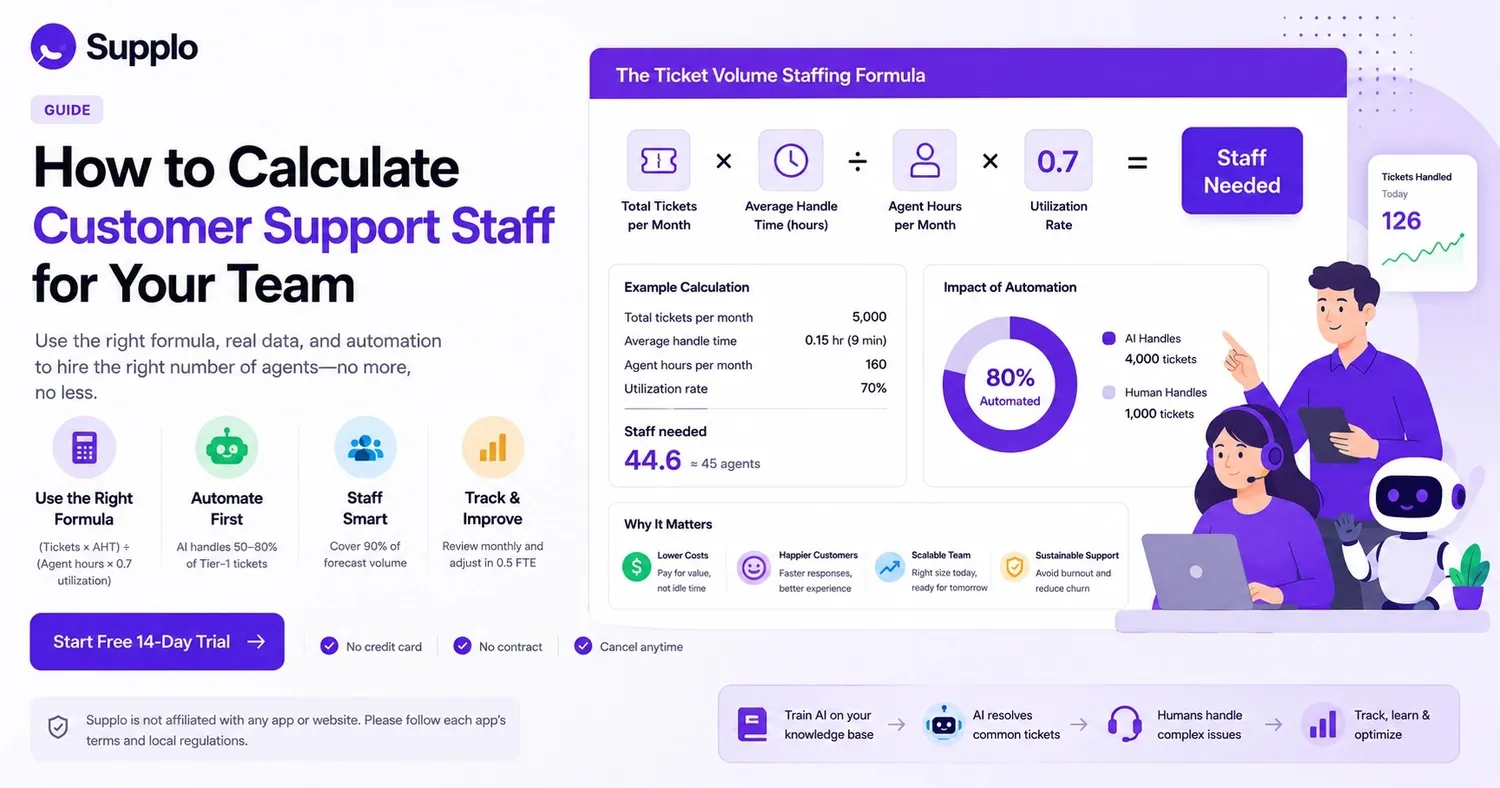
- Figure out your staffing needs using the ticket volume formula: (Total monthly tickets × Average handle time in hours) ÷ (Agent hours per month × 0.7 utilization rate).
- Prioritize automation: an AI agent can manage 50–80% of Tier-1 issues, cutting your human staff needs by 60–70%.
- Staff for 90% of your predicted volume and use automation to handle spikes, preventing overstaffing.
- Review your metrics monthly and adjust staffing in 0.5 Full-Time Equivalent (FTE) increments.
Why Most Teams Misjudge Their Support Agent Count: 4 Common Slip-ups
Most businesses get their customer service team size wrong because they trust their gut feelings instead of concrete operational data. Here are the four biggest blunders:
- Mistake 1: Treating every ticket type the same (a billing refund might take 8 minutes, but a password reset only 2).
- Mistake 2: Staffing only for "average" call volume, which quickly burns out agents during busy periods.
- Mistake 3: Forgetting that new agents need 2–4 weeks to reach full productivity and efficiency.
- Mistake 4: Letting email back up while agents are forced to prioritize incoming phone calls.
Using a support ticket workload calculator immediately highlights these issues. Just by fixing these four mistakes, you can reduce your actual staffing requirements by 15–25% without sacrificing service quality.
The Ticket Volume Staffing Formula: A Straightforward Approach to Calculate Your Needs
Here’s the essential formula that many staffing guides overlook: Total monthly tickets ÷ (Working hours per agent per month × 0.7 utilization rate).
That 0.7 utilization rate is key here. It accounts for all the necessary breaks, meetings, training, and mental downtime every person needs to stay focused and productive. If you push agents past 80% utilization for too long, burnout isn't a possibility—it's a certainty.
Let’s put this into perspective. Suppose you receive 5,000 tickets each month, and each agent works 160 hours monthly at 70% utilization. You'd need approximately 45 agents to keep things running smoothly. This might seem like a lot, but remember: utilization isn't about squeezing every second out of someone.
- Formula: (Monthly ticket volume × AHT in hours) ÷ (Monthly agent hours × Utilization %)
- Average handle time (AHT) varies by channel: chat (4–6 min), email (8–12 min), phone (10–15 min)
- Your utilization rate should realistically never go over 80%; burnout will quickly set in if it does.
- Calculate separately for each channel if your team handles different communication methods.
This ticket volume staffing formula works best when you also consider average handle time and the complexity of each communication channel.
Test the formula yourself! Use your own ticket data to see where your current staffing stands. No sign-up, no commitment—just a practical benchmark you can use today.
Customer Service Agent Staffing Calculator: Create Your Own with 5 Pieces of Data
You don't need expensive software to build your own customer service agent staffing calculator. A simple spreadsheet and five data points will get you surprisingly far in figuring out your workforce management needs:
- Total ticket volume broken down by channel (email, chat, social, phone).
- Average handle time (AHT) per channel (track this for at least 30 days).
- Your target service level (e.g., 80% of tickets answered within 2 hours).
- Average agent work hours weekly, minus time for admin tasks and training.
- Shrinkage percentage (time off, meetings, coaching—typically 15–25%).
Plug these details into a straightforward spreadsheet formula, and you’ll instantly see your staffing gaps. Most teams discover they’re either understaffed by 20–30% based on volume, or overstaffed by 15% due to ticket complexity.
Understanding the Support Team Size Ratio: What the Figures Really Show
You've probably heard the "one agent per 100 customers" rule of thumb. Honestly, that metric is pretty useless in the real world.
A SaaS product with 1,000 active users that has a buggy feature might generate 500 tickets a month. Meanwhile, a simpler product with 10,000 users could generate only 200 tickets. The actual customer count tells you almost nothing about your real support workload.
A more reliable customer service team size ratio focuses on agents per 1,000 tickets resolved monthly, not per customer count.
- Standard ratio benchmarks: B2B SaaS (1:150–200 tickets), e-commerce (1:300–400 tickets).
- Customer count ratios are misleading if your customer retention is high but your ticket volume is also high.
- Best practice: Calculate your own ratio using three months of historical contact center data.
- Industry benchmarks vary widely, so don't blindly copy a competitor's ratio.
- This ratio changes instantly once you introduce AI for Tier-1 ticket handling.
How to Staff Support for Busy Periods Without Draining Your Budget
Staffing for peak seasons is the most common reason teams end up with an inflated support budget. It's tempting to hire new full-time staff for what's only a temporary surge, leaving you with extra payroll costs for months after the rush ends.
Smart teams instead use a three-tier model:
- Tier 1 (Baseline): Full-time staff who cover 100% of your normal volume.
- Tier 2 (Shoulder): Part-time or overflow contractors for up to 1.3 times your typical volume.
- Tier 3 (Peak): An AI agent takes on 50–80% of Tier-1 tickets automatically.
Make sure to pre-train your AI using data from past seasonal spikes to avoid any initial hiccups. Don’t forget to factor in holiday schedules and reduced agent availability.
The Hidden Cost of Overstaffing Versus Understaffing Your Support Team
Here's something that keeps me up at night: most teams focus heavily on understaffing but completely overlook the silent drain of overstaffing.
Understaffing immediately harms your customer experience: long wait times, upset customers, and negative reviews. You feel that impact right away.
However, overstaffing poses a greater risk to your bottom line. It silently bleeds cash through idle time, unnecessary payroll, and increased management overhead. Research consistently shows that overstaffing by even one full-time equivalent (FTE) can cost $40,000–$60,000 annually in salary and benefits.
A support ticket workload calculator helps you pinpoint the sweet spot where you have enough coverage for 90% of your volume without inflating your payroll.
- Understaffing cost: Lost revenue from customers who leave (5 times the cost of gaining new ones).
- Overstaffing cost: Idle payroll + management overhead + wasted recruiting expenses.
- Sweet spot: Staff for 90% of your forecasted volume; let automation or overtime handle the remaining 10%.
- Use an AI agent as your overflow valve instead of paying full-time employees to wait.
- Track "idle time per agent" monthly; if it's over 15%, you're probably overstaffed.
If your staffing calculations aren't adding up, your current tool might be the issue. Older support platforms often charge per seat, making it pricey to manage your numbers correctly. supplo charges per workspace, not per individual.
→ Check out our transparent pricing.
When to Hire a Human vs. When to Deploy an AI Agent
Not every ticket requires a human; in fact, most don't!
A smart staffing strategy maps your tickets by their complexity:
- Tier-1 (simple): This is typically 50–70% of all incoming volume, covering things like password resets, order status updates, and basic how-to questions.
- Tier-2 (moderate): These issues require both a knowledge base and human judgment—think refund exceptions, account merging, or troubleshooting.
- Tier-3 (complex): These tickets demand empathetic, nuanced human support, such as escalated complaints, sensitive account problems, or product feedback.
Implement a "bot-first" routing system: Let the AI agent try to resolve the issue. If it can't, it hands off to a human. This approach instantly reduces your required customer service team size by up to 50% in terms of volume, without lowering customer satisfaction.
supplo is not affiliated with any app or website. Please adhere to each app's terms and local regulations.
How to Optimize Support Agent Count Over Time: Real-Time Adjustments
Your staffing needs change every month, so your agent count should too. Static headcount planning is a thing of the past, especially in the age of AI.
Set up a straightforward tracking system: measure weekly ticket volumes, average handle time, and service levels. When handling time decreases (because your agents become more efficient or your AI improves), recalculate your staffing formula. Most teams can cut their agent count by 1–2 FTEs each quarter purely through efficiency gains, without needing new hires.
- Track weekly: new tickets, AHT, Customer Satisfaction Score (CSAT), and first-response time.
- Re-run your staffing calculator every 90 days with updated performance metrics.
- Watch for "handle time creep"; this often points to training gaps or process issues.
- Use AI analytics to identify tickets that consume a disproportionate amount of time.
- Adjust your team size up or down in 0.5 FTE increments using part-time or contract staff.
Automate First: How AI Transforms Your Total Support Staff Requirements
AI fundamentally changes how you calculate customer support staff needs. If your AI agent automatically resolves 80% of incoming tickets, your staffing formula shifts from "agents per ticket" to "agents per complex ticket."
Let me illustrate this practically. With 10,000 tickets per month and 80% automation, your human team only needs to handle 2,000 tickets. Assuming you have the right AI setup, this can cut your required staff by roughly four times.
- Automation rate matters: 50% automation saves 25% of staff; 80% saves 60% of staff.
- AI works best when it's trained on your internal knowledge base and past conversations; use a knowledge base to power it.
- Human agents can then shift from repetitive tasks to high-value, complex problem-solving.
- AI costs are generally around $0.04 per resolution, compared to $0.99 for traditional tools.
- Your support ticket workload calculator absolutely must include an automation reduction factor.
Support Staffing Levels That Truly Scale
There's no universal staffing size that fits every business. The ideal number of support agents depends on your specific ticket volume, the complexity of issues, your service-level targets, and how much you leverage automation.
The most reliable approach? Begin with the ticket volume staffing formula, add an automation factor, and track your ratios monthly. Aim for a staffing level where agents handle no more than 250–300 complex tickets per month after automation has done its part.
- Start with raw ticket volume, then apply your AHT and utilization formula.
- Add your automation percentage to determine your "human-touch volume."
- Track actual versus planned staffing for three months to validate your formula.
- Adjust ratios for your channel mix (chat is faster, phone is slower, email is moderate).
- Revisit your staffing plan every quarter, not just once a year.
Ready to optimize your support team size without overspending? Start your free 14-day trial now—no credit card required. Your AI agent will begin working immediately.
Key Takeaways
- Use the ticket-volume staffing formula to establish your baseline agent count.
- Automate first to decrease your human support staff needs by up to 60–70%.
- Staff for 90% of estimated volume and use automation for surges to avoid overstaffing.
- Monitor your metrics monthly and adjust staffing in 0.5 FTE increments.
- Aim for a staffing level where agents handle a maximum of 250–300 complex tickets per month after automation.
FAQ
What's the quickest way to calculate my support staff needs?
Simply use the ticket volume staffing formula: (Total monthly tickets × Average handle time in hours) ÷ (Monthly agent hours × Utilization rate). This calculation gives you a baseline number that already accounts for average handle time and necessary agent downtime.
How many tickets can one support agent handle daily?
A typical full-time agent can manage 30–60 simple tickets, 15–25 moderate tickets, or 8–12 complex tickets per day. The exact figure varies based on the channel (chat is quickest, email is moderate, phone is slowest) and the extent of automation you use for Tier-1 issues.
What if my ticket volume fluctuates monthly? How do I staff for that?
Staff for your 90th percentile volume, not just the average. Use an AI agent or an overflow system to absorb the top 10% of spikes. This allows for a leaner team that can scale flexibly without incurring costs for idle agents.
Does AI truly reduce the number of agents I need?
Yes, significantly! An AI agent that resolves 80% of incoming tickets can cut your required human staff by approximately 60–70%. The crucial step is training the AI using your specific knowledge base and past conversations so it effectively handles real questions, not just generic responses.
Should I use a support ticket workload calculator before hiring?
Absolutely. A workload calculator helps you steer clear of both overstaffing and understaffing. Input your volume, average handle time, and service level targets, and it will show you the precise headcount needed, along with the financial impact of being off by even one FTE.
What's the ideal support agent-to-customer ratio?
There isn't a universal ratio. It depends on ticket complexity, your channel mix, and your level of automation. A better metric is agents per 1,000 tickets resolved monthly; aim for 1 agent per 250–300 complex tickets after automation.
How do I know if I'm overstaffing or understaffing my support team?
Track your agent utilization rate. If agents are idle more than 15% of the time, you're likely overstaffed. If your first-response time regularly exceeds your target for over 10% of tickets, you're probably understaffed. Run a staffing calculator quarterly to maintain balance.
Compliance line: supplo is not affiliated with any app or website. Please adhere to each app's terms and local regulations.