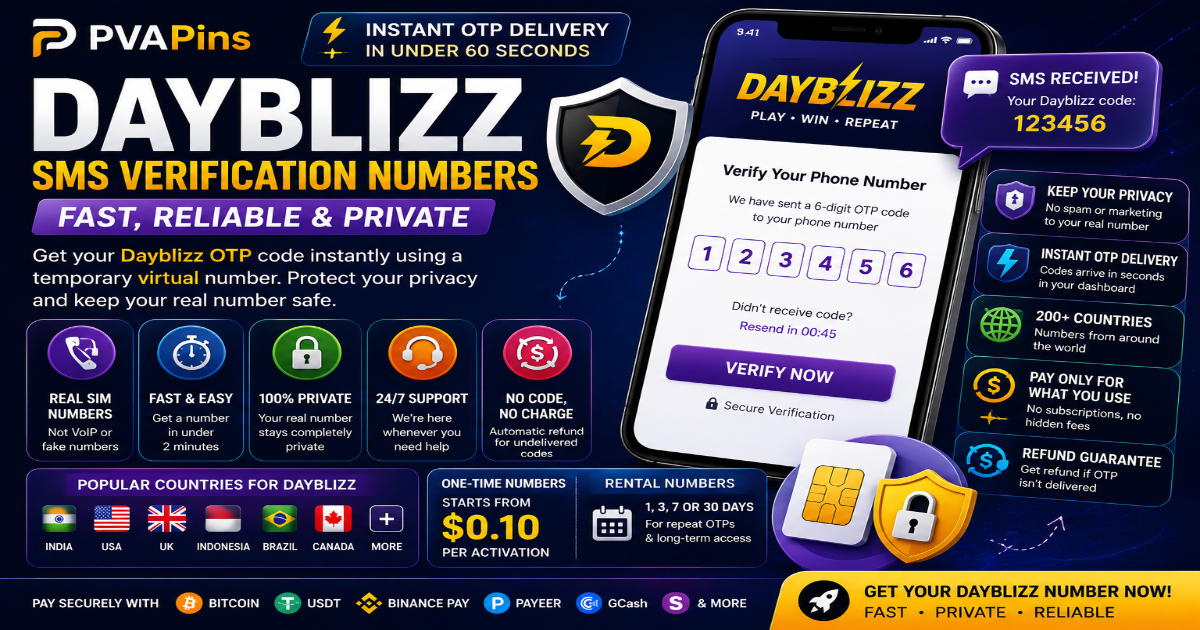
Ever found yourself needing to sign up for Dayblizz, reset your password, or turn on two-factor authentication (2FA) — but you’re not exactly thrilled about handing over your personal phone number? Totally get it. This guide’s got your back.
A Dayblizz SMS verification number is a short-term virtual phone number designed specifically to catch those one-time passcodes (OTPs) from Dayblizz. It’s a great fit if you’re big on privacy, need to work around location-based limits, or just want a tidy way to verify your account without exposing your actual SIM card.
The Short Version:
Fast setup: Snag a Dayblizz temp number in under a minute, no SIM required.
Live OTPs: Codes show up on your dashboard moments after Dayblizz fires them off.
Pay as you go: No subscriptions here. Pay per activation or rent one for 1–30 days.
Crypto friendly: Check out with Bitcoin, USDT, Binance Pay, and more.
Privacy focused: Keep your real number off marketing lists and out of data leaks.
So, What’s a Dayblizz SMS Verification Number, and Why Bother?
A Dayblizz SMS verification number is basically a virtual phone line you can use to grab the OTP Dayblizz sends during sign-ups, password resets, or 2FA checks.
Rather than giving away your actual SIM number — which might get you spam calls or tie you to just one account — you pick up a temporary number that routes the code straight to your web dashboard. That way, your personal line stays private, and you can still join Dayblizz even if your home country isn’t officially supported or your carrier blocks certain SMS types.
These numbers work for Dayblizz registration, login checks, and 2FA recovery. You don’t even need a physical SIM. Just a browser and a few cents. The numbers come from real carriers in countries where Dayblizz is active, so the OTP looks like a standard text. You pay for the number once, and that’s it — no monthly fees.
Want the full list of supported services? Check out our Dayblizz SMS verification service page.
How to Grab a Dayblizz Temp Number in 3 Minutes Flat
Getting a Dayblizz temporary number is quicker than downloading a new app. Really.
Hop over to the PVAPins Android app dashboard, pick "Dayblizz" from the service list, choose a country where Dayblizz accepts numbers, and pay with crypto or something like Binance Pay or GCash. The number shows up on your screen instantly, and you can copy it right into Dayblizz’s registration box. No waiting around, no sneaky delays.
There’s no account approval step, so you can sign up and grab a number in under 60 seconds. Available countries include the USA, UK, Canada, Indonesia, and plenty more where Dayblizz is common. Payments can be made with Bitcoin, USDT, Payeer, AmanPay, and others. You’ve got options for a single activation or rentals spanning 1, 3, 7, or 30 days.
Curious to try it out first? Snag a free number from our trial pool to see how everything works before you commit.
Can You Get Dayblizz Codes Without Your Real SIM?
Absolutely. That’s the whole idea behind a virtual number.
You’ll receive SMS online codes on a temporary number that lives in the cloud, not in your phone’s SIM slot. The message arrives in real time on the PVAPins dashboard, and you can read the code there or through the API. Your actual number stays untouched — no spam, no exposure, no carrier lock-in.
This setup works on any device with a browser, and there’s zero SIM swapping involved. The code shows up exactly as Dayblizz sends it, without any tweaks. Meanwhile, your real SIM keeps handling calls and texts while the virtual number deals with verification. It’s perfect for frequent travelers or anyone juggling multiple accounts.
Why a Paid Dayblizz Virtual Number Beats Free SMS Sites
Free SMS sites often recycle numbers that hundreds of people have already used. Dayblizz might block them, or your code could end up in some stranger’s inbox.
A Dayblizz SMS verification number from a paid service like PVAPins is all yours for the duration of your activation or rental. The code lands in your dashboard, not a public pool. Plus, you’ll get a refund if no code shows up — something free sites never offer.
Paid numbers tend to have a much better acceptance rate because they’re not flagged as "known" by Dayblizz. There’s zero sharing with strangers; your session stays private. Free sites often deal with lag or downtime, but paid services deliver SMS in real time. And if the code doesn’t come through, you’ve got a dedicated support line to lean on.
Step-by-Step: Getting Dayblizz OTP Codes on Your Dashboard
Once you’ve bought a number for Dayblizz, the OTP code will appear in your PVAPins dashboard under "Active Numbers." Refresh the page or flip on auto-refresh, and the code pops up within seconds of Dayblizz sending it. You can also set up a webhook or poll the API if you’d rather automate the whole thing.
Here’s a quick walkthrough:
Buy the number: Purchase a Dayblizz verification number from pvapins.
Copy and paste: Copy the number and drop it into Dayblizz’s sign-up or verification form.
Wait for SMS: Dayblizz usually sends the code within 5–30 seconds.
Check dashboard: The code shows up in your PVAPins log with a timestamp.
Grab the code: Use what’s displayed to finish your Dayblizz verification.
Filter if needed: Got multiple numbers active? Filter by "Dayblizz" to find the right one.
Everything happens in a single browser tab — no need to check your phone. For the latest pricing details, peek at our pricing for Dayblizz.
What If Your Dayblizz SMS Code Online Doesn’t Show Up?
If your Dayblizz SMS code online doesn’t appear, don’t stress.
First, double-check that you picked the right country; Dayblizz might not send codes to every region. Next, try requesting a fresh code from Dayblizz after 60 seconds. Still nothing? Look at your dashboard for a status update. Some providers block virtual numbers, but the PVAPins FAQ covers refunds if no code lands within the time frame.
Troubleshooting tips:
Check activity: Make sure the number is still live; rental numbers expire after their period.
Try another country: If the first one fails, switch countries — Dayblizz coverage varies.
Verify the number: Confirm you didn’t mistype it when pasting into Dayblizz.
Be patient: Wait up to 60 seconds; some carriers are slower than others.
Hit up support: If nothing works, contact support for a refund or a replacement.
Didn’t get your code? If the SMS never arrives, we’ll refund you, no questions asked. Grab a replacement number with better acceptance rates. Start a new activation now.
Dayblizz App SMS Verification: One-Time Use vs. Rental Numbers
For Dayblizz app SMS verification, you’ve got two paths:
One-time activation: Costs just a few cents and works for a single sign-up. Number expires after use.
Rental number: Lasts 1, 3, 7, or 30 days for repeated OTPs like login codes or 2FA.
If you only need to verify once, go with the activation. If you’ll be using Dayblizz regularly, renting a number is smarter — it’s cheaper per code and saves you the hassle of swapping numbers.
Key differences:
One-time activation: Pay once, get one code; number expires after. Ideal for quick verifications.
Rental: Pay for the chosen period (like 1 or 7 days), receive unlimited codes from Dayblizz during that time.
Consistency: Rentals are great for keeping a steady Dayblizz account without fresh numbers.
Cost-effective: No extra fees for multiple codes on a rental plan.
You can flip between both options anytime from the dashboard. If you need ongoing access, rent a number for 1–30 days.
How Developers Automate Dayblizz App OTP Receipt Via API
Developers can automate Dayblizz app OTP receipt by plugging into the PVAPins API. You request a number with a simple HTTP POST, poll the API for SMS status, and grab the OTP as soon as it lands — no manual checking required.
This is perfect for testing Dayblizz sign-up flows, running automated QA, or building apps that verify users programmatically.
Here’s how it works:
Request a number: Use the API endpoint to ask for a Dayblizz number with a specific country code.
Poll for status: Hit the status endpoint every 2–3 seconds until the OTP arrives.
Webhooks: Set up webhooks for real-time push notifications, receiving codes as they come.
Documentation: Full API docs include sample code in Python, PHP, and JavaScript for easy integration.
Rate limits: Our API offers generous rate limits, supporting robust automated workflows.
For all the technical details and integration guides, you can integrate via the API.
Privacy & Safety: Using a Dayblizz Virtual SMS for App Sign-Ups
Using a Dayblizz virtual SMS for app sign-ups keeps your real phone number off Dayblizz’s marketing lists and away from data brokers. It also shields your personal number if Dayblizz ever has a data breach.
Quick note: PVAPins isn’t affiliated with the app, website, or platform. Make sure to follow each app or website’s terms and local laws.
That means you’re responsible for using the number legitimately — no spam, no fraud, just a privacy layer.
Privacy and safety perks:
Data privacy: Your real number stays hidden; only the virtual one is shared.
Security: No risk of SMS-based phishing or SIM swap attacks on your personal line.
Location flexibility: Great for signing up for Dayblizz where your carrier doesn’t support SMS.
Compliance: Always check Dayblizz’s terms to confirm virtual numbers are allowed.
Long-term privacy: Use a rental number for ongoing accounts to avoid leaking your real info over time.
Dayblizz App Sign Up Number: The Smart Way to Stay Off Marketing Lists
When you use a Dayblizz app sign-up number, your real phone number never ends up on Dayblizz’s marketing SMS lists or gets sold to third-party advertisers. The virtual number is disposable, so when you’re done with the account, you just let it expire. No more 2 AM spam texts or "last chance" offers clogging your personal line.
Here’s why it’s a smart move:
No marketing: Virtual numbers aren’t tied to your identity, making them useless for marketers.
Disposable: Toss the number after sign-up and cut ties completely.
Convenience: No need to change your real number or carry a secondary SIM.
Testing: Ideal for trying out Dayblizz features or new accounts without committing a personal phone.
Clean inbox: Keeps your personal SMS clear of unsolicited ads, so important messages stand out.
Need ongoing access? Rent a dedicated Dayblizz number for 1, 3, 7, or 30 days and get codes anytime. No subscription, no hidden fees. Try our virtual rent number service today.
FAQs
Quick answers to common questions about Dayblizz SMS verification.
Is it legal to use a temporary number for Dayblizz?
Yes, it’s legal as long as you stick to Dayblizz’s terms of service. PVAPins isn’t affiliated with Dayblizz, and you should always check local regulations around SMS verification.
Why doesn’t my Dayblizz code arrive?
Common reasons include: the country you picked isn’t supported by Dayblizz, the number’s been used too many times, or you mistyped it. Try a different country or reach out for a refund via PVAPins if no code shows up.
Should I use a one-time activation or a rental number for Dayblizz?
For a single sign-up, a one-time activation is cheaper. If you’ll use Dayblizz often (login codes, 2FA), renting for 1–30 days is more cost-effective and keeps your account stable.
What should I NOT use a temporary number for?
Don’t use temporary numbers for fraud, spam, breaking Dayblizz’s terms, or any illegal activity. They’re meant for privacy, testing, and legitimate sign-ups only.
How do I fix a missing OTP?
Wait 60 seconds, request a new code from Dayblizz, check your dashboard for the SMS, and confirm the number’s still active. If it never arrives, contact PVAPins support for a refund.
Can I reuse the same temporary number for multiple Dayblizz accounts?
Only if you rent the number for a longer stretch. One-time activation numbers expire after the first code. Rental numbers let you receive multiple codes over several days.
Will Dayblizz know I’m using a virtual number?
Dayblizz might flag virtual numbers from certain pools, but PVAPins uses real carrier numbers that are less likely to be spotted. If a number gets blocked, try another country or ask for a refund.
Compliance note: PVAPins isn’t affiliated with the app, website, or platform. Please follow each app or website’s terms and local regulations.