Let’s cut to the chase—SendGrid vs Mailgun. What are the differences between these email sending platforms and which one should you choose?
I aim to answer these questions and provide you with an in-depth comparison of SendGrid and Mailgun.
Disclaimer: The features, prices, and ratings are up-to-date as of writing this article. But, they could change in the future, so they might be different when you’re reading.
SendGrid vs Mailgun: quick summary
SendGrid for businesses who are looking to send basic transactional emails while having additional marketing features.
Mailgun for tech-savvy users who are looking to add email-sending functionality to their apps without having a plethora of extra features.
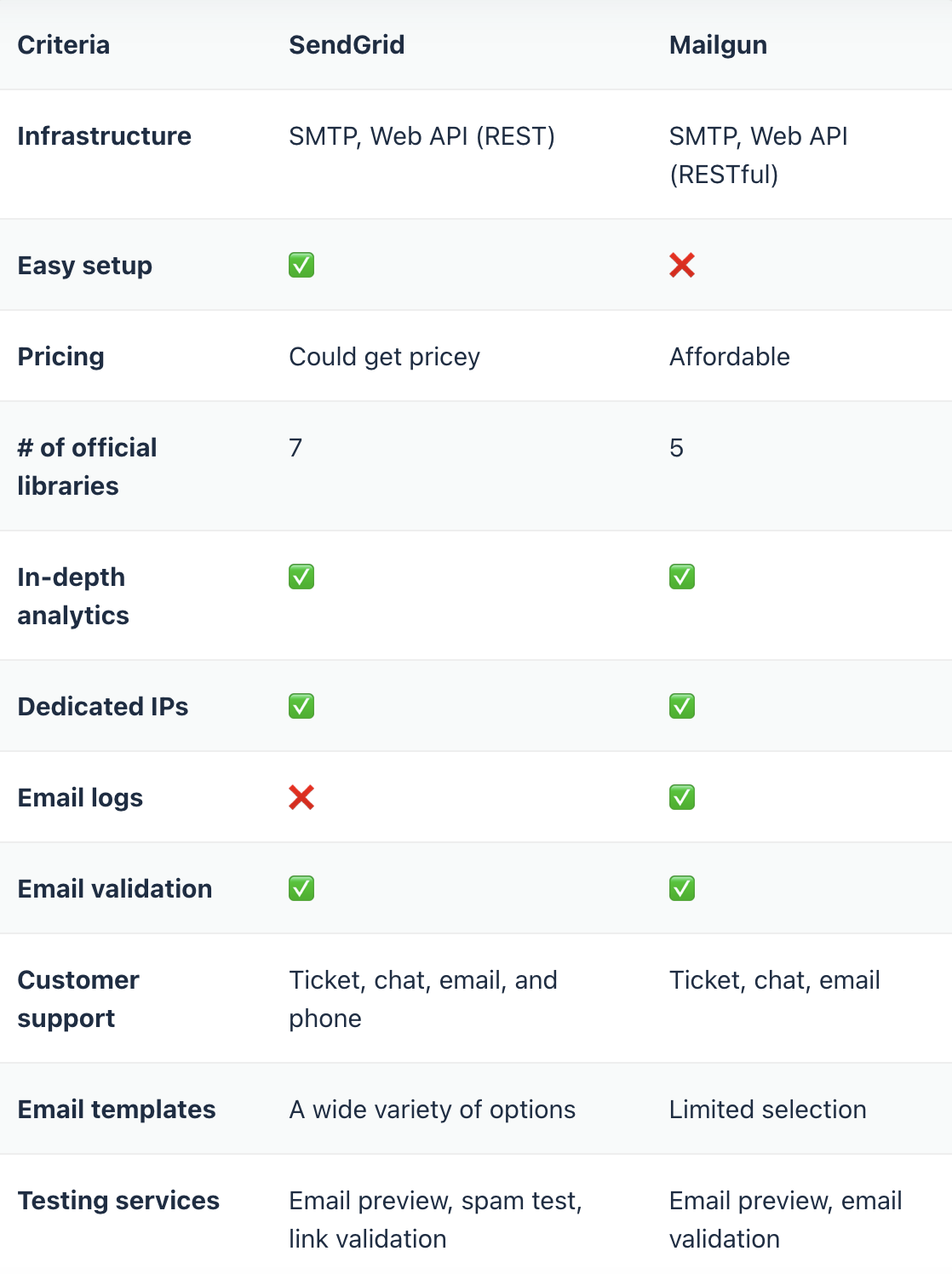
SendGrid vs Mailgun: overview
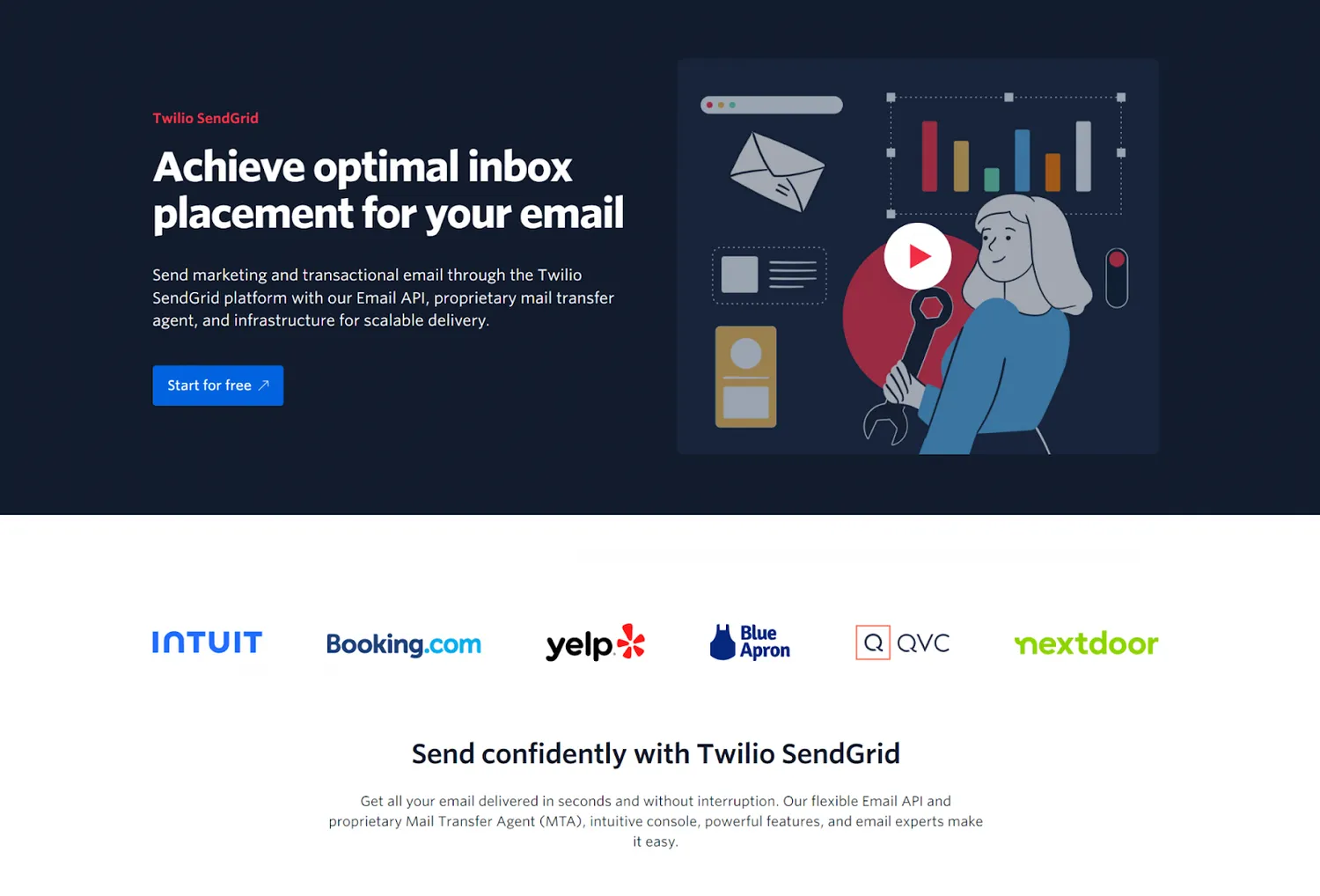
Founded back in 2009, SendGrid is one of the oldest names in the industry. It was acquired by Twilio in 2018 and since then has evolved from a platform focused on transactional email sending into an email marketing service.
With SendGrid, you can send both transactional and bulk emails with the added benefit of having various marketing features provided by Twilio.
Notable features:
- Integration with Twilio
- Onboarding services
- Easy-to-use editor
- Plethora of templates
- Seamless list management
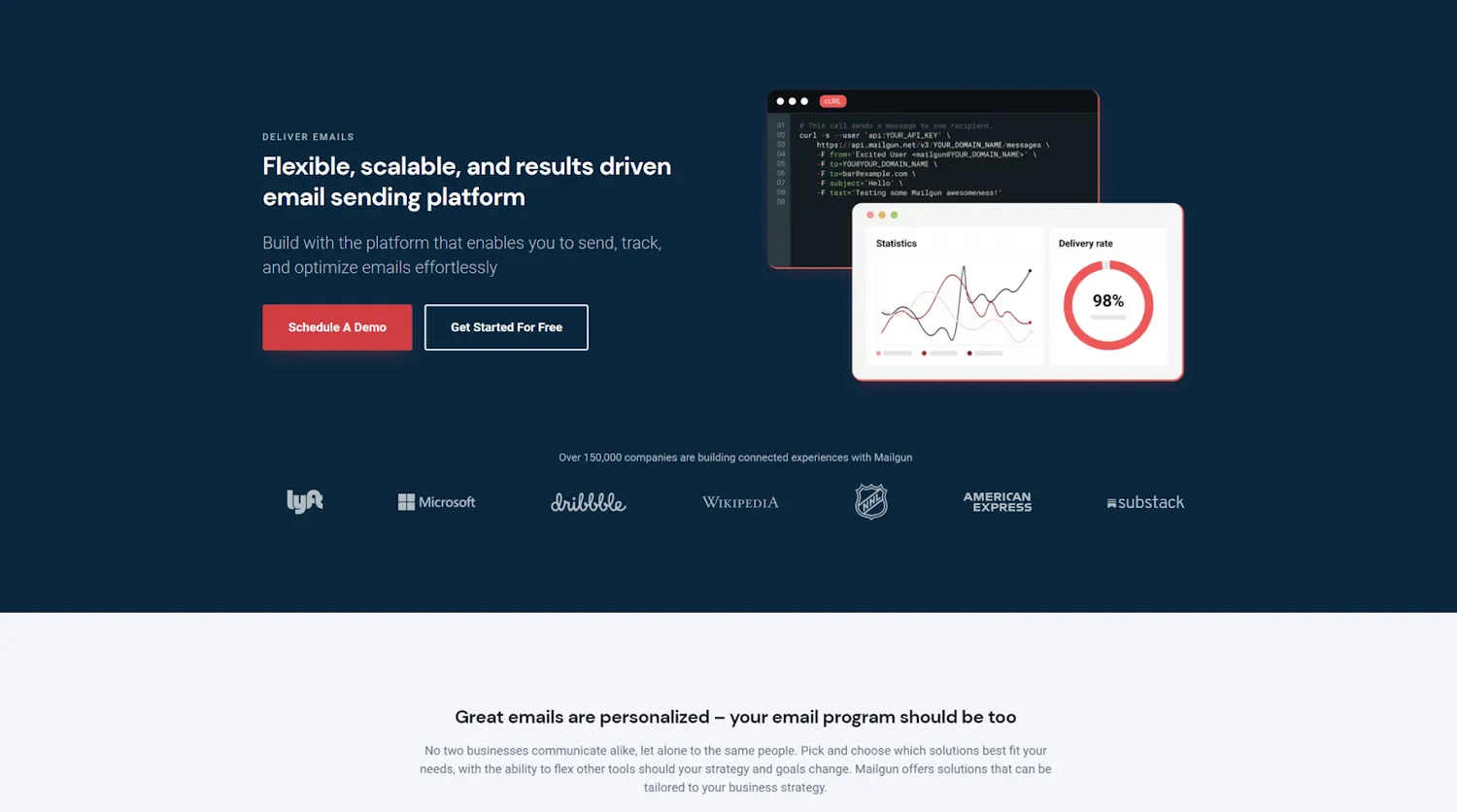
Mailgun was founded in 2010, and similarly to SendGrid, was acquired by another company, Pathwire, in 2021.
Since its inception, Mailgun has been geared towards developers and marketers who don’t have an issue working with code. Nowadays it also offers other messaging services provided by its parent company.
Notable features:
- High delivery rates for all plans
- Flexible and affordable pricing plans
- A free tier with lots of features
- Reliable customer support
- Email validation
Email infrastructure comparison
Deliverability
When you’re on the lookout for a new ESP, one of the first things you should check is the deliverability rate they offer, or, the rate that your emails land in your recipients’ inboxes.
Every ESP offers different features for achieving higher rates, and in the case of SendGrid and Mailgun, it’s a close race.
- SendGrid
According to SendGrid’s website, the platform promises a deliverability rate of 97% (with Expert Services) . It offers various advanced features that can help you increase your deliverability (more on those later), with the most notable ones being ISP outreach, IP warm-up, and Adaptive Communication Engine.
Having said that, keep in mind that you need to pay for a higher plan to unlock additional deliverability features.
- Mailgun
Mailgun boasts a 97.4% deliverability rate. It achieves that by focusing on email validation, real-time monitoring, and other features that help you increase your odds of reaching your recipients’ inboxes.
Moreover, if you’re willing to pay up, you can get help from a dedicated expert by opting for Mailgun deliverability services. They will be able to help you with onboarding and provide you with custom deliverability strategies and guidance so you can get the most out of the platform.
Deliverability features
Regardless of the deliverability rate a provider promises, most of it is in your hands and how you use your tools. To learn more about it, check out our Deliverability Guide. ⬅️
When it comes to SendGrid and Mailgun, both platforms provide the following features:
- Email validation
- Event webhooks
- SPF record authentication
- Insightful analytics
- Deliverability insights
- Dedicated IP addresses
- Inbox placement testing
- Email preview
- Reputation monitoring
- Spam trap monitoring
However, some features are locked at lower-tier plans, especially in the case of SendGrid. For example, to unlock email validation or dedicated IPs, you need to switch to the most expensive plan they offer.
Scalability
What we talk about when we talk about scalability is how reliably an ESP can ensure businesses can grow their operation needs and send a high volume of emails to their customers. That is, without compromising the quality of the service or encountering performance issues.
In short, your provider should allow you to send your emails to 1,000,000 recipients just as well as you would to 100.
- SendGrid
G2: 8.8 🌟
From what I’ve seen, the platform has a reliable infrastructure and has quite flexible, although a bit pricey, plans that allow you to upscale your sending needs.
If you’re into statistics and you’re up for some more reads, check out this article by SendGrid. In it, they describe how they processed 4+ billion emails on Black Friday and Cyber Monday back in 2019.
- Mailgun
G2: 9.1 🌟
Mailgun offers the Rapid Fire Delivery SLA, which guarantees 99% attempted delivery for up to 15 million messages within the first five minutes of sending.
The pricing plans also allow you to scale your operations easily as you can purchase more email sends without having to switch to a higher tier plan.
Reliability
Both SendGrid and Mailgun boast minimal downtime.
SendGrid
On a monthly basis, SendGrid delivers more than 80 billion emails to its users, some of which include Uber, Spotify, and Airbnb among others.
Mailgun
Mailgun provides email services to 225,000 businesses worldwide, such as Wikipedia, DHL, and others. According to its website, the platform delivers more than 400B emails every year.
User experience and pricing comparison
Ease of use
Now, I’ll go over how well SendGrid and Mailgun work with other tools and how easy they are to use, which can be a considerable factor when you’re choosing an ESP.
SendGrid
G2: 8.2 🌟 Capterra: 4.1 🌟
SendGrid has a smooth domain verification process and crystal-clear guidelines for sending mail.
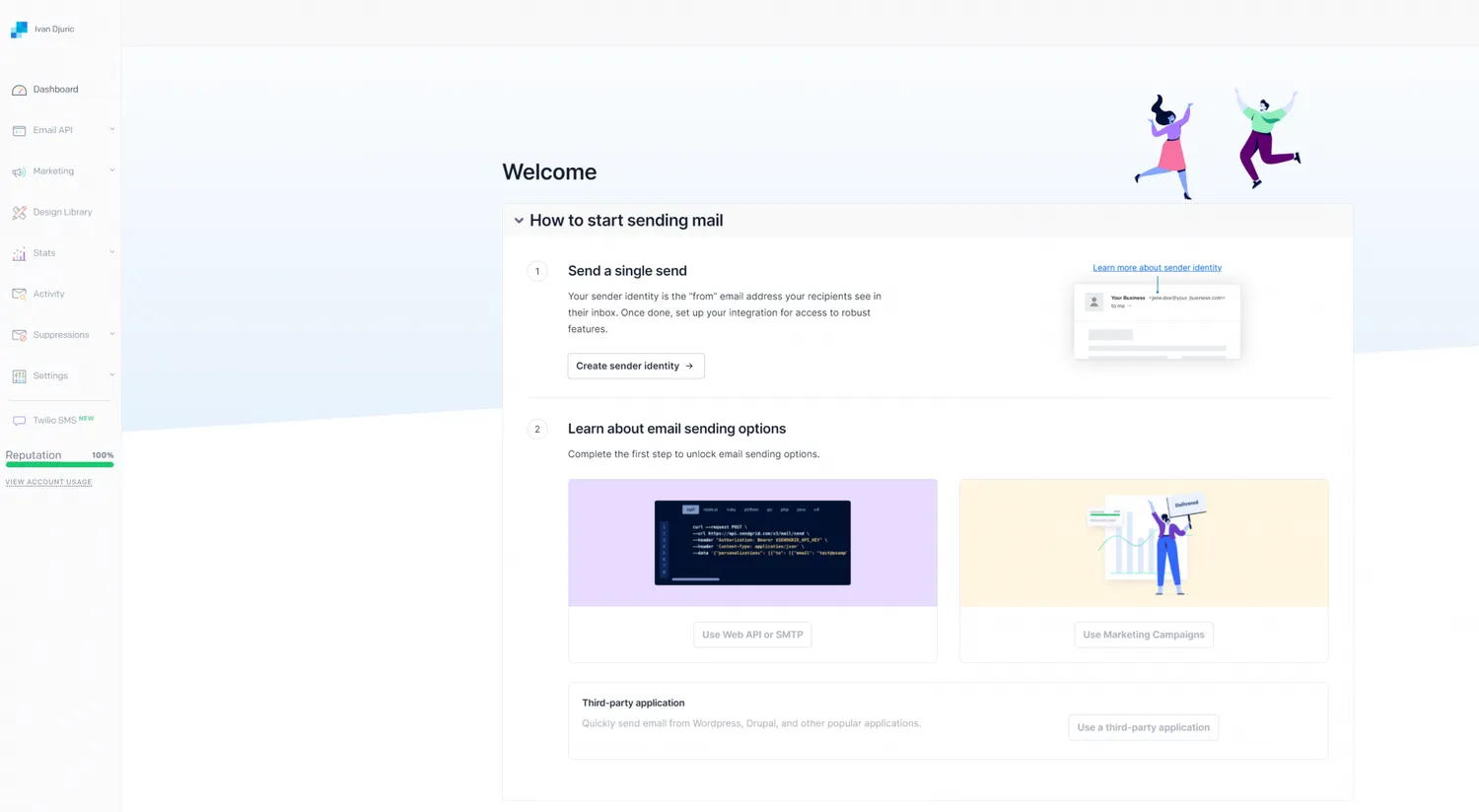
After some clicking around, you soon get used to the SendGrid UI and realize you have every tool in one place. This is a big plus, as you don’t have to be a coder to learn the ropes.
Mailgun
G2: 8.8 🌟 Capterra: 4.3 🌟
With Mailgun, you’ll have to be at least comfortable with coding or have a team member who is well-versed in it.
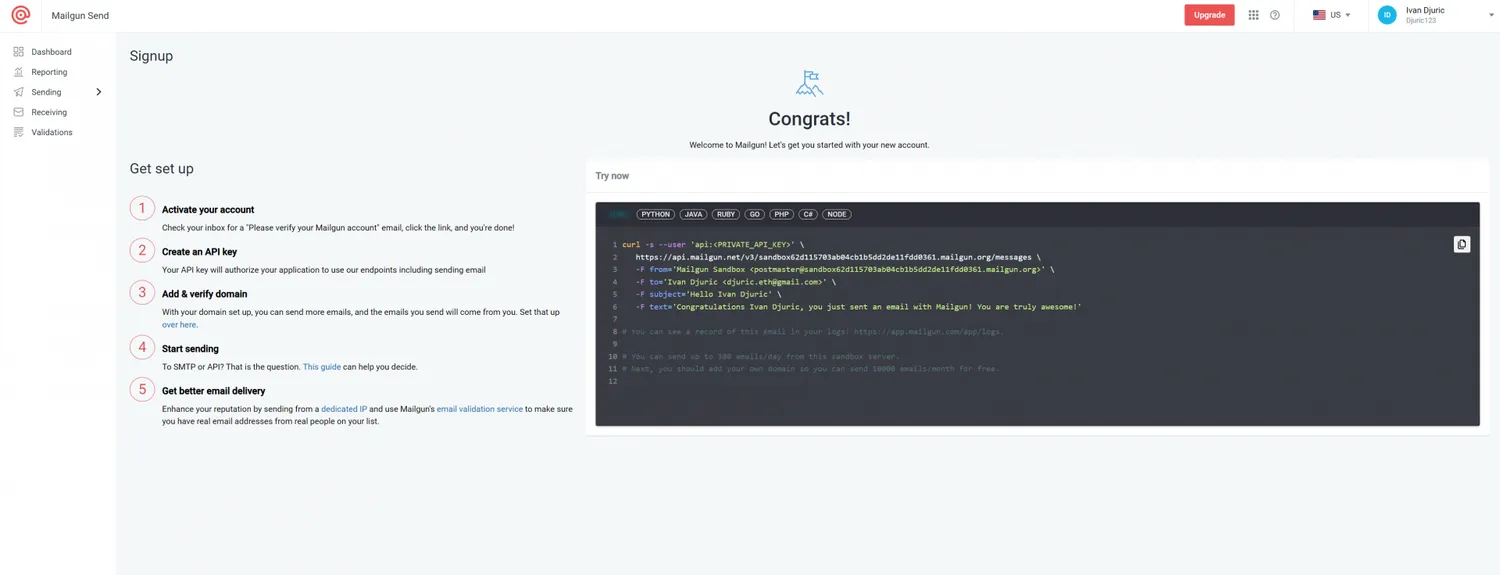
On the positive side, its UI is clear, provides all the information you need at hand, and after some research, I wasn’t able to find any customer complaints regarding the interface.
Customer support
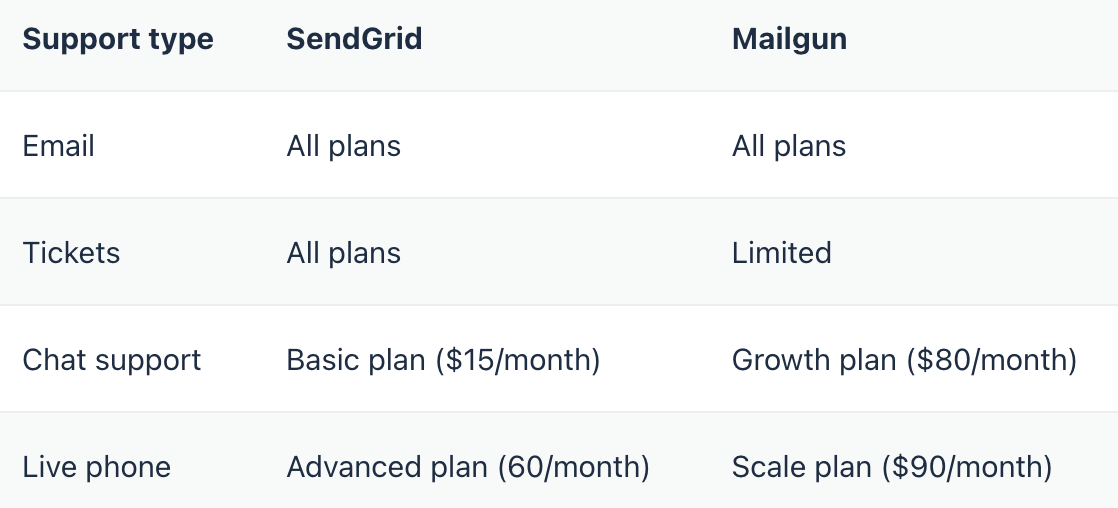
Customer support is one of the most important aspects I take into account when reviewing ESPs, and incidentally, it’s an area where SendGrid and Mailgun differ quite a bit.
SendGrid
G2: 7.6 🌟 Capterra: 3.8 🌟
SendGrid has a round-the-clock support team that you can contact via ticket, chat, email, and phone. However, phone support is available only for customers with a Pro or higher account.
Additionally, the response times for your inquiries depend on the pricing plan you choose.
Mailgun
G2: 8.3 🌟 Capterra: 3.9 🌟
Mailgun has a dedicated support team that also works around the clock. You can reach out to them via ticket, chat, or email, but you can’t do it via phone, unfortunately.
Higher-tier plans also get dedicated and prioritized support, whereas free users don’t have access to ticket support and have to rely on help center documentation.
Pricing
When considering the pricing of an ESP, you should take into account whether they cut back on important aspects such as deliverability or features like email logs. An ESP should also match your business’ size and offer the best value for your money.
Overall, I’ve found that SendGrid is on the pricey end as you need to pay up for additional features. Whereas Mailgun pricing is based on the number of emails you want to send, with some advanced benefits reserved for the highest tier plans.
In the following section, I’ll cover both free and paid plans separately, so you can have a better idea of what to expect.
Free plans
SendGrid:
- Up to 5,000 free emails per month
- Email APIs and SMTP relay
- Tracking, analytics, webhooks
- 1-day log retention
Mailgun
- 100 free emails per day
- Email APIs and SMTP relay
- 1 teammate permission
- 1 event webhook
- Dynamic template editor
- Email analytics
Paid plans
Keep in mind that both SendGrid and Mailgun have sliders on their respectable pricing pages, which you can use to increase the emails you can send per month for all plans.
SendGrid:
- Essentials: $19.95/monthUp to 50,000 emails per month
APIs, SMTP relay
1 teammate permission
Features such as analytics, deliverability insights, etc.
No access to email validation, dedicated IPs, sub-user management, single sign on (SSO)
- Pro: $89.95/monthUp to 150,000 emails per month
Access to all features, including the ones not available for Essential tier
- Premier: custom pricingMore than 1,500,000 emails per month
All features available
Mailgun:
- Foundation: $35/month50,000 emails per month
APIs, SMTP relay
Tracking, analytics, 5-day log retention, ticket support
Extra emails for $1/1,000 emails
- Scale: $90/month100,000 emails per month
Upgraded Foundation tier features
30-day log retention, dedicated IPs, etc.
Extra emails for $0.80/1,000 emails
- Enterprise: custom pricingMore than 2,5000,000 emails per month
All features from lower tiers included
Dedicated support
Proactive account monitoring
Customer feedback
In this section, I’ll share the user impressions on SendGrid and Mailgun I’ve found while digging through social media, which, in some situations, can be indicators of how an ESP is doing.
SendGrid
G2: 4 🌟 Capterra: 4.3 🌟
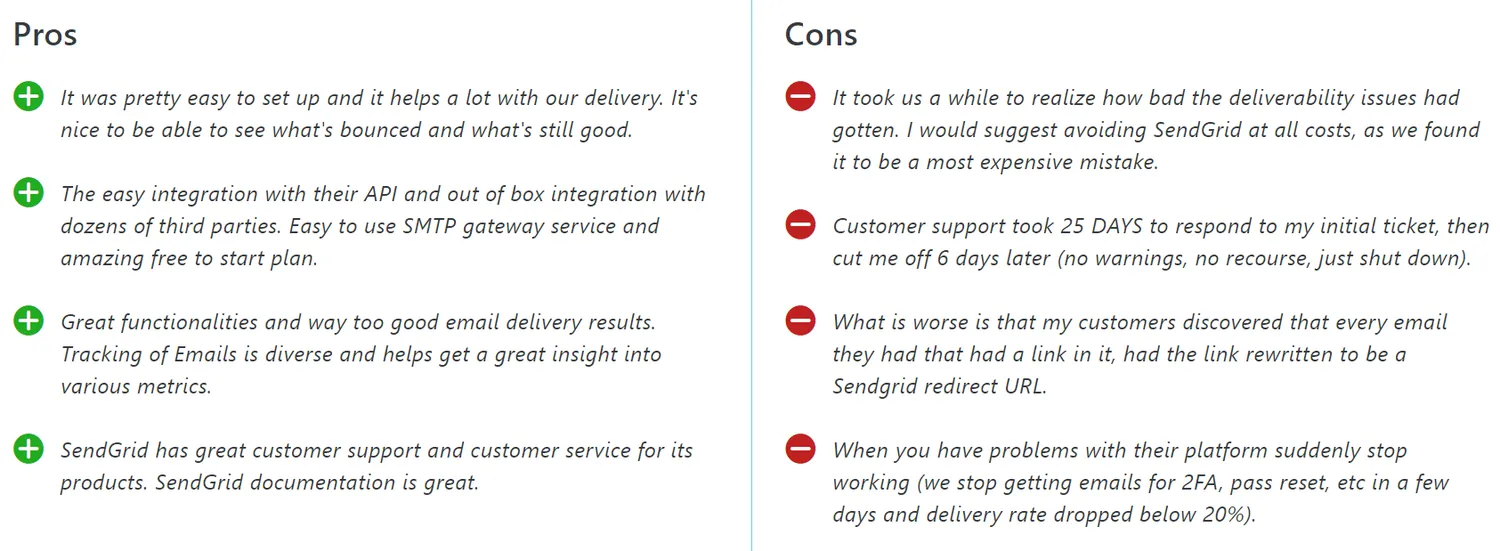
I’ve come across numerous reports on various issues, but the one that, like its original poster, blew my mind was that SendGrid tried to shut down an account three times. 🤯
Review websites like G2 for example have mixed reviews, with most of them being 4+. Here are some impressions from Capterra:
Mailgun
G2: 4.3 🌟 Capterra: 4.2 🌟
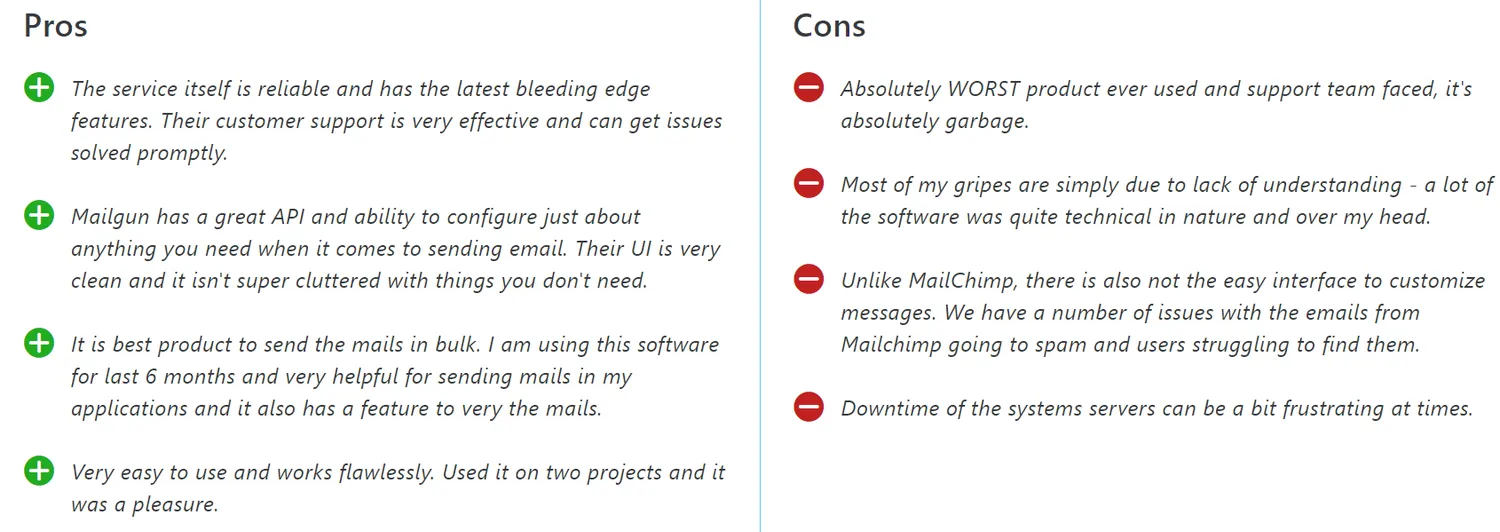
Contrary to SendGrid, I’ve seen mostly positive Mailgun reviews on Twitter.
Here’s what people have to say about Mailgun on Capterra:
Legal compliance
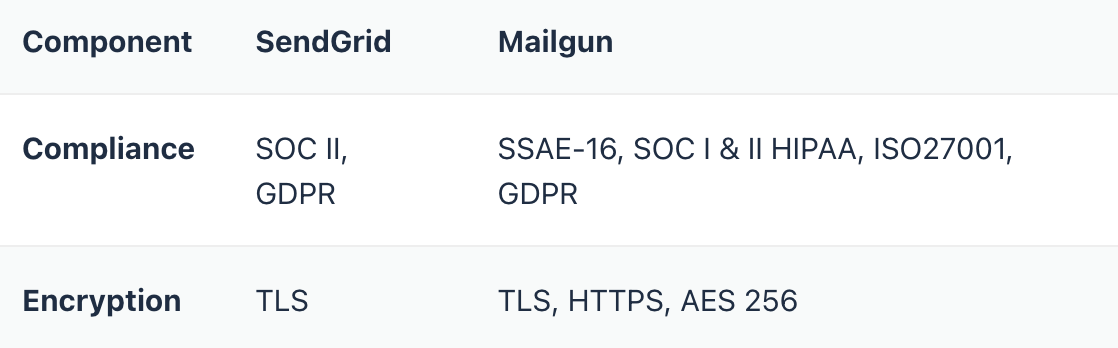
Whether an ESP is compliant with the latest privacy legislation and whether it uses the latest encryption standards should play a big role in your decision.
Can’t decide between SendGrid and Mailgun?
If you can’t seem to decide between SendGrid and Mailgun, check out the articles our email infrastructure experts wrote on SendGrid alternatives and Mailgun alternatives. Among others, they recommend:
- Mailtrap
- Mailjet
- Mandrill
- Postmark
- SparkPost
Personally, I would suggest the Mailtrap Email Delivery Platform where businesses, individuals, and developer teams can Test, Send, and Control their email infrastructure in one place.
Mailtrap consists of Email Sending and Email Testing, and the release of Email Campaigns is on the way.
Email Sending
With Mailtrap, you can send emails either with SMTP or API service. Mailtrap has a straightforward setup process and high deliverability rates by design, meaning you don’t have to pay for a higher-tier plan.
Watch the video to see more
You also get 24/7 customer support, also regardless of the plan you choose, which is huge in my book.
Some other benefits and features that stand out include:
- Dedicated IPs
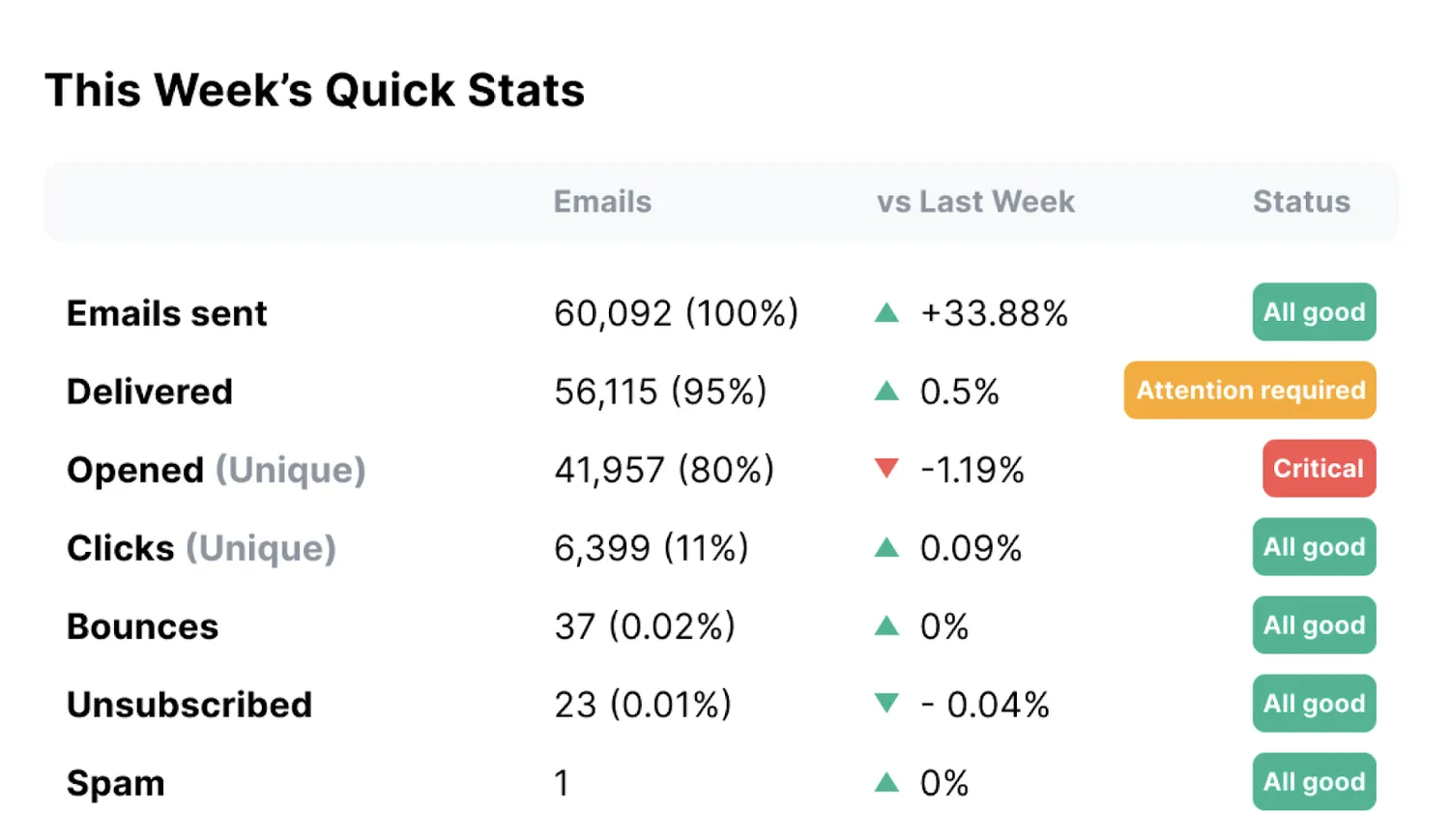
- Regular weekly reports
- In-depth tracking:Opens and Clicks
Delivery and Bounce rates
Deliverability Alerts (weekly and hourly if critical)
- Email logs for up to 60 days of sending history
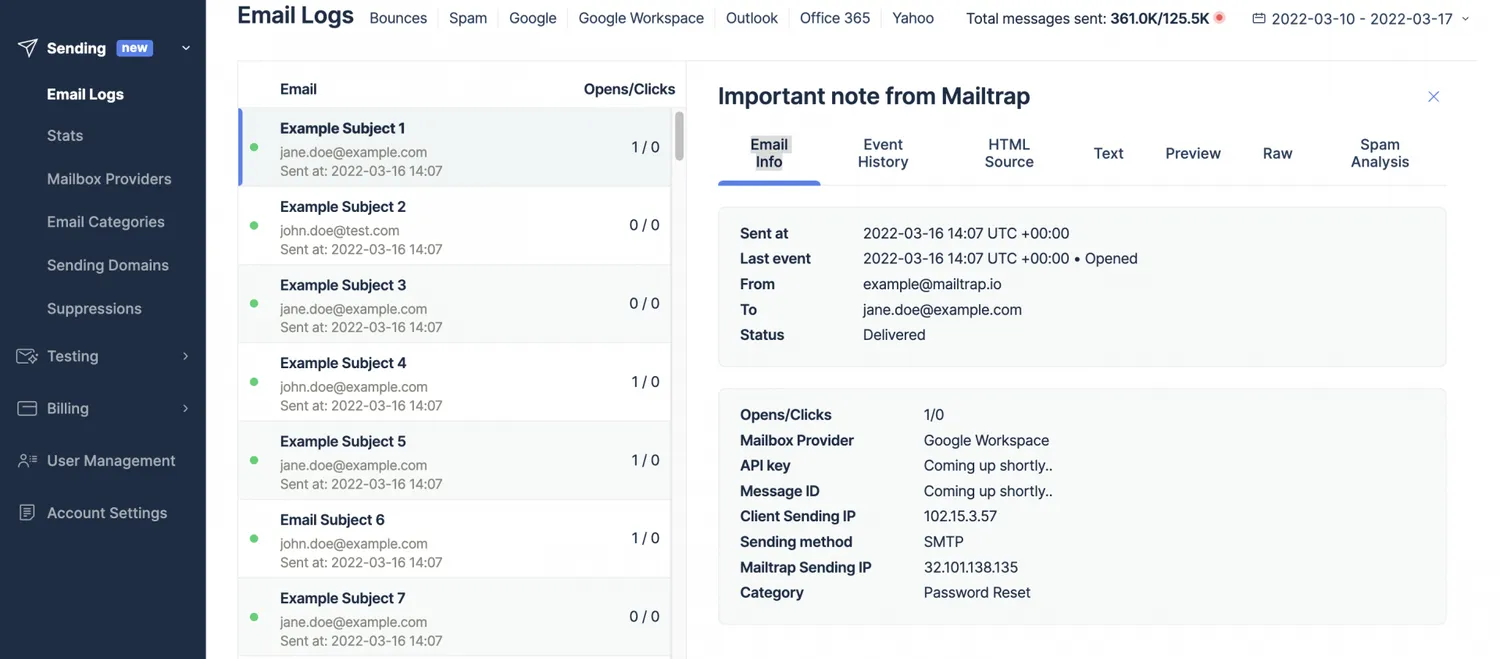
- Separate dashboard for all emails from users of:G. Workspace
Gmail
Microsoft 365
Outlook
Yahoo
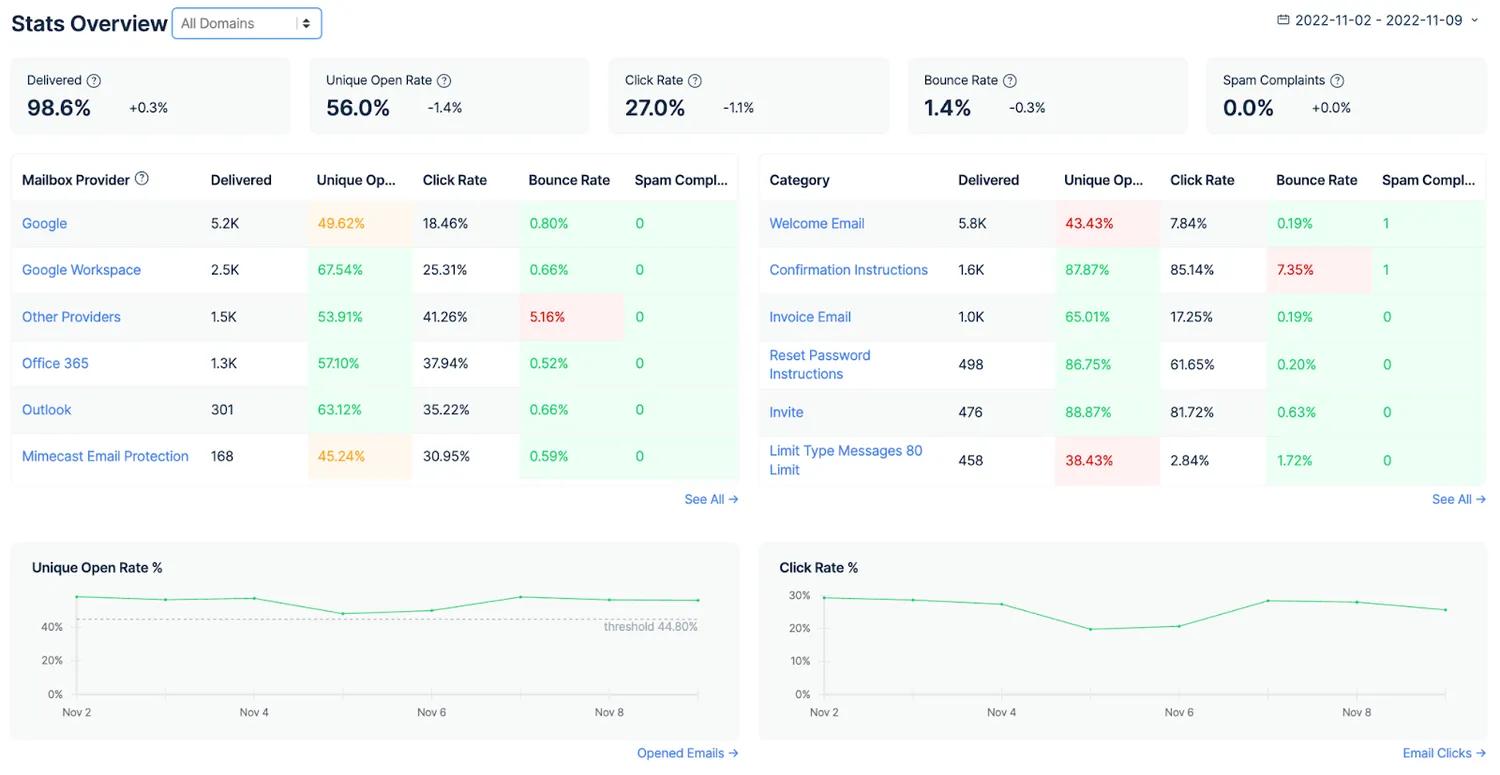
- Helicopter-view dashboards, drill-down reports, etc.
- Event webhooks
- Email templates
Special mention: with Mailtrap, you get bulk emails for the price of transactional as there are separate streams for Transactional and Bulk email sending, which use different endpoints.
Lastly, Mailtrap is super easy to set up and configure, regardless of whether you’re migrating from another platform or you’re fresh in the game.
Be sure to check out our migration guides for both SendGrid and Mailgun.
Send Emails with Mailtrap for Free
Email Testing
Mailtrap Email Testing lets you inspect and debug in staging, development, and QA environments. By using a fake SMTP server, you can test your emails without spamming your recipients or flooding your own inbox.
Watch the video to see more
Some of the most notable features include:
- HTML/CSS support – Check how your emails look with the most popular mailbox providers.
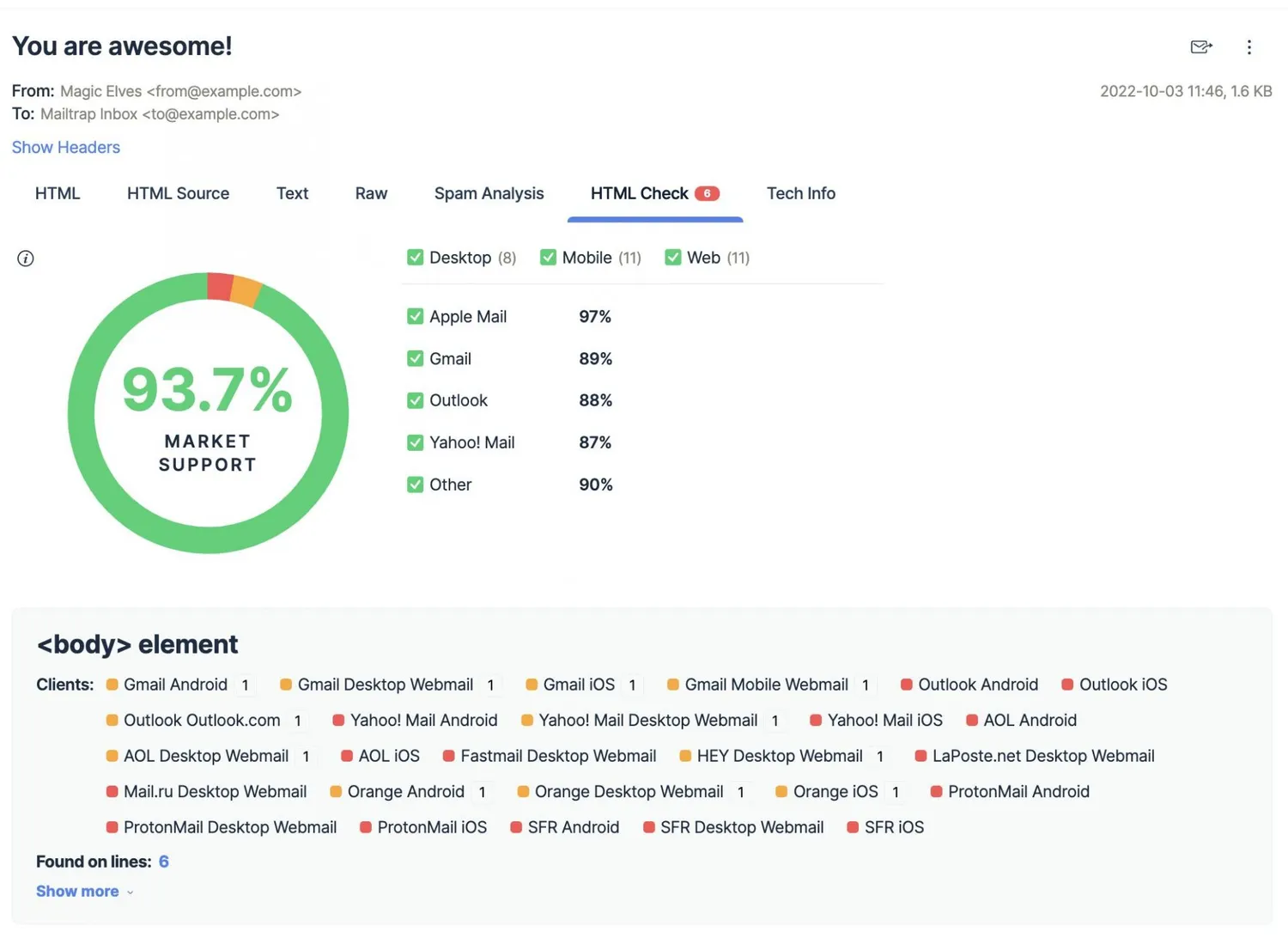
- Spam checker – Significantly improve your email deliverability rates and prevent your emails from going to spam by keeping your spam score under 5.
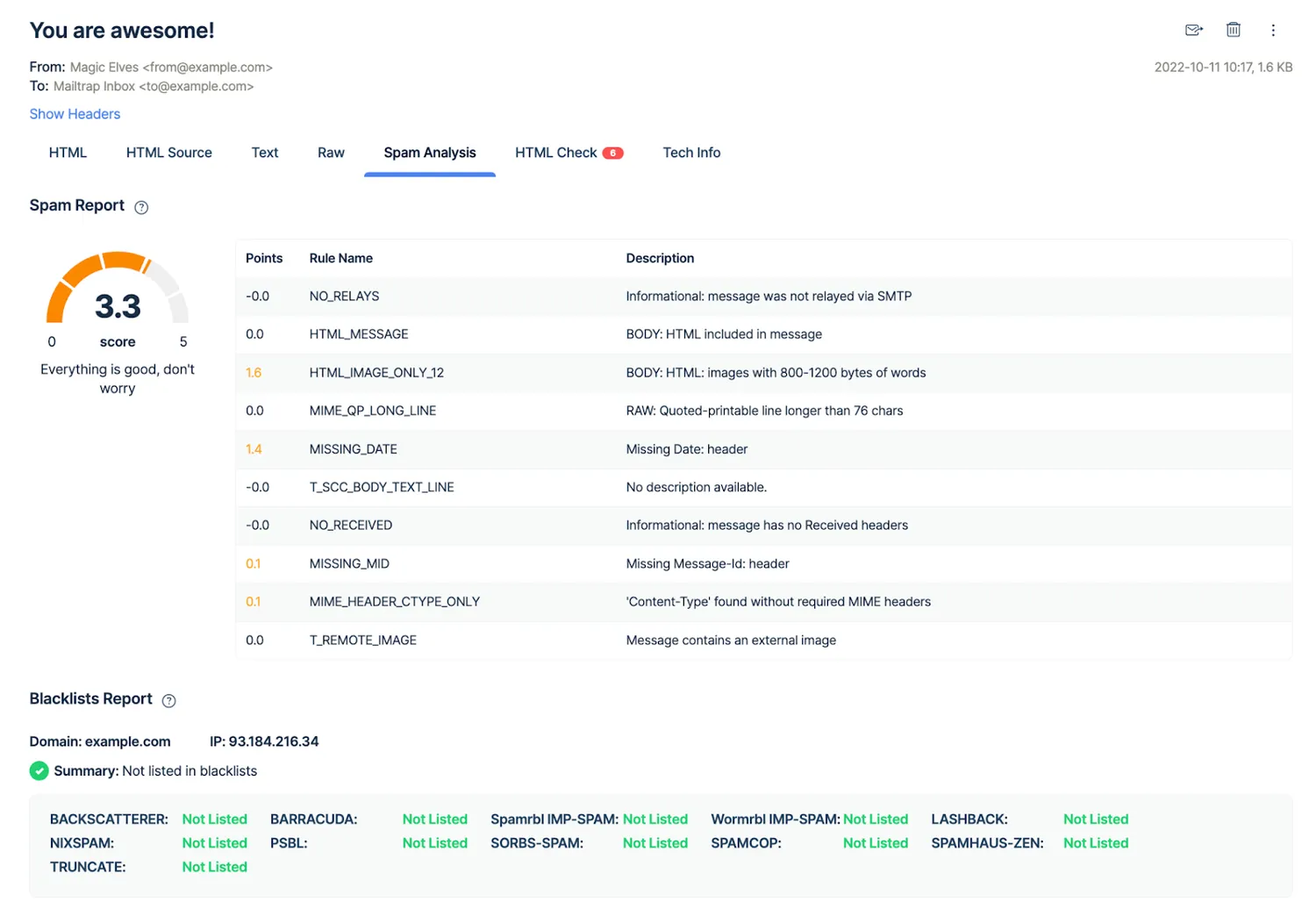
- Templates testing – Test your emails with our API and easily switch from staging to production once you think you’re ready to start sending.
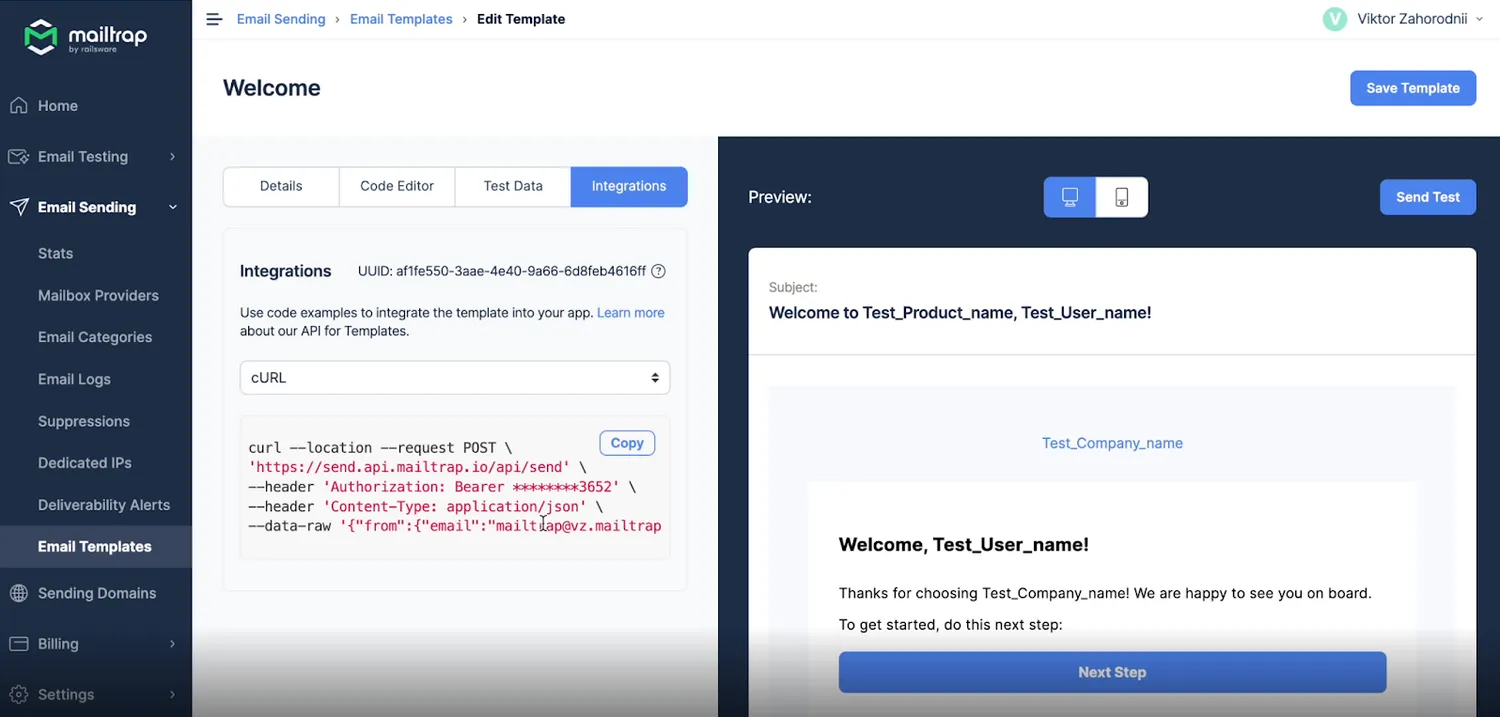
- QA automation – Use our Email Testing API and cover all your testing scenarios.
Test Emails with Mailtrap for Free
Wrapping up
So, SendGrid vs Mailgun — which platform do you think is better for your email-sending needs?
I advise you to put the needs of your business down on paper, evaluate them, and choose the right email service provider based on the features they offer and the functionality you need. Of course, keep in mind their reliability, track record, customer feedback, etc.
Although you can’t go wrong with your choice between SendGrid and Mailgun, I hope you give Mailtrap a shot as a reliable alternative with a superb free plan (no credit card required).
Any which way, good luck with your choice and happy sending!
Article by Ivan Djuric, Technical Content Writer @Mailtrap
We appreciate the you chose this piece og the article to find out the difference between SendGrid and Mailgun. If you want to read about transactional email features comparison as well as email marketing features comparison, click here!