Let’s face it: there is no email API that fits the needs of every team out there. However, a solid API will give you control of your sending process and allow you to fine-tune it according to your team’s requirements.
In other words, an email API needs to be flexible.
So, I’ll break down the email API flexibility for 5 of the best providers out there.
First, I’ll give you a snapshot of my research, tell you about the methodology I used, and then I’ll cover the following components (click to jump):
- Infrastructure and scalability
- Sending logic and performance
- Integration and extensibility
- Templates and personalization
- Testing environment
- Customer support
Email API flexibility comparison: a snapshot
Click on a platform name to jump ahead to the detailed review.
- Mailtrap has the most flexible setup, offers separate sending streams, a full-fledged Sandbox, advanced webhooks, making it great for high-volume senders.
- Resend offers great flexibility but lacks some features like dedicated streams, testing solution, and templates, which can be a deal breaker for some.
- Postmark is a reliable, minimalistic choice, but if you plan to use it, you’ll have to handle retries, templates, and testing on your own.
- Mailgun offers a plethora of advanced features and is quite flexible, although it lacks dedicated streams, and its customer support availability depends on your plan.
- SendGrid is a super flexible option for users who are willing to pay for a higher plan for more control of their sending infrastructure.
To give you a sneak peek, here’s a table (one of many) that summarizes the key findings of my research:
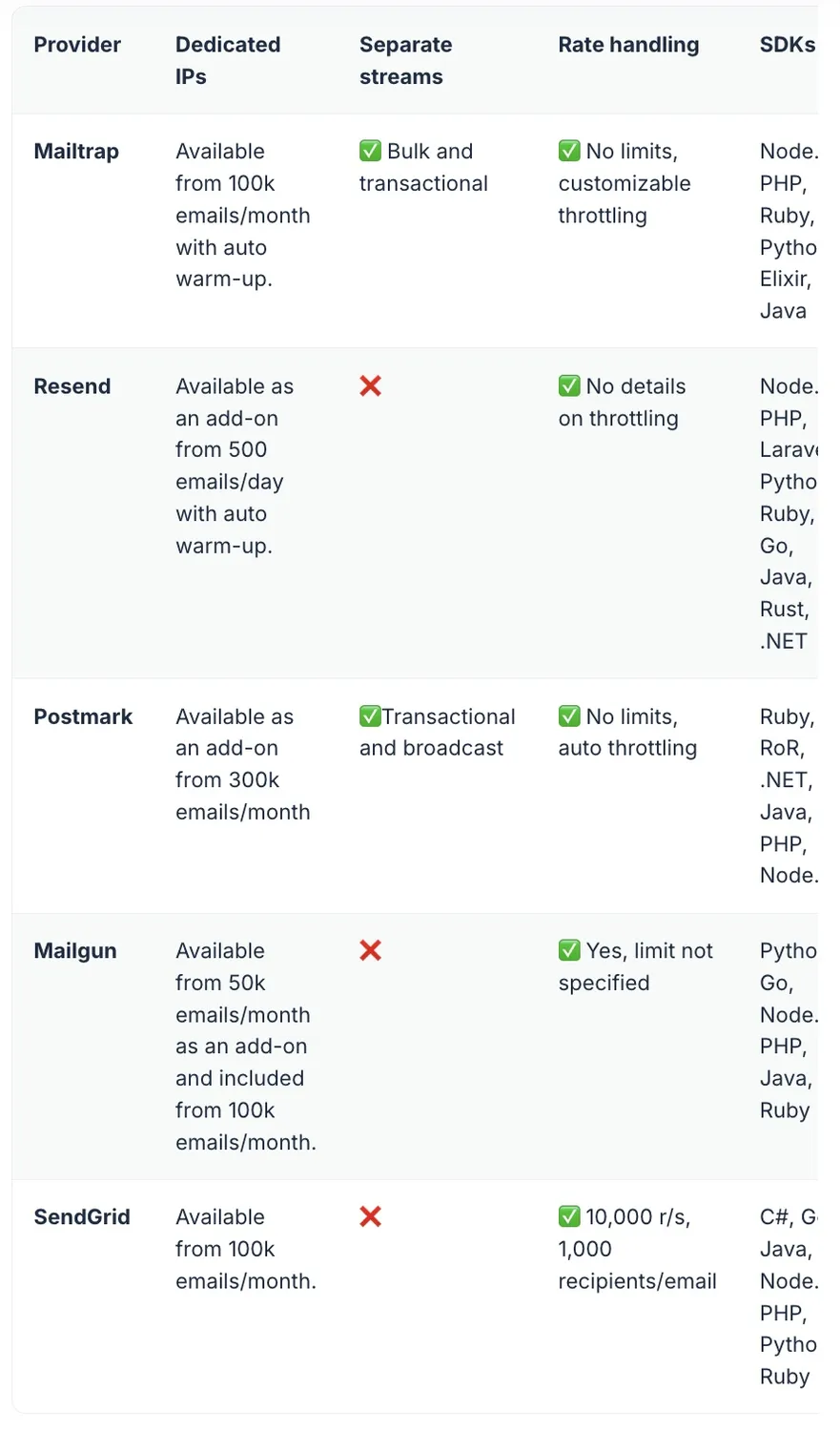
Methodology
First, I analyzed the official documentation. This includes support portals, knowledge bases, changelogs, and various integration guides from providers, like this one for example.
Going through these docs, I was relatively able to see how easy to use an API is, what it allows me to do, and whether it’s maintained regularly.
Then, of course, I ran tests with each API to simulate real-world usage. By doing this, I was able to see how much control I had over email sending, how easy it is to set up an API, etc. The tests I ran include:
- Sending emails with different sending configurations to test real use cases
- Triggering rate limits and retry behavior to see how the API handles high volume
- Create email templates and see how much personalization they allow
- Setting up webhooks for some of the events they support
- Using the testing solutions to validate my email designs, check spam scores, etc.
The most important information regarding APIs and the tests I ran is in the following chapter.
Email API flexibility detailed comparison
Infrastructure and scalability
Let’s start off with the essentials, that is, the API infrastructure, for which I considered the following:
- Scalability
- IP infrastructure
- Email streams
- Multitenancy support
Scalability
An email API is scalable if it allows you to increase your sending volume without delays, deliverability hiccups, or infrastructure bottlenecks. To allow you all of this, most modern email API providers offer cloud-based infrastructure paired with other features like dedicated IPs.
The following table sums up the technical tidbits related to scalability:
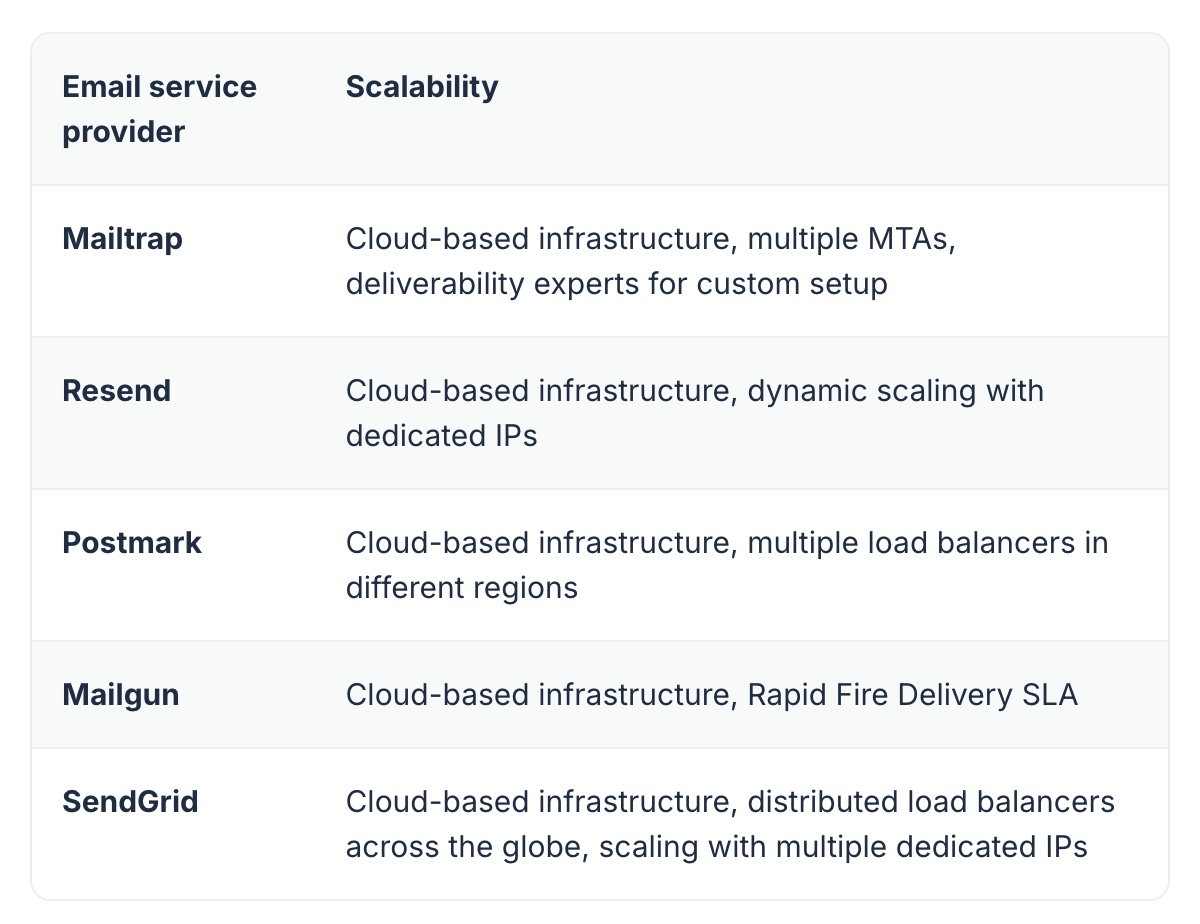
What it means:
- Mailtrap offers automatic MTA distribution and help of deliverability experts for setting up your sending configuration. This makes it best for teams who want to scale while having guidance along the way.
- Resend adjusts IPs dynamically, meaning the API will adjust to your sending volume in real-time. This makes Resend ideal if you have a fast-growing app with variable sending volumes or a website with traffic spikes.
- Postmark distributes email traffic evenly to prevent delays and routes emails through the closest server to the recipient. Thanks to this, it’s considered a reliable choice if you plan to send transactional emails.
- Mailgun offers its Rapid Fire Delivery SLA, an agreement promising safe and reliable delivery of up to 15 million emails per hour, delivered under certain pricing plans. This is ideal for senders who plan to perform email blasts.
- SendGrid sends emails from servers closest to recipients and combines this with multiple dedicated IPs to ensure stability during spikes. This makes it best for teams who plan to send both marketing and transactional emails at a high volume.
IP infrastructure
No matter how great your content is or how clean your contact list is, your emails won’t land in the primary inbox if your ESP doesn’t have a solid IP infrastructure, which consists of dedicated IPs, features like auto warm-up, and more.
Here’s a quick breakdown for you:
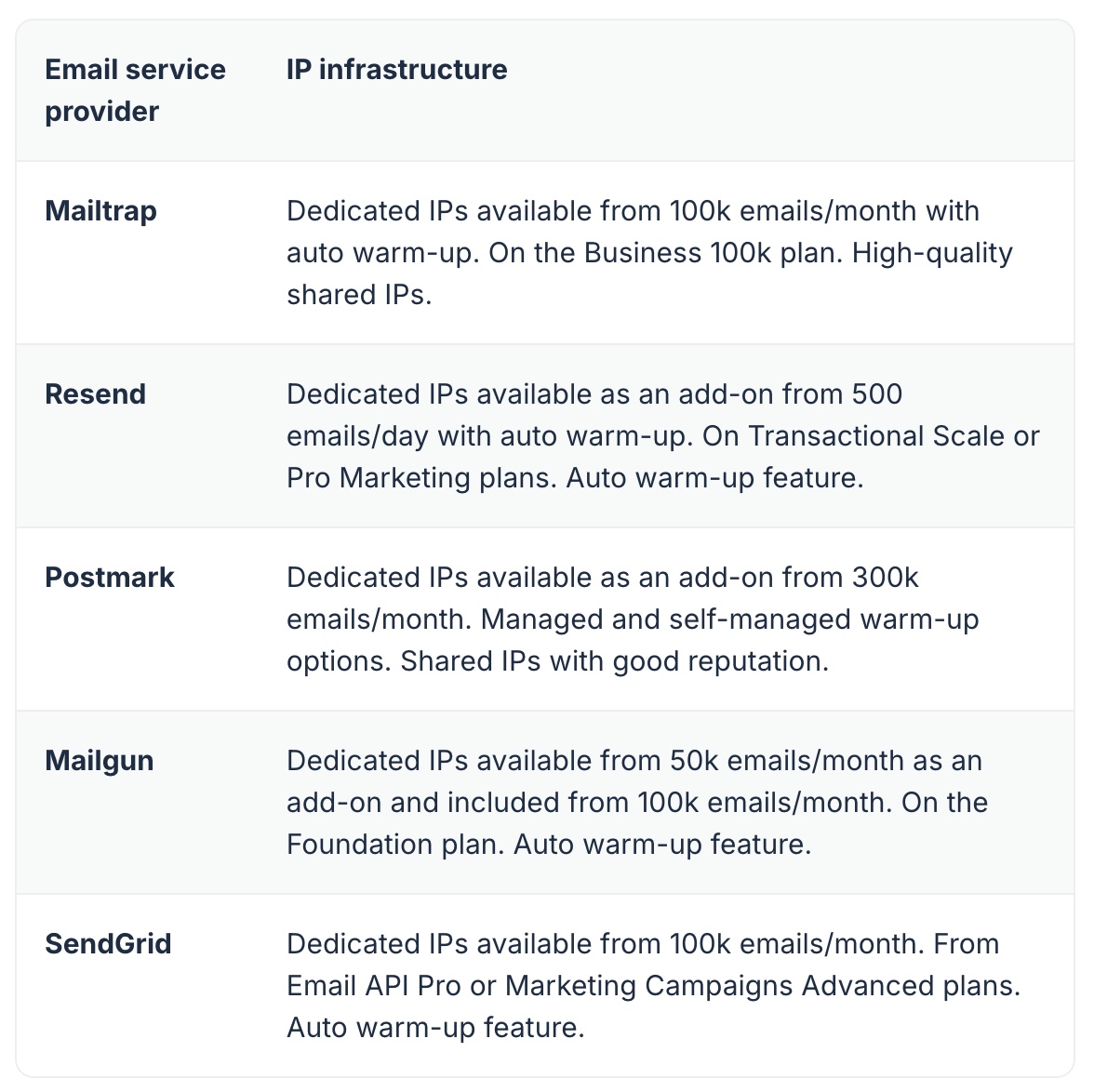
What it means:
- Mailtrap offers free dedicated IPs for senders with a volume higher than 100k/month, has automatic warm up and high-quality shared IPs. This makes it super flexible for teams who plan to scale gradually or send over 100k emails per month.
- Resend provides dedicated IPS as an add-on under certain plans, making it perfect for teams who are just starting out and have a low sending volume.
- Postmark offers dedicated IPs as an add-on if you’re sending 300k emails/month. It also offers options for managed or self-managed warm-up, which makes it a solid choice for experienced teams, especially smaller senders, since its shared IPs are very reputable.
- Mailgun is slightly more flexible with dedicated IPs as an add-on for plans with more than 50k emails per month. It also includes auto warm-up, making it great for inexperienced teams and smaller senders.
- SendGrid provides dedicated IPs for free if you’re sending more than 100k emails per month and has auto warm up. This makes it a great choice if you’re looking for a solid API to send marketing and transactional emails.
Email streams
If you plan to send mass emails or different types of emails, having separate sending streams can make a world of difference for your sender reputation. Nowadays, some providers offer a separate infrastructure through IP pooling and dedicated IPs, whereas some also offer a true separate stream.
Here’s a super quick breakdown:
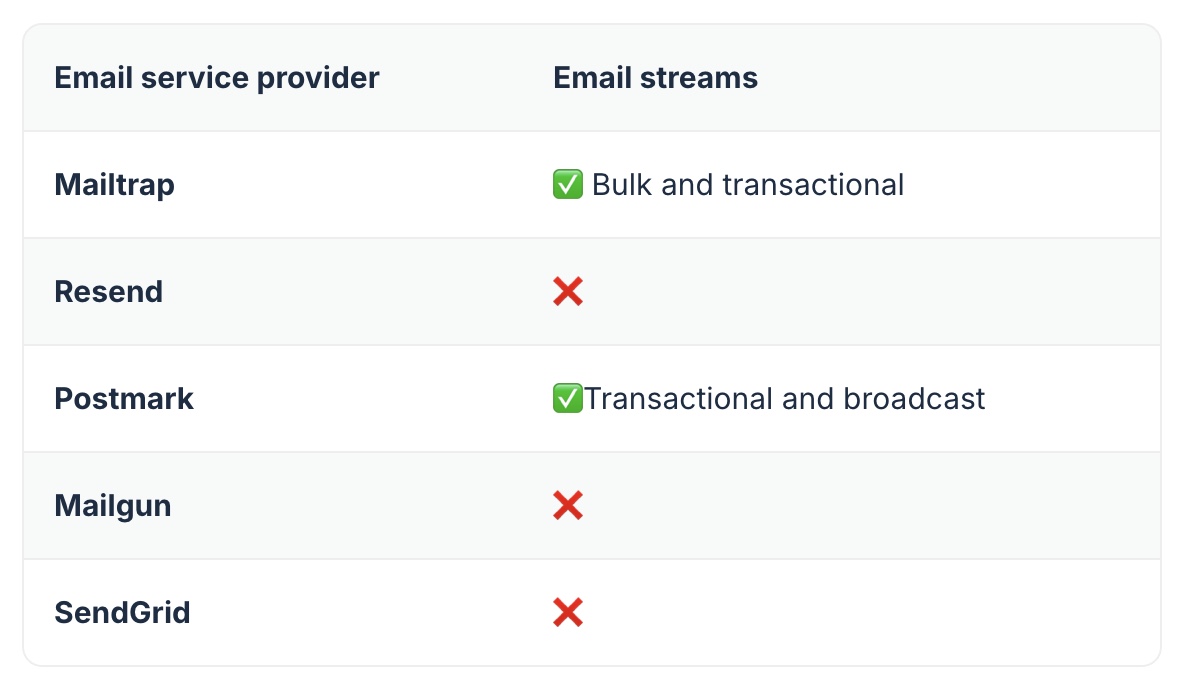
As you can see, only Mailtrap and Postmark have separate sending streams. You can also configure other APIs to do a similar job, but it won’t be as efficient as a true separate stream.
Multitenancy support
If you have several different teams, clients, domains, etc., you’ll need an email API with high-level multitenancy support. Most providers offer multitenancy via subaccounts or sub-users, but some also provide it via servers or domains.
Email service provider
Multitenancy support
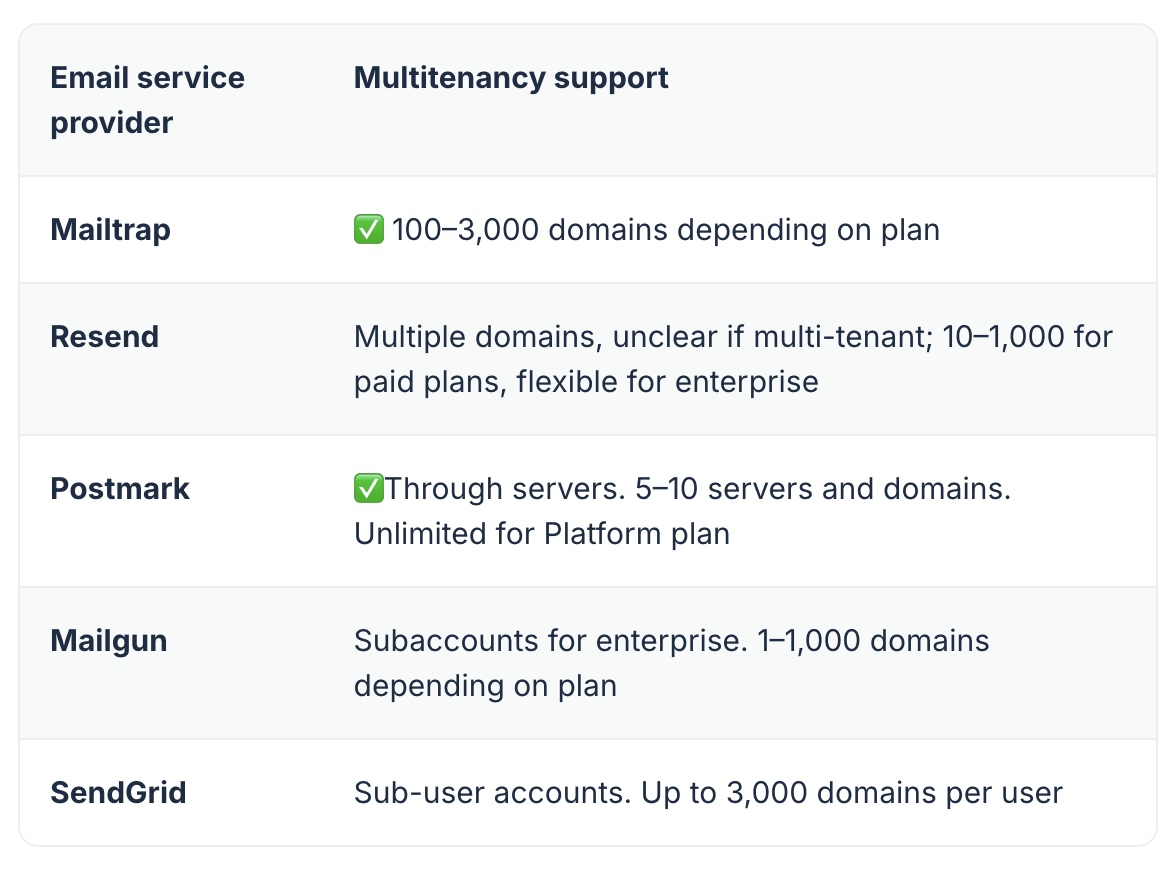
Based on the table:
- Mailtrap is best for SaaS platforms or agencies with many clients.
- Resend is best for teams who don’t need true multitenancy.
- Postmark is best for teams that need to separate clients and apps.
- Mailgun is best for those who want to separate tenants between units, clients, or regions.
- SendGrid is best for teams with many sender profiles.
Sending logic and performance
Don’t worry, I didn’t just consider the sending limit of each API. I took into consideration the following:
- Rate limits and throttling
- Queueing
- Retry logic
- Batch API
These elements not only make an email API flexible, but they also ensure stable delivery by not overwhelming receiving servers, meaning your emails are more likely to reach the main inbox.
Rate limits and throttling
Rate limits define how many requests an email API can make over a set period (e.g., 1,000 requests per second), whereas throttling controls the request speed. In translation, both give you control over your sending.
And here’s what the ESPs offer in this regard:
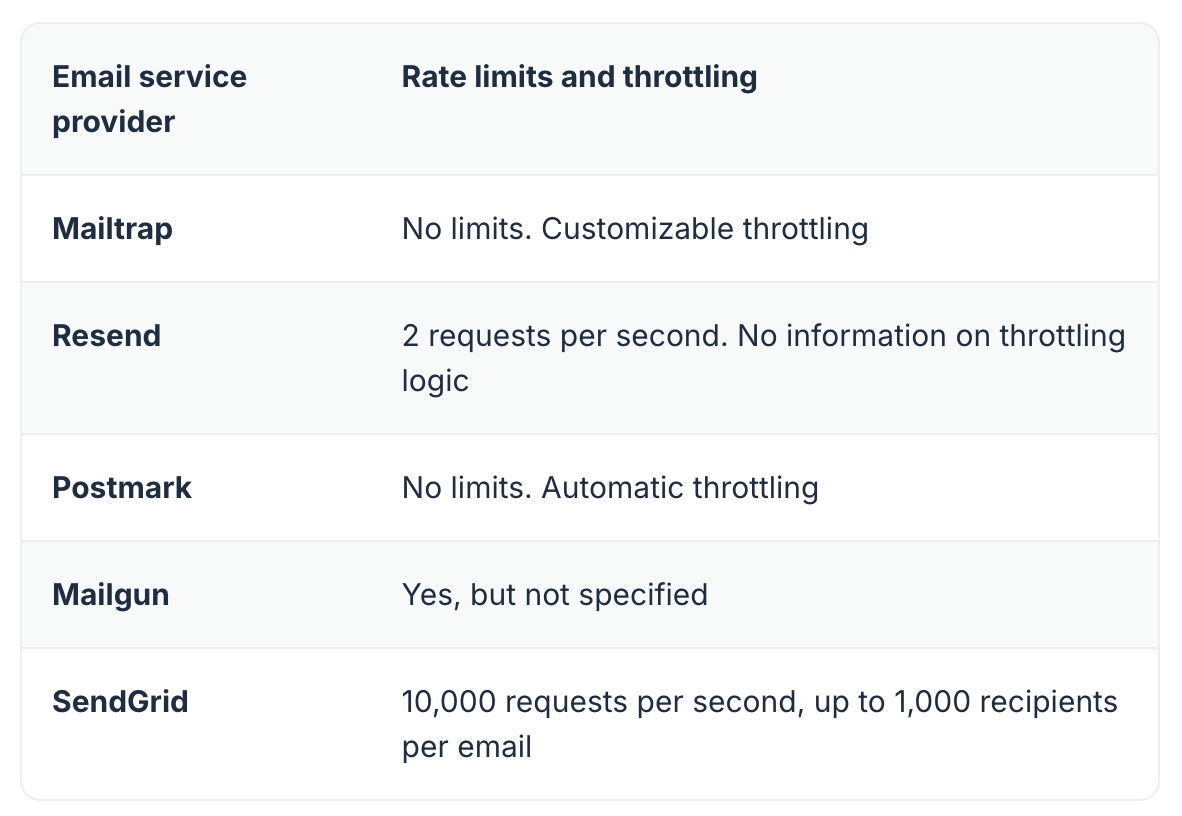
Quick breakdown:
- Mailtrap has no limits and lets you customize throttling, making it ideal if you want to fine-tune your sending behavior.
- Resend has enforced 2 requests per second and doesn’t publicly state if throttling is customizable, so it’s best for teams who don’t need flexibility or control when it comes to sending.
- Postmark has no rate limit, but it handles throttling automatically, so it’s great if you’re looking for a hands-off sending control.
- Mailgun doesn’t state its enforced rate limits, but you can increase it by contacting their support.
- SendGrid has a super high sending throughput and recipients per email, making it great for high-volume senders.
Queueing
Sending a large volume of email at once is never a good idea, so queueing them is a must if you don’t want to end up in spam. Most ESPs do it automatically, but some also allow you to do it within their APIs or manage it manually.
Check it out:
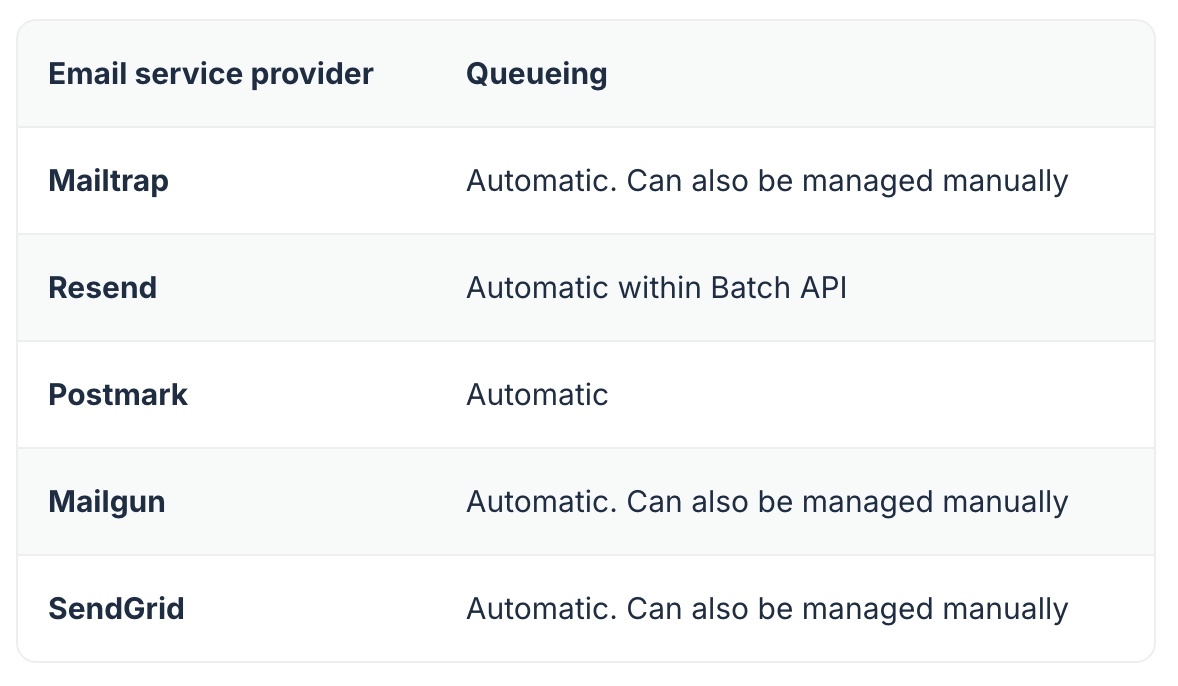
You should go with:
- Manual queueing if you plan to send large volumes of email or time-sensitive messages, as you’ll need to tailor queues by recipient domain, app environment etc.
- Automatic queueing if you want a minimal setup and don’t plan to send bulk email.
Retry logic
Sometimes, you can do everything right, but emails will fail to send due to uncontrollable issues like recipients’ servers being unavailable, DNS hiccups, etc. In this case, you need an email API that can handle these failures with retry logic, which varies from provider to provider, mostly based on its retry time window. Check it out:
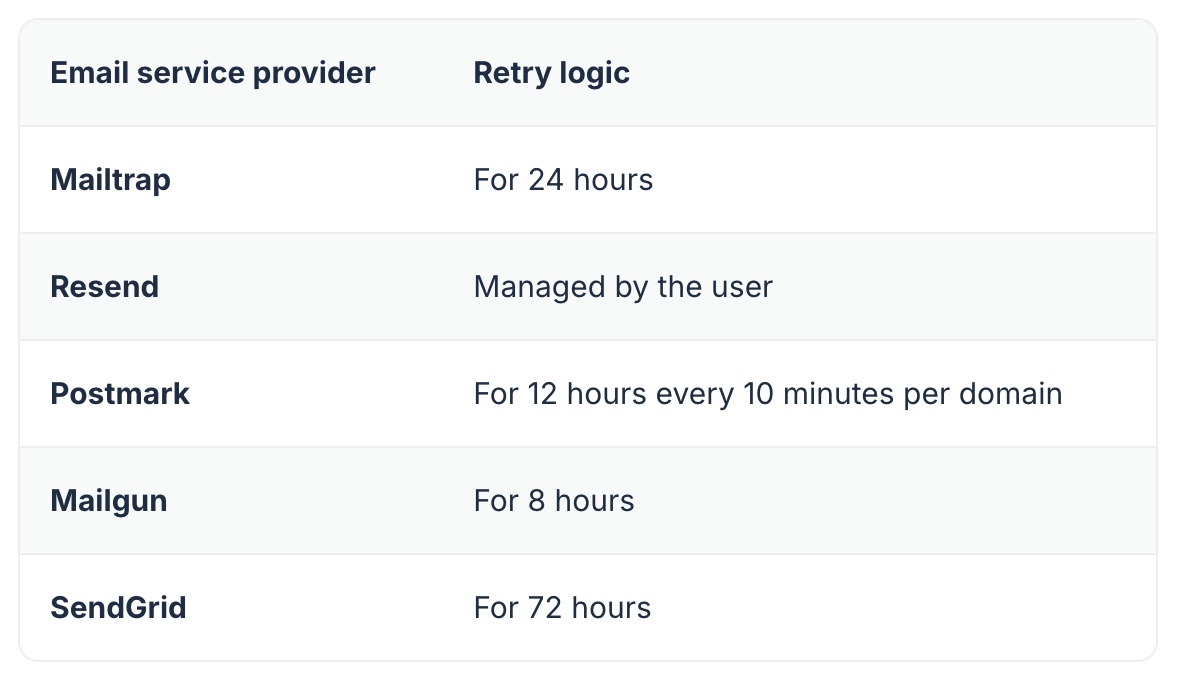
Tip: If you plan to send sensitive emails like payment confirmations, go with an ESP that has long retry windows (e.g., Mailtrap or SendGrid).
Batch API
Sending emails in groups, or batches, is an industry-standard practice that takes an unnecessary load off your email infrastructure. Now, each provider offers different batching loads, so you can narrow down your search based on your batching limit preferences:
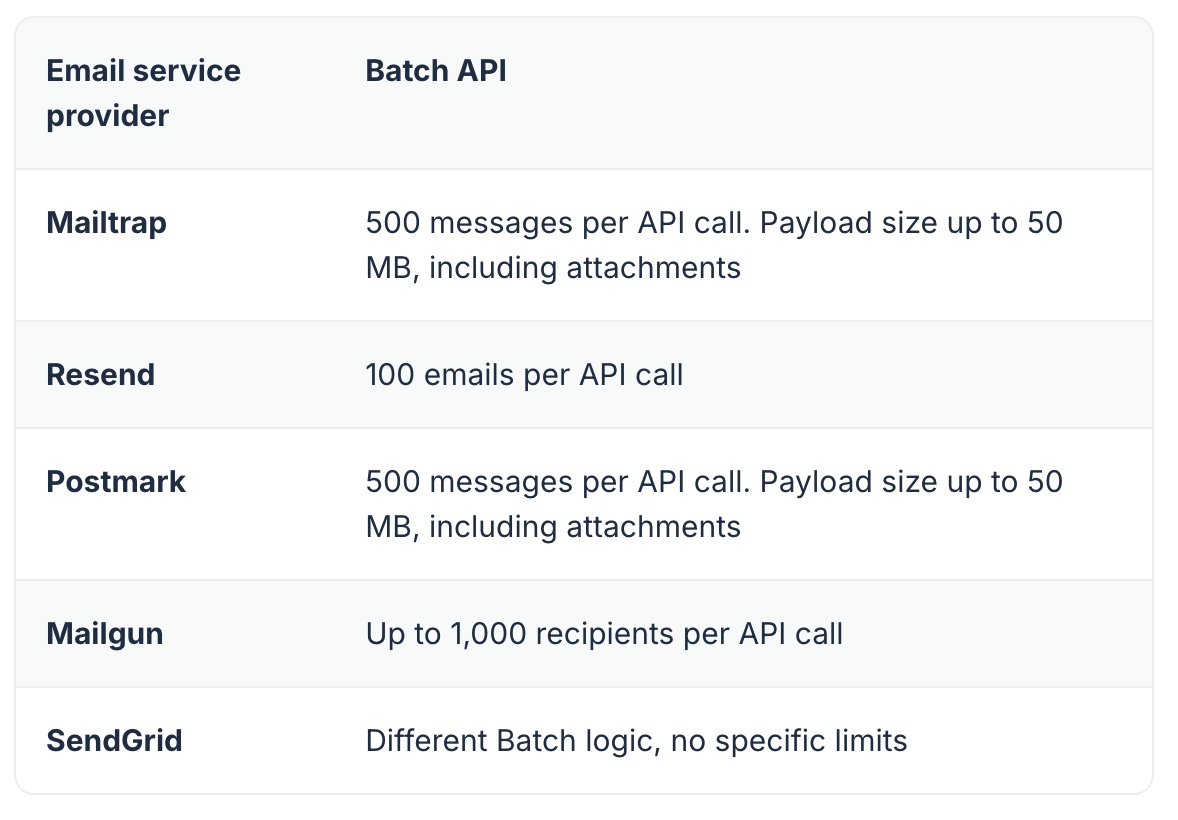
Tip: If you plan to send the same email (e.g., newsletter or product update) to many recipients at once, providers like Mailgun or Postmark are a great choice since they have high-volume batch calls. You can also track each group separately with SendGrid’s Batch ID logic, which is the most flexible option here.
Wrapping up
I hope you enjoyed reading our in-depth comparison of the best email API providers. This article includes selected highlights and was originally published in full on the Mailtrap Blog, where you can explore the complete guide.