ARIA Standard: A Pillar of Web Accessibility
In the ever-evolving digital landscape, accessibility remains a cornerstone of inclusive design. For developers and designers aiming to create equitable online experiences, understanding and implementing the ARIA standard is crucial. This standard, established by the World Wide Web Consortium (W3C), ensures that web applications and dynamic content are accessible to users with disabilities.
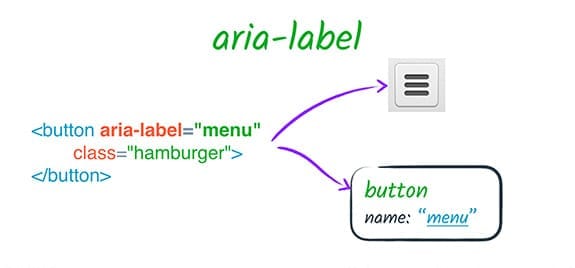
What is the ARIA Standard?
The ARIA (Accessible Rich Internet Applications) standard is a set of attributes that enhances the accessibility of web content, especially for users who rely on assistive technologies such as screen readers. It bridges the gap between interactive, dynamic web components and their usability by providing semantic information about elements that might otherwise be inaccessible.
Key Components of the ARIA Standard
- Roles: Define the function of a web element. For example,
role="button"informs assistive technologies that an element functions as a button. - States: Represent the current condition of an element, such as
aria-expanded="true"to indicate a dropdown menu is open. - Properties: Offer additional descriptive information, like
aria-labelledbyto link an element to its label oraria-hiddento hide non-essential content from assistive technologies.
Why the ARIA Standard Matters
The ARIA standard addresses the accessibility challenges posed by modern web applications, which often use dynamic content and advanced interactivity. By implementing ARIA attributes, developers can:
- Enhance Navigation: Provide meaningful context and structure to improve navigation for users with assistive devices.
- Communicate Changes: Ensure dynamic updates, such as form validation messages or modal dialogs, are accessible.
- Promote Inclusivity: Foster a digital environment where users of all abilities can engage effectively.
Best Practices for Using the ARIA Standard
- Prioritize Native HTML Elements: Many HTML elements, like
<button>or<label>, have built-in accessibility features. Use ARIA attributes only when native elements cannot meet accessibility needs. - Use ARIA Roles Appropriately: Avoid redundant roles. For instance, adding
role="button"to a<button>is unnecessary. - Keep Attributes Up-to-Date: Ensure ARIA states, such as
aria-expanded, reflect the current state of an element. - Validate Implementation: Use tools like Lighthouse or Axe to test ARIA compliance and functionality.
- Follow Authoring Practices: Refer to the W3C’s ARIA Authoring Practices Guide for detailed guidelines.
Tools for Testing ARIA Implementation
To ensure correct implementation of the ARIA standard, consider using:
- WAVE: An online tool for evaluating web accessibility.
- NVDA and JAWS: Screen readers for hands-on testing.
- Chrome DevTools: Built-in tools for debugging ARIA attributes.
- Axe Accessibility Tool: A browser extension for accessibility auditing.
The Impact of the ARIA Standard
The ARIA standard empowers developers to create websites that are not only functional but also inclusive. It aligns with accessibility laws and standards, such as the Americans with Disabilities Act (ADA) and Web Content Accessibility Guidelines (WCAG), helping organizations avoid legal challenges while fostering a culture of inclusivity.
Conclusion
The ARIA standard is an indispensable framework for modern web accessibility. By leveraging its roles, states, and properties, developers can ensure that web applications are accessible to everyone, regardless of their abilities. Adopting and adhering to this standard is not just a technical requirement but a step toward a more inclusive digital future. Let’s commit to making the web a place where accessibility is the norm, not the exception.