Launching a business website is an important step, but choosing a theme and writing a few pages is only part of the work. A website also needs a clear purpose, dependable hosting, a memorable domain, secure connections, reliable backups and a plan for regular maintenance. When these pieces are considered before launch, the site is easier to manage and visitors are less likely to face broken pages, confusing navigation or security warnings.
This checklist is written for small business owners, independent professionals and first-time website managers. It does not assume that you are a developer. The goal is to help you ask the right questions, prepare the information your website needs and understand which technical decisions should be made before the first visitor arrives.
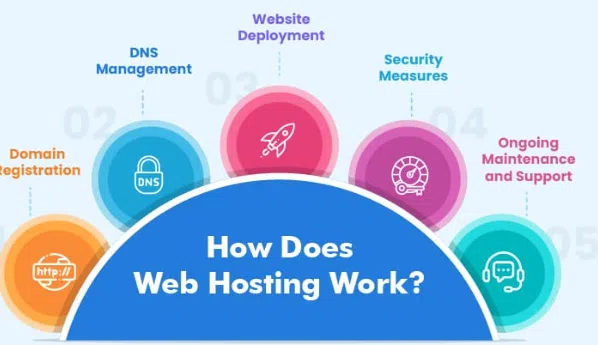
Start with the job your website must do
A website should be built around a real business purpose. A local service company may need to explain its services, show its operating area and receive enquiries. A consultant may need a profile, case studies and a booking form. An online shop needs product pages, a reliable checkout process and clear delivery information. These are different requirements, so they should not all be treated as the same website project.
Write down the three most important actions you want visitors to take. Examples include calling the business, requesting a quote, booking an appointment, reading a guide or purchasing a product. Then decide which pages are necessary to support those actions. A small company may begin with a home page, about page, services page, contact page and privacy information. A larger website may need separate pages for each service, location, product range or customer group.
This simple planning step prevents a common problem: building many attractive pages without making it clear what the visitor should do next. Keep the navigation focused, use descriptive page titles and make contact information easy to find. A visitor should understand what the business offers without having to search through several menus.
Choose a domain that people can remember
A domain name is more than an address typed into a browser. It becomes part of the business identity and is often printed on invoices, visiting cards, packaging, advertisements and email signatures. A useful domain is easy to say, spell and remember. Avoid unnecessary hyphens, confusing abbreviations and spelling choices that need a long explanation whenever someone hears the name.
Before registering a domain, check whether the name is available in the extension that makes sense for the audience. A local Indian business may prefer a .in address, while a company serving customers in many countries may consider .com. Some organizations also register a second relevant extension to reduce confusion, but a new business does not need to purchase every possible variation. Set a sensible budget and renew the domain before it expires.
Check the spelling carefully before completing registration. A small typing error can send visitors to the wrong address and may be difficult to correct later. Keep the account email, renewal date and domain access details in a secure company record. Domain ownership should remain under the business owner's control, even when a designer or developer helps with setup. For a quick overview of registration and management options, see the domain guide.
Match hosting to the size and purpose of the website
Hosting is the service that stores a website's files and makes them available when people visit its domain. The right plan depends on the software being used, the expected traffic, the amount of storage needed and the level of technical control required. A small brochure website has different needs from a busy online store or a web application with custom processes.
Shared hosting is often a sensible starting point for a small website. Several websites use resources on the same server, which helps keep costs manageable. It can suit a new blog, portfolio or local business site with moderate traffic. The trade-off is that resource use is shared, so a very busy neighbour or a website with unusually heavy workloads may affect performance. The owner should understand the plan's storage, resource and backup limits rather than choosing only by the headline price.
Managed or specialised WordPress hosting can be useful when the website is built with WordPress and the owner wants an environment designed around that platform. It may simplify common tasks such as software installation, updates and WordPress-related support. A virtual private server provides a more isolated environment and more configuration control. It may be suitable when an application needs specific software, additional resources or custom server settings. Dedicated hosting is normally considered when a project has sustained resource demands or needs the control of a complete physical server environment.
Do not upgrade merely because a larger plan sounds more professional. First understand the actual need. Review website traffic, resource usage, database activity and the effects of plugins or scripts. A carefully maintained small plan can be better than an expensive server that is poorly configured. Compare the available hosting types with the requirements you wrote down during planning.
Prepare the content before the design is finalized
Visitors usually arrive with a question. They want to know what you sell, whether you can solve their problem, how much the service may cost or how they can contact you. Your content should answer those questions in simple language. Avoid writing only about how passionate the company is. Explain the service, who it helps, what the process looks like and what information a potential customer should provide.
Create a separate page for each major service if the business offers several distinct solutions. Add real photographs where possible, but compress image files before uploading them. Give images useful alternative text when they communicate information. Do not use a large photograph as the only place where an important phone number or instruction appears. Text should remain readable on a phone, and buttons should be large enough to tap without difficulty.
Proofread the content for spelling, outdated prices, incorrect contact details and claims that cannot be supported. Check every button and form. A contact form should send messages to an inbox that is actively monitored. Test it with a real submission and confirm that the visitor sees a clear success message. If the website collects personal information, explain what is collected and why in a suitable privacy notice.
Make security part of the launch plan
Security is not a single plugin or a padlock icon. It is a combination of safe account practices, software maintenance, access control, backups and monitoring. Begin by using unique passwords for the hosting account, website administrator, domain registrar and business email. Store credentials in a reputable password manager rather than a public document or shared chat.
Enable HTTPS with a valid SSL/TLS certificate. HTTPS encrypts information while it travels between a visitor's browser and the website. It is especially important for login forms, enquiry forms and online payments. After enabling the certificate, check that the site loads over HTTPS and that internal images, scripts and links do not continue to use insecure HTTP addresses. A certificate does not remove every security risk, but it is an important basic protection.
Give administrator access only to people who need it. Use separate accounts rather than sharing one password with a team. Remove access when a contractor or employee no longer needs it. Keep the content management system, themes and plugins updated, and remove extensions that are no longer used. Before making a major update, create a backup and confirm that you know how to restore it. The SSL guide explains common certificate checks in cPanel.
Build a backup and recovery routine
A backup is useful only when it can be restored. Website owners should know whether the backup includes files, databases, configuration files, email data and any other important information. The right schedule depends on how frequently the site changes. A simple brochure website may not need the same backup frequency as a shop that receives orders every hour.
Keep more than one copy where practical. A copy stored only on the same server may be lost if the server account is compromised or damaged. Consider a separate storage location and protect access to it. Keep a few known-good restore points rather than relying on a single recent backup that may already contain a problem. Record who is responsible for checking that backups complete successfully.
Test the recovery process in a safe environment. Confirm that the restored files and database work together, that the home page loads and that important forms or checkout steps function. Write down the steps so another responsible person can follow them during an emergency. A tested recovery plan reduces uncertainty when something goes wrong.
Check performance before announcing the launch
A website can be technically online and still feel slow. Large images, unnecessary scripts, heavy themes, too many plugins and unoptimized database queries can increase loading time. Test important pages on a mobile connection as well as a desktop browser. Pay attention to the first screen, because visitors should be able to understand the page while the remaining content loads.
Resize images to the largest dimensions actually needed. Use modern compressed image formats where supported. Avoid placing several auto-playing videos or decorative animations on the home page. Remove plugins that provide overlapping functions. If a page uses external widgets, chat tools or advertising scripts, check whether each one adds enough value to justify its effect on loading and privacy.
Performance should be measured rather than guessed. Check a few important page templates, not just the home page. A product page with several images or a contact page with an embedded map can behave differently from a simple text page. Record a baseline before making changes, then test again so you can see whether the change helped.
Decide who will maintain the website
A website is not finished forever on launch day. Someone must check software updates, renew the domain, monitor uptime, review forms, remove spam submissions and update business information. Decide who is responsible for each task. If an outside professional manages the site, make sure the owner retains access to the domain and hosting accounts and receives a record of important settings.
A monthly maintenance review can cover several important checks: confirm that backups are completing, review available updates, test the contact form, check for broken pages, inspect account access and confirm that the site still displays correctly on mobile devices. A quarterly review can look at page performance, content accuracy, security settings and whether the website still supports the business goals.
Professional development support can be useful when the project requires custom layouts, integrations or ongoing technical work. The key is to make the scope clear: list the pages, features, content responsibilities, delivery expectations and maintenance period before work begins. When planning a website that needs more than a basic template, agree on the design, features and maintenance requirements before development begins.

Final launch checklist
Before announcing the site, open it in more than one browser and test it on a phone. Check the domain spelling, navigation, page titles, contact details, forms, downloads and social links. Confirm that HTTPS works and that there are no obvious mixed-content warnings. Check that the privacy information is easy to find and that the site does not publish private customer details by mistake.
Review the hosting plan, storage limits, backup schedule and support contact process. Make sure renewal notices go to an email account that someone checks. Keep a secure record of the domain registrar, hosting account, DNS provider and administrator access. Finally, ask a person who was not involved in building the website to complete a simple task, such as finding a service or sending an enquiry. Their experience can reveal confusing wording that the team has stopped noticing.
A business website becomes dependable through many small decisions. Clear content, an appropriate hosting plan, a sensible domain, secure accounts, tested backups and ongoing maintenance work together. Taking time to complete these checks before launch makes the site easier to trust and easier to improve as the business grows.